 ProMapRanker
Best Apps to Animate Photos in 2026

Key takeaways
- Motionleap is our pick for most people who want to animate parts of a photo, such as water and sky.
- MyHeritage Deep Nostalgia suits old family photos, where a face animation adds emotion to an archive image.
- Canva and CapCut are best when animation is one step inside a wider design or video project.
- Only animate photos you own or have permission to use, and never animate a real person without their consent.
Quick comparison
| Pick | Great for | Pricing starts at | Free tier | |
|---|---|---|---|---|
 Motionleap | Animating parts of a scene | Free | Yes | Visit |
 MyHeritage Deep Nostalgia | Animating old family photos | Free | Yes | Visit |
 PixaMotion | Simple looping photo animation | Free | Yes | Visit |
 PhotoMirage | Desktop photo animation | See website | Free trial | Visit |
 Canva | Animated designs and social posts | Free | Yes | Visit |
 CapCut | Animated photos inside video edits | Free | Yes | Visit |
 Remini | Restoring then animating old photos | Free | Yes | Visit |
 TokkingHeads | Talking portrait animation | Free | Yes | Visit |
 AKOOL | Web-based photo animation tools | Free | Yes | Visit |
The best apps to animate photos
Photo animation covers several different jobs, from looping water in an outdoor scene to making an old portrait blink. We compared mobile apps, desktop tools and web tools using vendor pages and app store listings, and we kept only tools live in October 2026. A plain consent warning applies throughout: only animate photos you own or have permission to use, and never animate a real person without consent.

Motionleap, formerly Pixaloop, is the most controlled way to animate a still photo. You draw arrows to show where water, clouds, smoke or hair should move, place anchors to hold other areas still, and add overlays for extra life. That control is why it leads this list for outdoor scenes and creative shots.
The free version covers the core tools well enough to learn the app, while Pro adds more overlays, effects and higher-quality exports. High-quality, well-lit photos give the cleanest motion, while low-resolution images can look soft once animated.
- Precise motion paths and anchors
- Animated sky and water effects
- Exports as video or GIF
- Best effects sit behind Pro
- Free exports can carry a watermark
- Results depend on photo quality
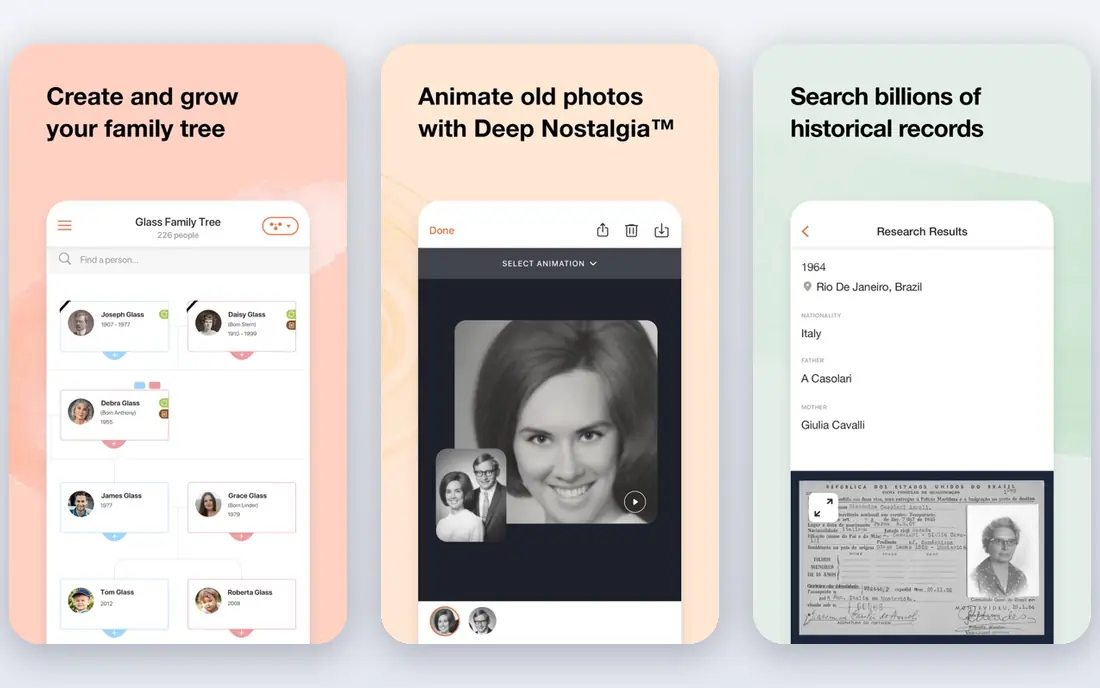
Deep Nostalgia animates faces in old photos, so a grandparent in an archive portrait appears to blink, turn and smile. The effect is emotional for family history work, and it needs almost no editing skill. Upload a photo, run the animation, and share the result.
It is important to remember what this is. The motion is generated by AI, not recovered footage, so it should be presented as an animation, not as a real video of the person. Use it for your own family photos, or with permission, and keep that context clear when you share it.
- Automatic face animation for old photos
- Simple one-tap process
- Works well for family history sharing
- Many features need a paid membership
- Animation is generated, not real footage
- Best on clear frontal portraits
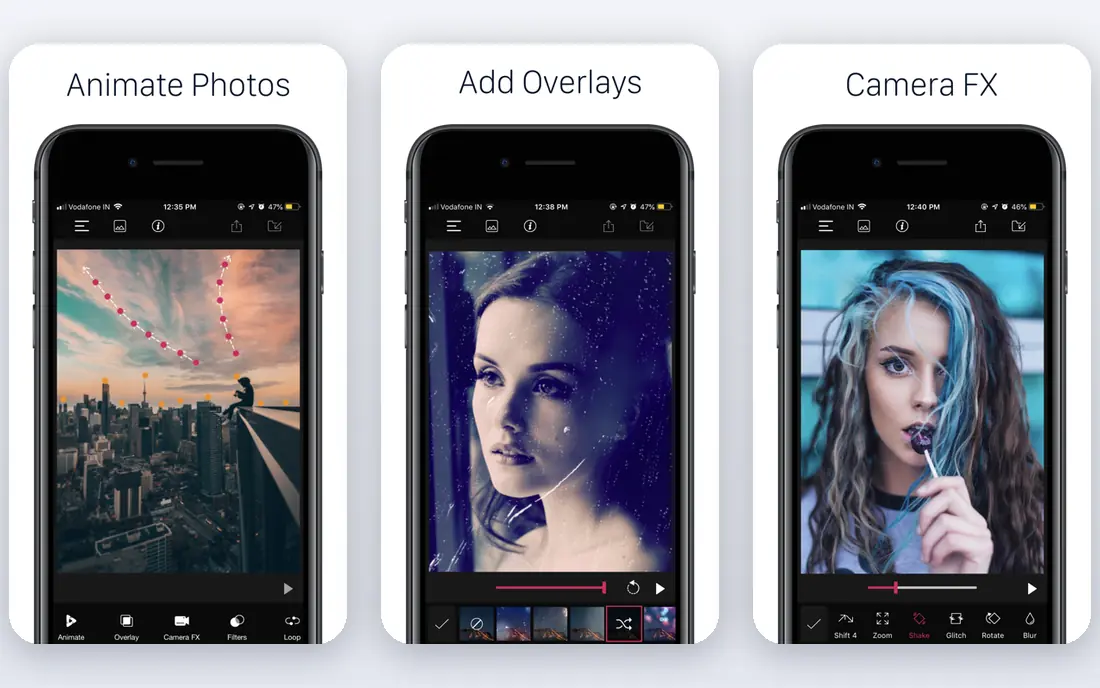
PixaMotion is a straightforward mobile app for turning a photo into a short looping video. You pick an image, add motion and effects, and export a loop for social sharing. It suits casual creators who want a fast result without learning path and anchor tools.
Power users may miss Motionleap's precision. PixaMotion trades control for speed, which is a fair trade for social posts and quick creative experiments, but less ideal for a carefully art-directed scene.
- Easy looping photo maker
- Filters and effects included
- Quick sharing to social apps
- Fewer fine controls than Motionleap
- Some effects need payment
- Best for short loops rather than long scenes
PhotoMirage, from Corel, brings photo animation to the desktop. Animating on a larger screen with a mouse suits marketers and designers who already work on a computer, and the masking tools give reasonable control over which parts move.
Mobile creators will prefer Motionleap or PixaMotion. PhotoMirage makes sense when animation is part of a desktop design workflow, or when you want to prepare many images for campaigns in one sitting.
- Desktop workflow for larger screens
- Mask and motion tools
- Good for social and marketing images
- Desktop only, not a mobile-first app
- Paid product beyond the trial
- Learning curve for first-time animators
Canva is not a specialist photo animator, but it is often the fastest route to an animated social post. You can animate photos, text and graphics with preset motions, then export for social platforms. For marketers and small businesses, that all-in-one workflow matters more than specialist control.
If your goal is a realistic looping outdoor scene, Motionleap will do it better. If your goal is a polished animated post with text, branding and a photo, Canva gets you there faster and with less learning.
- Huge template library
- Easy animation for text and images
- Free tier covers many social designs
- Not a dedicated photo animator
- Finer motion control is limited
- Best animations need a Pro plan
CapCut suits creators who animate photos as part of a video. You can add motion, zooms, transitions and music, then publish to short-form platforms. That makes it a strong pick for social video, slideshows and story-style edits.
It is less precise than Motionleap for animating a single still image. Use CapCut when the photo is one element in a video, and use a specialist app when the animated photo itself is the finished piece.
- Photo animation inside a full video editor
- Transitions, music and captions
- Free tier is generous
- Animation is part of video editing, not a specialist photo tool
- Some effects need Pro
- Exports are video-first
Remini is best used before animation, not instead of it. Its AI enhancement sharpens old, blurry or low-resolution photos, which then animate more cleanly in another app. For archive photos, that two-step process often gives a better result than animating the damaged original directly.
The free tier lets you test the enhancement, but regular use needs a subscription. Think of Remini as preparation, then finish the motion in Motionleap or a similar animator for the best control.
- Strong AI enhancement for old, blurry photos
- Useful first step before animation
- Simple mobile workflow
- Animation is secondary to enhancement
- Free tier is limited
- Subscription needed for full use
TokkingHeads turns a portrait into a talking head, syncing lips to text or audio you supply. It suits greetings, memes and creative projects where the synthetic nature is obvious and intended. The effect is fun precisely because viewers know it is generated.
Consent matters most here. Only use portraits you own or have permission to animate, and never present a talking portrait of a real person as if they actually said those words. Label synthetic talking portraits clearly when you share them.
- Makes a portrait speak with lip-sync from text or audio
- Fun for greetings and creative posts
- Web and mobile access
- Results are clearly synthetic
- Free use is limited
- Needs care with consent for any real person
AKOOL offers web-based animation tools that suit quick tests without installing an app. You can animate images through the browser, which helps when you work across devices or want to try an idea before committing to a mobile app.
Web quality varies by tool and input photo, so test with your own images before relying on it for a client project. For regular, polished work, a dedicated app such as Motionleap usually gives more consistent results.
- Web-based tools with no install
- Face and image animation options
- Useful for quick creative tests
- Free use has limits
- Web tools vary in quality
- Paid plans needed for heavier use
How we picked these
We compared vendor pages and app store listings, and we kept only legitimate creative tools live in October 2026. We favoured tools that clearly state their free limits, export options and consent expectations, and we excluded tools marketed for undressing people or non-consensual imagery. Where pricing was unclear or varied by store, we wrote See website or Free rather than inventing a figure.
How to animate a photo well
Start with a strong original. Sharp, well-lit photos animate far better than blurry or dark ones, and a simple scene with one or two moving elements usually looks better than everything moving at once. For outdoor scenes, animate water or sky and hold the rest still.
Next, match the tool to the job. Use Motionleap or PixaMotion for looping scenes, MyHeritage for old portraits, and Canva or CapCut when the animation sits inside a design or video. Export a short test first, watch it on a phone, and adjust speed and anchors before you share it.
Finally, keep consent and honesty front of mind. Only animate photos you own or have permission to use, never animate a real person without consent, and label AI-generated motion as animation when the context could mislead viewers. That care protects the people in your photos and your own credibility as a creator.
Frequently asked questions
What is the best app to animate photos?
Motionleap is our pick for most people, thanks to its precise motion paths and sky and water effects. MyHeritage Deep Nostalgia is better for old family portraits, while Canva and CapCut suit wider design and video projects.
What are the best tools to animate a photo for free?
Motionleap, PixaMotion, Canva and CapCut all offer free tiers that cover basic animation. Free exports may carry watermarks or limit effects, so check the export before you rely on a free tier for client work.
Can I animate an old photo of a family member?
Yes, if it is your own family photo or you have permission to use it. MyHeritage Deep Nostalgia and Remini are built for this job, but present the result as an AI animation, not as real footage of the person.
How do I animate photos for social media?
Use Motionleap or PixaMotion for a looping photo, then export as video or GIF for your platform. For posts with text and branding, Canva is faster, and for short videos with music, CapCut is the better finish.
Is it safe to animate photos of real people?
Only with their consent, and only with photos you own or have permission to use. Never animate a real person without consent, and never present a synthetic talking portrait as a real statement by that person.
Sources
See where you really rank - block by block
ProMapRanker scans Google Maps across a grid of your service area. Simple monthly plans from $19, white-label on every plan.
Start freeKeep reading
 zoho inventory alternatives
6 Alternatives to Zoho Inventory, Compared on Price and Fit
Zoho Inventory alternatives: 6 tools compared on price, free plans and fit. Katana leads the list for manufacturers. Fit and flaws are laid out for each entry.
Read → zoho crm alternatives
Best Zoho CRM Alternatives (2026)
Need Zoho CRM alternatives? We compare 7 tools on cost, free access and who each suits. Every pick gets a straight assessment. Built for quick decisions.
Read → zelle alternatives
Best Zelle Alternatives in 2026
Compare the best Zelle alternatives for sending money to friends, paying sellers and moving funds abroad, with honest notes on fees, speed and safety in 2026.
Read →