 ProMapRanker
Best App to Track Subscriptions in 2026


Automatic detection and cancellation help · Pricing starts at: Free
Key takeaways
- Rocket Money is the best choice if you want automatic detection from bank accounts, while Bobby and Subby suit people who prefer manual entry.
- Manual trackers protect privacy because they never link to a bank, but they only work if you add every subscription yourself.
- Renewal reminders need lead time: an alert on the day of the charge is too late to cancel an annual plan.
- A tracker should show your true monthly total, including annual plans converted to a monthly figure, or the number will mislead you.
Quick comparison
| Pick | Great for | Pricing starts at | Free tier | |
|---|---|---|---|---|
| Rocket Money | Automatic detection and cancellation help | Free | Yes | Visit |
 Bobby | Simple iOS manual tracking | Free | Yes | Visit |
 Subby | No-account manual tracking | Free | Yes | Visit |
 TrackMySubs | Web tracking with reminders | Free | Yes | Visit |
 Quicken Simplifi | Subscriptions inside budgeting | See website | No | Visit |
 ReSubs | Privacy-first manual tracking | Free | Yes | Visit |
 SubTracker | Free manual tracking on the web | Free | Yes | Visit |
 Tilla | Simple Android tracking | Free | Yes | Visit |
The best app to track subscriptions
These apps help you list recurring charges, see monthly totals, and get alerts before renewals. We compared official feature pages, app store listings, and public reviews, with a focus on detection method, privacy, reminders, and price.

Rocket Money is our pick for most people because it does the hard part: finding subscriptions you forgot. After you link bank and card accounts, it scans transactions, groups recurring charges, and shows a monthly total with upcoming bills. The free tier covers tracking and alerts, while premium adds bill negotiation and extra budgeting tools, with recent summaries listing premium around $6 to $14 per month depending on plan.
The trade is privacy and cost. You must be comfortable linking financial accounts, and premium itself becomes another subscription to review. Rocket Money can also cancel some subscriptions on your behalf, which helps when a cancellation page is hard to find. If you want the most complete list with the least manual work, start here and review the detected list carefully before you trust it.
- Finds recurring charges from linked accounts
- Cancellation help
- Bill negotiation on premium plans
- Requires bank linking
- Premium adds its own monthly cost
- Some charges can be misclassified
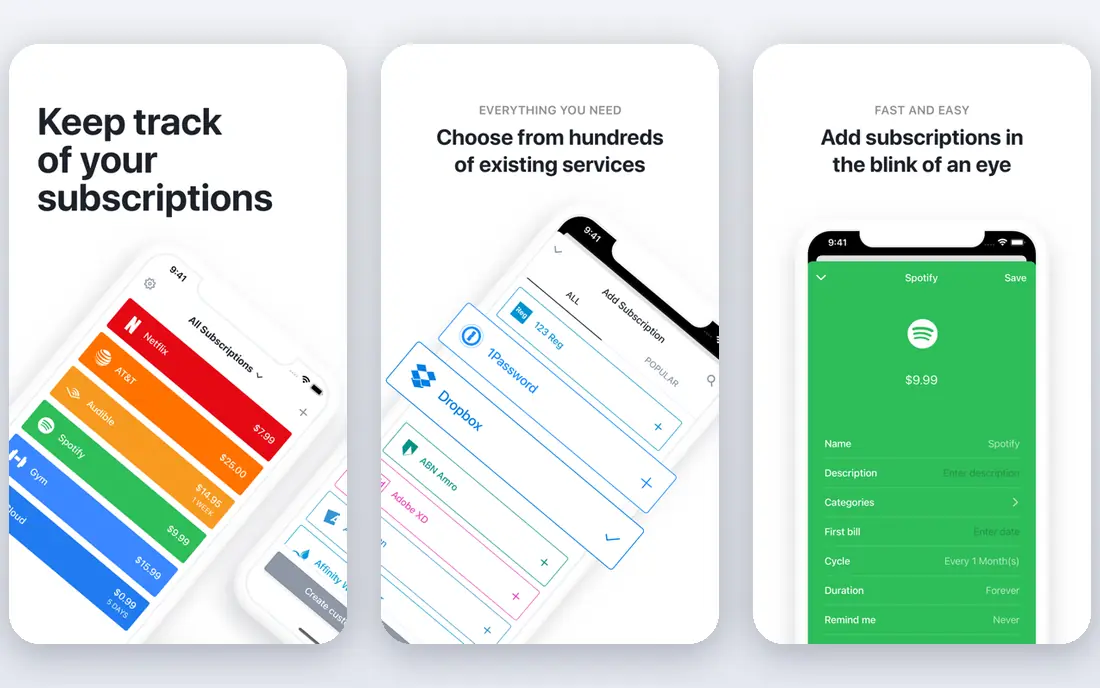
Bobby is the best choice if you want a tracker that looks good and stays simple. You add each subscription by hand, choose a billing cycle and currency, and see a clear monthly total with upcoming payment dates. The app is free for a small number of subscriptions, with in-app purchases for more slots and features, often listed around $2.99 for an all-in-one pack.
The limit is scope. Bobby does not scan your bank, import statements, or cancel for you, so a subscription you forget to add will stay invisible. It also has no Android or web version, which matters if you switch phones. For iPhone users with a short, stable list of streaming, music, and app subscriptions, Bobby is fast, private, and easy to keep up to date.
- Clean, fast design
- No bank linking
- One-time purchase option for extra features
- IOS only
- Manual entry only
- No automatic cancellation help
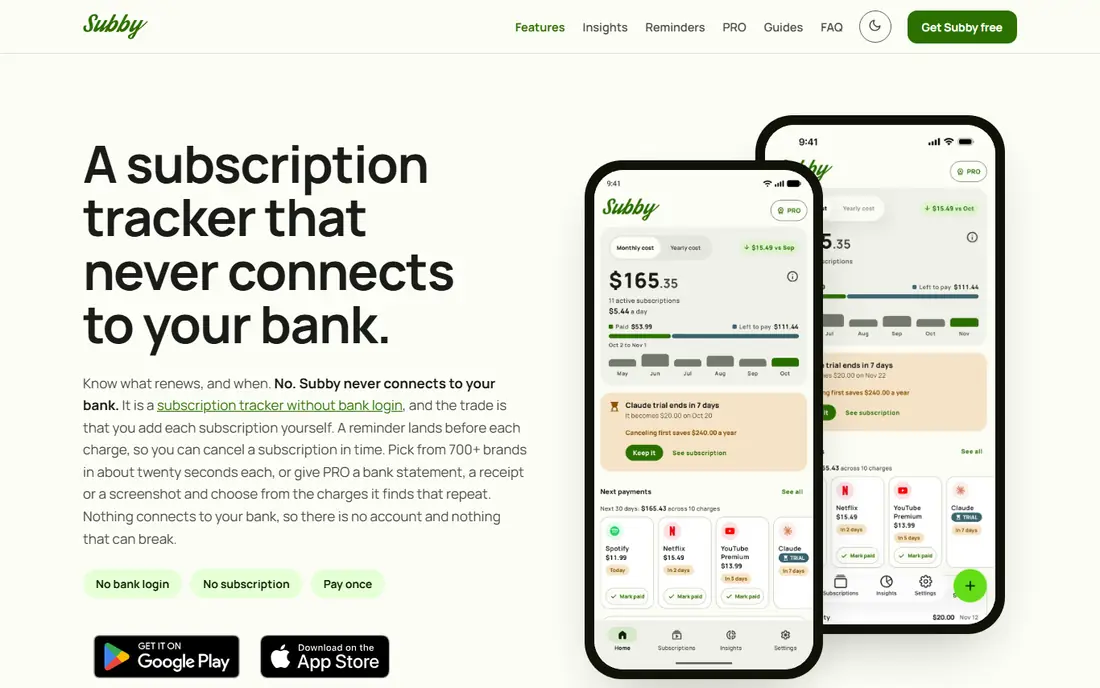
Subby suits people who want to start in two minutes without creating an account or linking a bank. You add subscriptions manually, set renewal dates, and get alerts before each charge, with a free insights view that flags price creep. The free tier covers the core tracker, while Pro is a one-time purchase that removes ads and adds cloud backup, widgets, and screenshot import in published summaries.
The downside is the same as Bobby: manual entry means completeness depends on you. Subby works on Android and iOS, which gives it wider reach than Bobby, and its no-account approach keeps your list off a third-party server by default. If privacy matters and your list is short, Subby is a practical, low-friction start.
- No account or bank login needed
- Renewal alerts
- Free insights on price changes
- Manual entry only
- Ads on the free version
- Pro is a one-time purchase with varying store pricing
TrackMySubs is useful for freelancers and small teams who want subscriptions on the web rather than only on a phone. The free tracker lets you add subscriptions, view a payment schedule, and see totals, while Pro adds statement import, renewal and trial emails, price increase alerts, calendar sync, and CSV export. Recent published pricing lists Pro at $6 per month or $48 per year, with a 7-day free trial.
The free tier has limits, and you still need to cancel each service yourself, because TrackMySubs does not act on your behalf. That is normal for manual trackers, but it means the value comes from reminders and a clear schedule, not automation. If you manage business software and client tools, the web view and export options make TrackMySubs a better fit than a phone-only tracker.
- Web-based tracking
- Payment schedule and history
- Statement import on Pro
- Manual entry on the free tier
- Cannot cancel for you
- Pro needed for full alerts and export
Quicken Simplifi is the best pick if you want subscription tracking inside a full budgeting app rather than a standalone list. It links accounts, flags recurring transactions, and shows subscriptions beside budgets, spending, and savings goals. That context helps when you decide whether a $15 service still fits your monthly plan, rather than judging it in isolation.
The cost is the main question. Simplifi is a paid budgeting app with no free tier, so it only makes sense if you also want budgeting, reports, and account tracking. It will not cancel subscriptions for you, and its subscription view is less focused than Rocket Money. If you already budget in Simplifi, use its recurring view. If you only want a tracker, a free manual app will cost less.
- Recurring transactions beside budgets and accounts
- Spending reports
- Web and mobile sync
- No free tier
- Subscription tracking is one feature among many
- Bank linking needed for full value
ReSubs is a strong privacy-first option for people who refuse to link a bank account. You add subscriptions manually, import by CSV, scan receipts, or extract details from billing emails, then track active, paused, cancelled, and trial states with renewal reminders. Multi-currency support with conversion helps if you pay for services in different currencies, and a calendar view shows renewal dates at a glance.
The free tier is limited, and premium adds unlimited subscriptions and deeper insights, with pricing shown in the app store rather than as a single web list price. ReSubs does not cancel for you, and it includes step-by-step cancel guides for common services, which partly fills that gap. If privacy and cross-platform use matter most, ReSubs is a solid manual tracker.
- No bank access
- Manual entry, CSV import, and receipt scanning
- Multi-currency support
- Limited free tier
- Premium pricing varies by store
- No automatic cancellation
SubTracker suits people who want a free, manual tracker without a trial clock. Published summaries describe a free tier that is unlimited and has no time limit, with tracking, reminders, and reporting on the web. That makes it easy to test for a full billing cycle, including annual renewals, before you decide whether a paid tool is needed.
The trade is automation. SubTracker does not scan your bank, so you must add each subscription and keep dates current. It also lacks the cancellation help and bill negotiation that Rocket Money offers. For a short list and a privacy-first approach, SubTracker is a fair free start, and its simplicity means you are more likely to keep using it.
- Free tier with no time limit in published summaries
- Manual tracking and reminders
- Simple web use
- No bank detection
- Smaller feature set than Rocket Money
- No cancellation service
Tilla is a simple option for Android users who want a clean tracker without bank linking. You add subscriptions manually, see totals and upcoming renewals, and upgrade with a one-time premium purchase rather than a monthly fee in published summaries. That pricing model appeals to people who do not want their tracker to become another recurring charge.
The main risk is reach and longevity. Tilla is less widely reviewed than Rocket Money, Bobby, or Simplifi, and its feature set is narrower. Check the current app store listing for platform support and premium terms before you commit a long list to it. For a short Android list and a preference for a one-time purchase, Tilla is worth a try beside Subby.
- Simple Android tracker
- One-time premium purchase in published summaries
- Renewal reminders
- Less well known than rivals
- Manual entry
- Limited web and iOS reach in some summaries
How we picked these
We compared official feature pages, app store listings, and public reviews, and we kept only apps that still operate in October 2026 and truly track subscriptions, not general budgeting apps with a passing mention. We included automatic detection, manual privacy-first trackers, and web tools, so readers can choose by privacy comfort and list size. Where store pricing varied, we wrote See website or noted the range rather than inventing a single figure.
How to run a subscription audit that sticks
Start with a full list from your bank and card statements for the past 12 months, because annual plans hide in monthly views. Add every recurring charge to your tracker, including app store subscriptions, domain renewals, and memberships that bill yearly. Set reminders at least seven days before annual renewals and three days before monthly ones, so you have time to cancel.
Cancel, pause, or rotate
For each subscription, decide whether to keep, pause, cancel, or rotate it. Streaming services with no cancellation penalty suit rotation: cancel, restart later, and avoid paying for months you do not use. Annual plans need a different check, because you may not get a refund after renewal. Keep a note in the tracker for why you kept each service, so next quarter review takes minutes, not an evening.
Frequently asked questions
What is the best app to track subscriptions for most people?
Rocket Money is the best starting point for most people because it finds recurring charges automatically from linked accounts and helps with cancellation. If you prefer not to link a bank, Bobby, Subby, and ReSubs are strong manual alternatives. Choose automatic detection if your list is long, and manual tracking if privacy matters more.
Can a subscription tracker cancel subscriptions for me?
Rocket Money can help cancel some subscriptions on your behalf, especially on premium plans, but most manual trackers cannot. Bobby, Subby, TrackMySubs, ReSubs, and SubTracker show you what to cancel and when, but you still visit each service to stop billing. Check the cancellation help for each service before you rely on it.
Do I need to link my bank account to track subscriptions?
No, manual trackers work without bank access, and they keep your financial data off third-party servers. The trade is completeness: you must add every subscription yourself, including annual plans. Automatic trackers like Rocket Money and Simplifi find more charges, but they require account linking to do it.
How do I catch annual subscriptions before they renew?
Use a tracker with reminders set at least seven days before annual renewals, and review your bank statements for the past 12 months when you first set it up. Annual plans are the most common surprise charge, because they do not appear in a monthly statement review. A calendar view in ReSubs or TrackMySubs helps you spot them early.
Is there a free app to track subscriptions?
Yes, Rocket Money, Bobby, Subby, TrackMySubs, ReSubs, SubTracker, and Tilla all offer free tiers or free core tracking. Free tiers differ: some limit the number of subscriptions, some show ads, and some reserve import and export for paid plans. Start free, and only pay if you need unlimited entries, bank detection, or cancellation help.
Sources
See where you really rank - block by block
ProMapRanker scans Google Maps across a grid of your service area. Simple monthly plans from $19, white-label on every plan.
Start freeKeep reading
 zscaler alternatives
Best Zscaler Alternatives in 2026
Looking for zscaler alternatives? We compare 9 SASE and zero trust platforms on architecture, data protection, pricing, and fit for your network and team.
Read → zapier alternatives free
Best Zapier Alternatives Free in 2026
Nine automation tools for zapier alternatives free in 2026, all with genuinely free tiers, plus free plan limits, starting prices and upgrade paths explained.
Read → which platform is best for online reputation
Which Platform Is Best for Online Reputation in 2026
Wondering which platform is best for online reputation? We compare 8 review, listing, and response tools for small and multi-location businesses and agencies.
Read →