 ProMapRanker
Best App for Paycheck-to-Paycheck Budgeting in 2026


Zero based budgeting and breaking the cycle · Pricing starts at: $14.99 per month
Key takeaways
- A monthly budget can hide the real problem when rent is due on the 1st and payday lands on the 15th, so the best tools here plan by paycheck, not by calendar month.
- PocketSense and DistroFi are built around pay periods, with a safe to spend figure for the days until the next check.
- YNAB suits people who want a strict method and can pay for coaching style structure, with a 34 day trial to learn it.
- Goodbudget and EveryDollar work well for envelope style planning without handing over bank login details, though bank sync costs extra or is limited.
- This is general information only, not financial advice. If debt or missed bills are involved, a nonprofit credit counsellor can help alongside any app.
Quick comparison
| Pick | Great for | Pricing starts at | Free tier | |
|---|---|---|---|---|
| YNAB | Zero based budgeting and breaking the cycle | $14.99 per month | Free trial (34 days) | Visit |
 PocketSense | Safe to spend until next payday | Free | Yes | Visit |
 DistroFi | Payday to payday planning without bank login | See website | Yes | Visit |
 Goodbudget | Envelope budgeting for couples | $10 per month | Yes | Visit |
 EveryDollar | Simple monthly and payday budgets | $79.99 per year | Yes | Visit |
 Rocket Money | Subscription and bill tracking | See website | Yes | Visit |
 Monarch Money | Full money dashboard with payday views | See website | Free trial | Visit |
 Copilot Money | Clean tracking for Apple users | See website | Free trial | Visit |
 Clear-Budget | Free manual payday planning | Free | Yes | Visit |
The best apps for paycheck-to-paycheck budgeting
Paycheck to paycheck budgeting is a timing problem before it is a spending problem. A monthly total can look fine while one single week runs short, because bills and paydays rarely line up neatly. The apps below were compared on pay period planning, bank connection options, price and how clearly they show what is safe to spend before the next check arrives.

YNAB, short for You Need A Budget, is the most structured option here, and that structure is the point. Each payday, you assign every dollar to a category before you spend it, set money aside for true expenses such as car repairs, and move money between categories when plans change instead of pretending the plan held. For people who earn enough on paper yet still run short before payday, that habit change often matters more than any chart.
The cost and learning curve are real drawbacks. At $14.99 per month or $109 per year, it is a serious subscription for a tight budget, and the method can feel fiddly in the first weeks. The 34 day trial is long enough to test it properly, though, and students with a valid school email can get a free year. If you want a coach rather than a tracker, YNAB is the strongest pick.
- Clear zero based method where every dollar gets a job
- Loan payoff tools and shared household access
- Long trial with no card required
- Highest price in this list
- Takes two to three weeks to feel natural
- No free tier after the trial

PocketSense is built for the exact gap this article covers. Instead of forcing your money into calendar months, it lets a budget period start on your actual payday, whether you are paid weekly, every two weeks or on a variable schedule. The headline figure is what is safe to spend until the next check, which is the number that prevents a mid period shortfall.
It is newer than YNAB or Goodbudget, so its community and third party guides are thinner, and it runs in a browser rather than as a polished native app. The free tier covers the core planning, with Premium at $4.99 per month and Pro at $9.99 per month for extra coaching room and trends.
- Budget periods match weekly, biweekly and variable pay
- Shows what is safe to spend until next payday
- Free tier with paid plans from $4.99 per month
- Newer and smaller than established rivals
- Browser based rather than a full native app experience
- Paid tiers add coaching and trends, not core budgeting
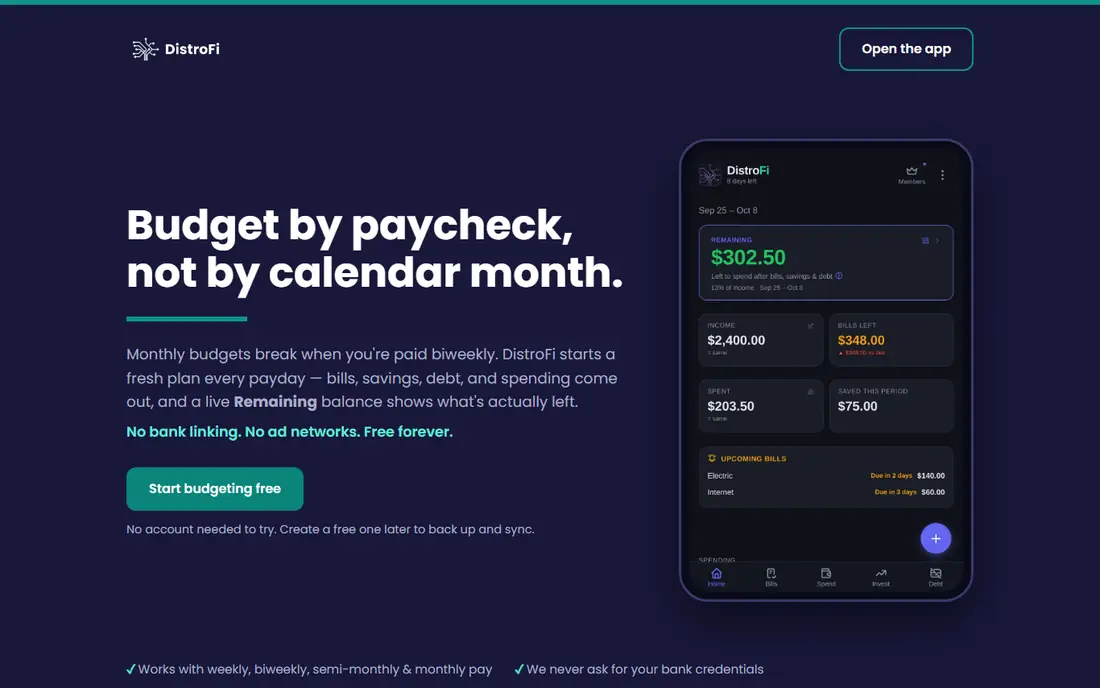
DistroFi follows one loop and repeats it every payday: income comes in, bills, subscriptions, savings, debt payments and spending buckets go out, and one remaining figure shows what is safe to spend. Bills carry due date badges and reminders, annual subscriptions are spread across periods so they do not ambush a single check, and unused bucket money can roll forward on the paid tier.
The privacy angle will appeal to readers who do not want to hand a budgeting app their bank login. You enter figures yourself, which takes a few minutes per period but keeps control in your hands. The trade off is manual work and a smaller ecosystem than the big names.
- Each period starts on payday, not the 1st of the month
- No bank credentials required
- Rollover and savings goal tools for pay periods
- Smaller user base and fewer integrations
- Some features, such as rollover, sit behind a paid tier
- Less suited to investors or complex accounts
Goodbudget turns the old cash envelope method into a phone app. You divide each check into envelopes for rent, groceries, transport and fun, then spend down each envelope and see at a glance which ones are thin before payday.
The free tier is genuinely usable, with 20 envelopes, one account and two devices, while the paid plan costs $10 per month or $80 per year and adds unlimited envelopes and bank sync for US banks. Manual entry is the price of the free tier, and the design will not impress anyone looking for charts and forecasts. For shared, simple, payday aware envelope budgeting, it remains a strong choice.
- Classic envelope method that is easy to explain
- Shared budgets for couples and households
- Free tier with 20 envelopes, one account and two devices
- Bank sync is a paid feature for US banks only
- Manual entry on the free tier
- Design is plainer than newer rivals
EveryDollar, from Ramsey Solutions, is the least intimidating app in this list. You create a budget, add income and planned spending, and track what is left. That simplicity helps people who have bounced off more complex tools, and the free tier is enough to build a basic paycheck plan if you are willing to enter transactions by hand.
The limit is that bank sync and fuller paycheck planning sit behind the premium tier at $79.99 per year or $17.99 per month. Without it, EveryDollar is a manual planner rather than an automatic tracker. If you want a clean, no jargon starting point and you do not mind typing in spending, it is a good first step, and you can move to a deeper tool later.
- Very simple to set up and use
- Free tier covers manual monthly budgeting
- Paycheck planning features in the premium tier
- Bank connection requires the premium tier
- Fewer advanced tools than YNAB or Monarch
- Premium price is high for a simple tracker
Rocket Money earns its place here for a different reason: many paycheck shortfalls are caused by subscriptions and bills that quietly renew. Rocket Money surfaces those recurring charges, sends bill reminders and gives a budget view alongside them, so a forgotten streaming bundle or gym charge does not eat the grocery envelope.
It is less of a pure payday planner than the top picks, and its premium tier uses a pay what you choose model that makes the exact cost harder to pin down without visiting the site. Treat it as a companion tool: use it to find and cancel waste, then run your payday plan in PocketSense, DistroFi or Goodbudget. Used that way, it pays for itself in awareness alone.
- Strong subscription tracking and bill reminders
- Budgeting and spending views in one place
- Free tier covers core tracking
- Premium pricing is pay what you choose and varies
- Bill negotiation and premium sync features cost extra
- Less focused on payday periods than PocketSense or DistroFi
Monarch Money is the dashboard option for readers who want every account, budget and goal in one place. It connects to banks, groups spending into custom categories and lets you build budget views that follow your income rather than a generic template. For a household juggling joint accounts, credit cards and savings goals, that single view reduces the need to check five apps.
The downside is scope and cost. There is no permanent free tier, only a trial, and the price should be confirmed on the official site before signing up. If timing paydays is your only problem, a simpler tool will do.
- Full dashboard covering accounts, budgets and goals
- Custom categories and flexible budget views
- Good for households that want one money home
- No permanent free tier
- Price must be checked on the site as it changes
- Can feel like too much if you only need a payday plan
Copilot Money appeals to readers who will only stick with a budget if it looks good and stays fast. Its interface is clean, its categorisation is smart, and its spending insights make it easy to see where a check actually went. Goal tracking and net worth views sit alongside the budget, so a payday plan can live next to longer term savings aims.
The main limits are platform and price. Copilot is built first for Apple devices, so Android users should look elsewhere, and there is no permanent free tier beyond a trial. Check the current price on the official site, and try it only if you already live in the Apple ecosystem and want tracking that you will actually open each week.
- Clean, fast interface with smart categorisation
- Good spending insight and goal tracking
- Works well across Apple devices
- Apple focused, with limited Android support
- No permanent free tier
- Price must be checked on the official site
Clear-Budget is the free, no strings option in this list. There is no paid tier to upsell you into, and you can build a budget over any dates you like, such as the days until your next paycheck. Paychecks and bills can repeat weekly, every two weeks or monthly, and each item carries a due date with a running balance after it, so you can see the pinch points before they arrive.
The cost of that freedom is manual work. There is no bank sync, no automatic spending history and no shared budget editing yet, and phone bill reminders were still listed as coming soon at the time of writing. If you value privacy and a zero price over automation, and you can spare a few minutes a week to type in figures, Clear-Budget is a solid, honest starting point.
- Completely free with no paid tier
- Budget over any dates, including payday to payday
- Repeating paychecks and bills for weekly and biweekly pay
- No bank sync at all
- Manual entry takes a few minutes each week
- No shared budgets yet
How we picked these
We compared official pricing pages, app store listings and feature pages for budgeting tools, with a focus on pay period planning rather than generic monthly budgets. We favoured tools that let a period start on payday, show a safe to spend figure, or support envelope and zero based methods that work for biweekly pay. We left out tools that only track net worth, tools with no current pricing, and spreadsheet templates sold as apps. Prices were checked against vendor pages and recent October 2026 roundups, and unverified prices are shown as See website.
How to build a payday budget that holds
Start by listing every bill with its due date, then assign each bill to the paycheck that actually pays it. Rent due on the 1st belongs to the last check of the previous month, not to a monthly average, and a bill due three days after payday belongs to that check, not the next one. This one step removes most payday surprises.
Next, pull savings out first, even if the amount is small. A fixed transfer on payday, before discretionary spending starts, builds a buffer faster than waiting to see what is left. Then set a safe to spend figure for groceries, transport and fun until the next check, and check it mid period rather than only at the end.
For biweekly pay
Count 26 checks a year, not 24. In most months you will get two checks, but twice a year you will get three, and those extra checks are the fastest way to build an emergency fund or pay down debt. Plan normal months on two checks and treat the third check as a bonus, not as spending money.
If a check will not cover its bills
Call the biller before the due date and ask about a due date change or a payment plan. Many utilities and lenders will move a date to match payday if you ask early. A budgeting app can show the gap, but it cannot close it alone, and a nonprofit credit counsellor can help you prioritise debts without selling you a product.
Frequently asked questions
What is the best app for paycheck-to-paycheck budgeting?
For most readers, PocketSense is the best starting point because it is free, plans by payday and shows what is safe to spend until the next check. YNAB is stronger if you want a strict method and coaching, while Goodbudget suits couples who like envelopes.
What is the best budget app for biweekly pay?
PocketSense and DistroFi are built for biweekly pay, since their periods start on payday rather than on the 1st of the month. Clear-Budget also handles biweekly repeats for free, though it needs manual entry. YNAB can handle biweekly pay too, but you must set up the categories yourself.
Can a budgeting app help if I am already behind on bills?
An app can show exactly which check covers which bill and where the gap sits, which makes a call to a biller or a counsellor much more useful. It cannot create money on its own, so pair it with due date changes, a payment plan or nonprofit credit counselling if bills are already missed.
Do I have to connect my bank account to budget by paycheck?
No. Clear-Budget, DistroFi and the free tiers of Goodbudget and EveryDollar all work with manual entry, and that privacy trade off suits many readers. Bank sync saves time and catches forgotten spending, but it is not required for a payday plan to work.
Is YNAB worth it on a tight budget?
It can be, if you use the 34 day trial fully and the method clicks for you. The structure helps many people break the cycle, but $14.99 per month is a real cost when money is tight. Try a free payday tool first, and only pay for YNAB if the free tool is not changing your habits.
Sources
See where you really rank - block by block
ProMapRanker scans Google Maps across a grid of your service area. Simple monthly plans from $19, white-label on every plan.
Start freeKeep reading
 zscaler alternatives
Best Zscaler Alternatives in 2026
Looking for zscaler alternatives? We compare 9 SASE and zero trust platforms on architecture, data protection, pricing, and fit for your network and team.
Read → zapier alternatives free
Best Zapier Alternatives Free in 2026
Nine automation tools for zapier alternatives free in 2026, all with genuinely free tiers, plus free plan limits, starting prices and upgrade paths explained.
Read → which platform is best for online reputation
Which Platform Is Best for Online Reputation in 2026
Wondering which platform is best for online reputation? We compare 8 review, listing, and response tools for small and multi-location businesses and agencies.
Read →