 ProMapRanker
Best Android Phone Cleaner App in 2026

Key takeaways
- Files by Google is the best cleaner for most Android users, since it is free, ad-free, and made by Google.
- SD Maid SE is the best deep cleaner for advanced users who want leftover files from uninstalled apps removed.
- Norton Clean is the best ad-free alternative from a known security brand for simple junk removal.
- Modern Android already clears much cache itself, so a cleaner should show what it will delete before you confirm.
Quick comparison
| Pick | Great for | Pricing starts at | Free tier | |
|---|---|---|---|---|
 Files by Google | Most Android users | Free | Yes | Visit |
 SD Maid SE | Deep cleaning | Free | Yes | Visit |
 Norton Clean | Ad-free simple cleaning | Free | Yes | Visit |
 CCleaner | Familiar brand cleaning | Free | Yes | Visit |
 AVG Cleaner | Automated cleaning | Free | Yes | Visit |
 Avast Cleanup | All-in-one boost and clean | Free | Yes | Visit |
 All-In-One Toolbox | Many tools in one app | Free | Yes | Visit |
 Droid Optimizer | Lightweight one-tap clean | Free | Yes | Visit |
The best Android phone cleaner apps
Cleaner apps promise speed, but most of the real gain comes from freeing storage and removing leftover files. We compared safety, ads, transparency, and whether each app shows what it will delete, and we favored tools from known makers over aggressive ad-heavy cleaners.
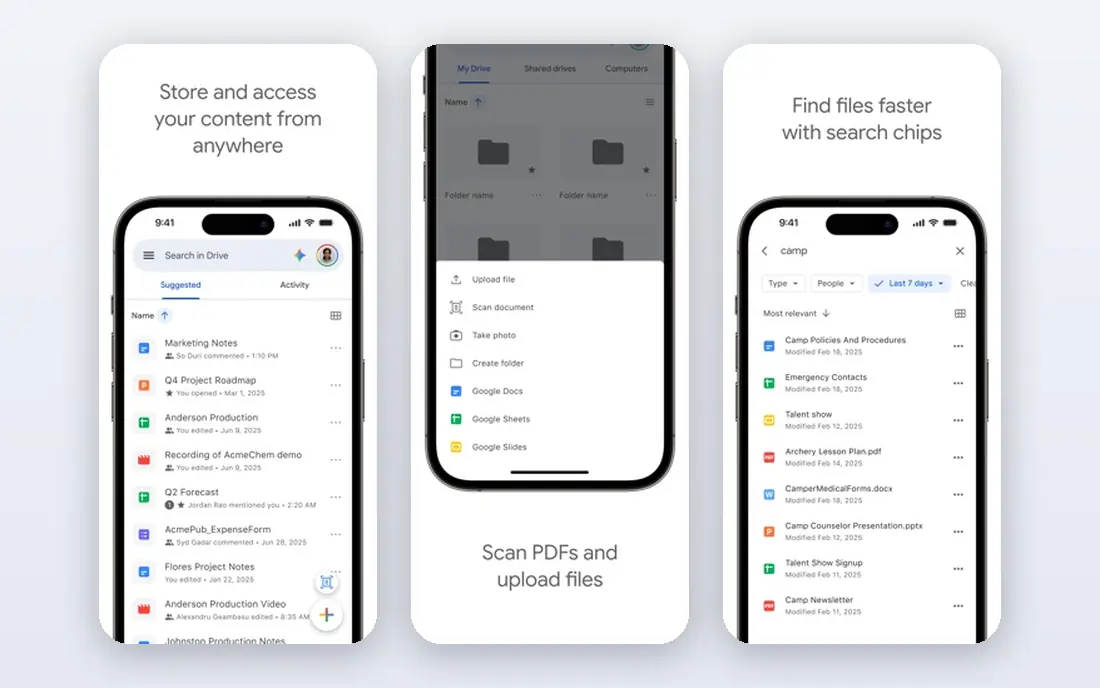
Files by Google is our pick for most people because it does the core job without ads, upsells, or background drain. It suggests duplicate photos, memes, large files, and unused apps to remove, and it lets you review each suggestion before deleting. That transparency matters in a category where some apps delete cache you would rather keep.
It is also a capable file manager, so you can browse downloads and move files after cleaning. If your phone is full, start here before installing any other cleaner, and check Android storage settings first, since they already handle much basic cleanup.
- Free and ad-free
- Finds duplicate photos and large files
- Built-in file browsing and sharing
- Less deep than SD Maid SE
- No advanced system cleaning
- Some features vary by device
SD Maid SE is the only deep cleaner we recommend without hesitation for advanced users. Its CorpseFinder and SystemCleaner tools find orphaned files that Files by Google misses, which can free gigabytes on a phone with many uninstalled apps. Being open source and ad-free also removes the upsell pressure common in this category.
The interface looks technical, with many scanners and permission steps on first run. Take ten minutes to learn it, review what each scan will delete, and avoid scheduled cache clearing, which forces apps to rebuild caches and can cost battery for little lasting gain.
- Open source and ad-free
- CorpseFinder removes leftovers from uninstalled apps
- Detailed scanners
- Technical interface
- Setup takes time
- Some features need a paid upgrade

Norton Clean suits users who want a simple, trusted cleaner without ads. It finds residual files, cache, and obsolete APK files, then lets you remove them in a few taps. Its small size and lack of background extras make it a good fit for older or budget phones.
It does not offer the battery, RAM, or app management tools found in larger cleaners. If you only need storage cleanup from a known brand, that focus is a strength, not a gap.
- Ad-free
- Lightweight
- Removes residual junk and old APK files
- Fewer features than all-in-one cleaners
- No battery or RAM tools
- Interface is plain
CCleaner brings its desktop reputation to Android, with junk cleaning, storage analysis, and an app manager in one app. For users who already trust the brand, it is a familiar way to clear cache and review what is taking space.
Recent user reports note aggressive premium upsells and, on some devices, a persistent background process. It still cleans, but Files by Google does the same core job without those drawbacks, so CCleaner is best for brand loyalists who accept the upsells.
- Well-known brand
- Clear junk and cache cleaning
- Storage analysis and app manager
- Frequent premium upsells
- Background process on some devices
- Some cache functions vary by Android version
AVG Cleaner, from the same parent company as CCleaner and Avast, focuses on set-and-forget maintenance. Auto-clean, battery insights, and app analysis help users who want the phone to tidy itself without opening the app each week.
The free version includes ads, and its core cleaning is close to its sibling apps, so choose it for automation rather than unique cleaning power. Review auto-clean rules carefully, so it does not remove files you wanted to keep.
- Auto-clean and scheduling
- Battery and storage analysis
- App usage insights
- Ads in free version
- Similar core to CCleaner and Avast
- Premium upsells
Avast Cleanup is the most feature-rich option in this list, combining junk removal with photo cleanup, app management, and hibernation for apps that drain battery. That breadth suits users who want one app for several maintenance jobs.
It is heavier than the simpler cleaners, and the free version pushes premium upgrades. If you use only junk cleaning, a lighter app will serve you better. If you use its photo and hibernation tools weekly, the extra size may be worth it.
- Junk cleaning plus photo and app tools
- Hibernation for battery-draining apps
- Clear storage views
- Ads and premium upsells in free version
- Heavier than Files by Google
- Some tools need paid plan
All-In-One Toolbox packs cleaning, boosting, battery, CPU, and app management into a single app. For users who like a toolbox approach, it replaces several single-purpose apps and keeps the main tools in one place.
The crowded interface and ads are the trade-offs, and some of its tools repeat what Android settings already offer. It fits users who enjoy tweaking their phone, rather than those who want a single clean button.
- Cleaning, boost, battery, and app tools in one place
- Lightweight core
- File manager included
- Ads in free version
- Interface can feel crowded
- Some tools duplicate Android settings
Droid Optimizer is a lightweight cleaner for older or low-storage phones. One tap clears junk, and a scheduler can run a clean overnight, which suits users who want maintenance without thinking about it. Its small size helps on devices where every megabyte counts.
It lacks the deep leftover-file tools of SD Maid SE and the polish of Files by Google. For a simple, light cleaner on a budget phone, it remains a practical choice.
- Lightweight
- One-tap cleaning
- Simple good-night scheduler for auto-clean
- Smaller maker than Google or Norton
- Fewer deep-clean tools
- Interface is basic
How we picked these
We compared official product pages, app store listings, and 2026 cleaner comparisons for Android apps that are live and focused on storage cleaning. We favored apps that show what they will delete, come from known makers or open source projects, and avoid deceptive speed claims. We did not list cleaners with a history of malware or aggressive ad behavior, and we treated RAM boosting claims with caution, since Android manages memory itself.
Choosing the best app to clean an Android phone
Start with Files by Google, and check Android Settings, then Storage, before installing anything else. Delete large videos, duplicate photos, and unused apps first, since those free far more space than cache alone. A cleaner helps most after that manual pass, not instead of it.
If storage is still critically full, add SD Maid SE for leftover files, but review each scan before deleting. Avoid cleaners that promise dramatic speed gains, hide what they delete, or run constantly in the background. Those apps often cost battery and privacy for little benefit.
Cleaner apps also vary in how much they run in the background, so check battery use after a week with a new app and remove any cleaner that drains power without freeing much space. Keep your photo and video backups current before a large clean, since deleting a file from a phone can also remove it from a synced library if settings are linked. Finally, clean on a schedule that fits your phone. A monthly review is enough for most users, while heavy photo and video users may need a weekly check. Do not clear cache daily, since apps rebuild it and you gain no lasting speed from constant clearing.
Frequently asked questions
What is the best Android phone cleaner app?
Files by Google is the best Android phone cleaner app for most users, since it is free, ad-free, and finds the files that actually fill storage. SD Maid SE is the best deep cleaner for advanced users who want leftover files removed.
What is the best app to clean an Android phone for free?
Files by Google, Norton Clean, and SD Maid SE are all free and ad-free, with Files by Google best for most people, Norton Clean best for simple trusted cleaning, and SD Maid SE best for deep cleaning.
Do Android phone cleaner apps really work?
They work for freeing storage and removing leftover files, but they do not make a phone dramatically faster on their own. Most speed gains come from freeing storage, removing unused apps, and restarting the phone, not from RAM boosting.
Is CCleaner good for Android?
CCleaner cleans junk and cache and is a familiar brand, but its free version includes frequent premium upsells. Files by Google offers similar core cleaning without ads, so CCleaner is best for users who already prefer the brand.
Should I use a cleaner app every day?
No. Daily cache clearing forces apps to rebuild caches and can cost battery. A monthly storage review, plus deleting large files and unused apps, is enough for most phones.
Sources
See where you really rank - block by block
ProMapRanker scans Google Maps across a grid of your service area. Simple monthly plans from $19, white-label on every plan.
Start freeKeep reading
 zscaler alternatives
Best Zscaler Alternatives in 2026
Looking for zscaler alternatives? We compare 9 SASE and zero trust platforms on architecture, data protection, pricing, and fit for your network and team.
Read → zapier alternatives free
Best Zapier Alternatives Free in 2026
Nine automation tools for zapier alternatives free in 2026, all with genuinely free tiers, plus free plan limits, starting prices and upgrade paths explained.
Read → which platform is best for online reputation
Which Platform Is Best for Online Reputation in 2026
Wondering which platform is best for online reputation? We compare 8 review, listing, and response tools for small and multi-location businesses and agencies.
Read →