 ProMapRanker
Best Alarm Clock App in 2026: 8 Apps Compared

Heavy sleepers who snooze through normal alarms · Pricing starts at: Free
Key takeaways
- Alarmy is the strongest pick for heavy sleepers, since missions force you to complete a task before the alarm stops.
- Sleep Cycle and Sleep as Android suit people who want a gentler wake-up inside a sleep window, plus sleep tracking.
- Simple alarm apps such as AMdroid and Alarm Clock Xtreme suit people who want many alarms and custom rules without sleep tracking.
- Free plans cover basic alarms well, but premium tiers often add smart wake-up, sleep analysis, and extra sounds.
- The best alarm is one you will actually complete when half asleep, so test the dismissal method for a week before judging it.
Quick comparison
| Pick | Great for | Pricing starts at | Free tier | |
|---|---|---|---|---|
| Alarmy | Heavy sleepers who snooze through normal alarms | Free | Yes | Visit |
 Sleep Cycle | Gentle wake-up with sleep tracking | $39.99 per year | Yes | Visit |
 Sleep as Android | Android users who want deep sleep tracking control | See website | Yes | Visit |
 Pillow | iPhone users who want Apple Health integration | See website | Yes | Visit |
 I Can't Wake Up | People who need a task to stop the alarm | See website | Yes | Visit |
 AMdroid | Flexible alarms for varied schedules | Free | Yes | Visit |
 Alarm Clock Xtreme | Loud alarms with strong customization | See website | Yes | Visit |
 Alarm Clock for Me | Simple alarms with clocks, timers, and weather extras | Free | Yes | Visit |
The best alarm clock apps
These eight apps cover heavy sleepers, gentle wake-ups, sleep tracking, and simple alarms. We compared official app store listings, vendor pages, and feature descriptions to sort them by dismissal method, platform, and cost. All eight are live on iOS or Android in October 2026.
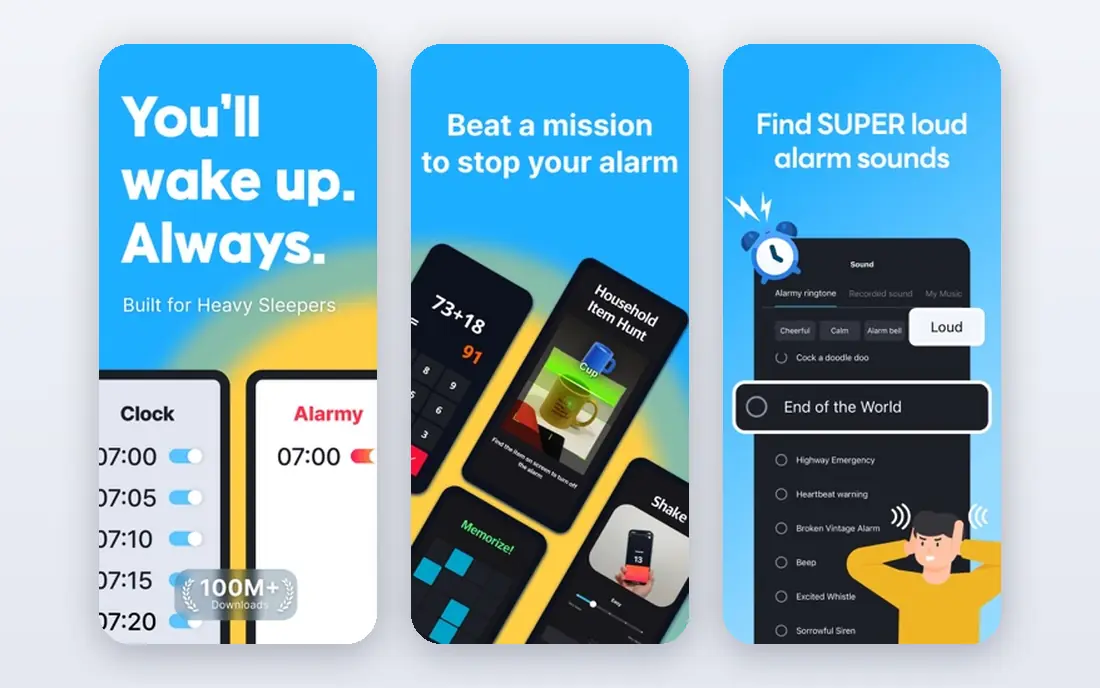
Alarmy is built around one idea: a normal alarm is too easy to silence when you are half asleep. Its missions require a concrete action, such as solving math problems, taking a photo of a set location, scanning a barcode, or shaking the phone a set number of times. That friction is what makes it work for heavy sleepers and chronic snoozers.
The same friction can be a drawback. A photo mission that requires walking to another room will wake a partner, and a math mission can feel harsh on a rough morning. Start with a mission you can complete reliably when groggy, and set a backup alarm for important days. For people who regularly sleep through standard alarms, Alarmy is the first app to try.
- Missions such as math, photo, barcode, and shake tasks
- Anti-snooze options
- Sleep sounds and tracking features
- Tasks can disturb a partner in a shared bedroom
- Some premium features require a subscription
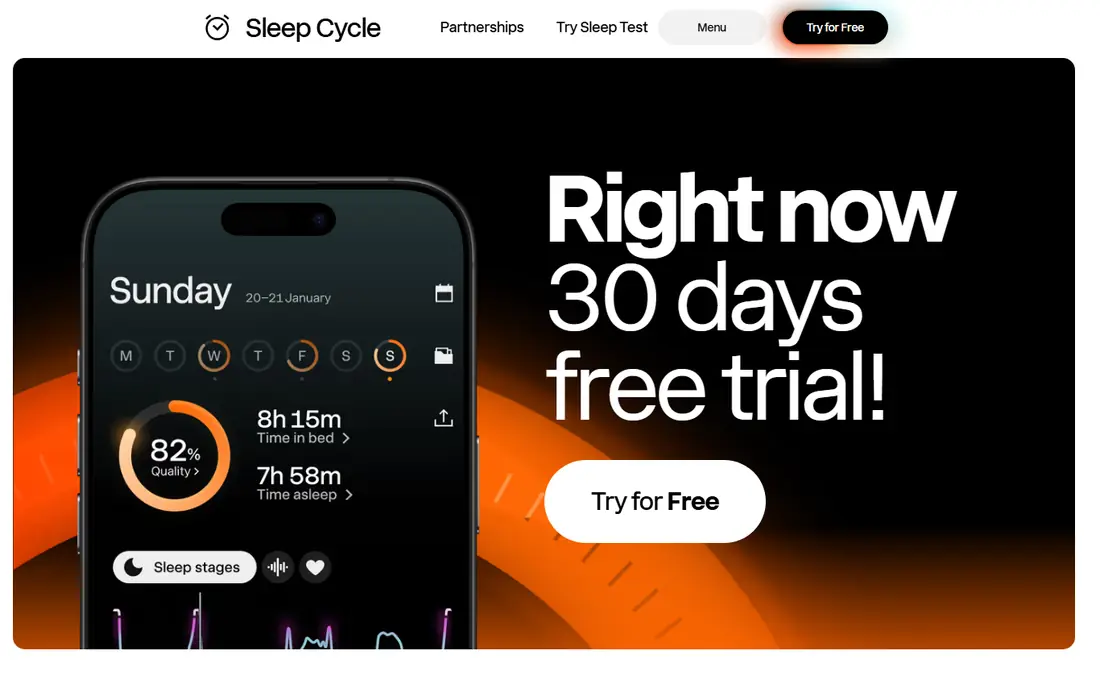
Sleep Cycle tracks sleep with the phone microphone and motion sensors, then wakes you inside a chosen window when sleep is lightest. That gentler approach suits people who dislike being jolted awake by a loud alarm at a fixed minute. Sleep trends, snore detection on premium tiers, and integration with health apps add context over time.
Heavy sleepers may find the gentle approach too soft, especially if they sleep through the window. The free tier covers basic alarms and tracking, while premium adds fuller analysis and features such as smart home integration on some platforms. For people who wake fairly reliably and want better mornings plus sleep insight, Sleep Cycle is a strong pick.
- Smart wake-up inside a wake window
- Sleep analysis and trends
- Sound and motion tracking without a watch
- Premium features require a yearly subscription
- Gentle wake-up may not suit very heavy sleepers
Sleep as Android
Great for: Android users who want deep sleep tracking control
Sleep as Android is the Android power-user option for sleep tracking and alarms. It offers contactless sonar tracking, motion tracking, smart wake-up windows, and a wide range of alarm settings, including captcha-style tasks and gradual volume. Integrations with wearables and smart home devices let it fit into a broader bedtime routine.
That depth is also its weakness for beginners. The settings menu is extensive, and new users may need time to find the combination that works. iPhone users need a different app, since Sleep as Android is Android only. For Android users who want control over tracking and wake-up, it offers more customization than most rivals.
- Sonar and motion tracking options
- Highly customizable alarms and smart wake-up
- Wearable and smart home integrations
- Android only
- Depth of settings can overwhelm new users
Pillow is built for iPhone users who already use Apple Health. It tracks sleep, offers a smart alarm, and presents sleep stages and trends in a clean interface. Automatic tracking means users do not always need to start a session manually, which helps consistency for people who forget to press start at bedtime.
The iOS-only limit excludes Android users, and the most detailed analysis requires a premium plan. Pillow suits iPhone owners who want sleep tracking that fits naturally with Apple Health, without the mission-based alarms of Alarmy. If gentle wake-up and health integration matter more than forced tasks, Pillow is a good fit.
- Sleep tracking integrated with Apple Health
- Smart alarm and sleep analysis
- Automatic tracking options
- IOS only
- Fuller analysis sits behind a premium subscription
I Can't Wake Up takes a similar approach to Alarmy, with tasks that must be completed before the alarm stops. Math problems, memory sequences, and barcode scans force a user to engage before dismissing the alarm, which helps heavy sleepers who silence alarms on autopilot. Multiple alarms and snooze settings give further control for shift work and varied schedules.
The app feels less polished than newer rivals, and task difficulty matters: too easy and it fails its purpose, too hard and mornings become stressful. Set tasks at a level you can complete while groggy, and keep a standard backup alarm for critical days. For Android users who want task-based waking without a subscription-first design, it remains a practical option.
- Wake-up tasks including math, memory, and barcode options
- Multiple alarms and snooze controls
- Android focus
- Interface feels dated compared with newer apps
- Task difficulty needs tuning to avoid frustration
AMdroid suits people whose schedules change often. It supports many alarms with rules based on location, day, and calendar events, which helps shift workers, students, and anyone with irregular routines. Alarms can be set to skip holidays or follow a pattern, reducing the need to reset them each week.
AMdroid is Android only, and its design prioritizes function over polish. It does not offer sleep tracking depth comparable to Sleep Cycle or Sleep as Android. For users who mainly need reliable, flexible alarms rather than sleep analysis, AMdroid is a strong free option. Pair it with a sleep tracker only if tracking matters separately.
- Many alarms with location, calendar, and rule options
- Free core features
- Good fit for shift workers
- Android only
- Design is functional rather than polished
Alarm Clock Xtreme is a long-running alarm app focused on making alarms hard to ignore and easy to customize. Users can set loud tones, gradual volume, math tasks, and snooze limits, and create different alarm profiles for workdays, weekends, and travel. That flexibility suits people who want one app for many alarm situations.
The free version covers core alarms, while some advanced features sit behind a paid upgrade. The range of options can also feel busy at first, so new users should start with one or two alarms and add rules gradually. For people who want a loud, customizable alarm without sleep tracking, Alarm Clock Xtreme is a solid choice.
- Loud alarm options with math and task dismissal
- Snooze controls and gradual volume
- Many alarm profiles
- Some features require a paid upgrade
- Interface can feel busy
Alarm Clock for Me
Great for: Simple alarms with clocks, timers, and weather extras
Alarm Clock for Me suits people who want a straightforward alarm plus a useful bedside clock. It offers alarms, timers, and a clock display, with weather and widget extras depending on platform. Setup is quick, and the interface is easier to learn than task-heavy or tracking-heavy apps.
The drawback is dismissal. A standard dismiss button is easy to press while half asleep, so heavy sleepers may still snooze through it. This app is best for reliable wakers who want a simple, attractive alarm clock rather than a forced wake-up system. If you sleep through standard alarms, choose Alarmy or I Can't Wake Up instead.
- Simple alarm setup with clock and timer features
- Weather and extra widgets on some versions
- Free core use
- No deep sleep tracking
- Alarm dismissal is standard, so heavy sleepers may need a task app instead
How we picked these
We compared official app store listings, vendor pages, and feature descriptions for alarm apps that are live in October 2026. We favored apps with a clear dismissal method, a distinct platform or tracking strength, and a usable free tier or clear pricing. We included heavy-sleeper apps, gentle smart alarms, and simple alarms, so readers can match the app to how they actually wake up.
What to check before you choose
Start with how you wake up, not with sleep tracking features. If you snooze through alarms, a task-based app is the priority. If you wake reliably but dislike harsh alarms, a smart wake-up window matters more. If your schedule varies, flexible rules and multiple alarms matter most. Test the dismissal method for at least a week, since a method that works once may fail when you are tired.
Next, check practical details. Confirm the app works with Do Not Disturb settings on your phone, test volume with your usual charger and bedside setup, and set a backup alarm for important days during the trial. For sleep tracking, check whether the phone needs to stay on the bed or nearby, and whether a watch is required. Those details decide whether an app fits daily life.
Frequently asked questions
What is the best alarm clock app?
Alarmy is the best pick for heavy sleepers, thanks to missions that require a task before dismissal. Sleep Cycle is the best pick for gentle wake-up with sleep tracking, while AMdroid suits flexible schedules. The best app depends on whether you need forced waking, gentle waking, or many alarms.
What are the best alarm apps for heavy sleepers?
Alarmy and I Can't Wake Up are the strongest options, since both require math, photo, barcode, or other tasks to stop the alarm. Alarm Clock Xtreme also offers math tasks and loud tones. Set a task you can complete when groggy, and keep a backup alarm for important mornings.
Is there a best free alarm clock app?
Yes. Alarmy, AMdroid, and Alarm Clock for Me all offer free core alarms, and Sleep Cycle and Sleep as Android offer free tiers with basic tracking. Free plans usually limit premium analysis, sounds, or advanced features, so check what the free tier includes before relying on it daily.
Do alarm apps work with Do Not Disturb?
Most alarm apps are designed to sound during Do Not Disturb, but behavior varies by phone, operating system version, and app permissions. Test the app with Do Not Disturb on before relying on it for work or travel. Also check volume, charger setup, and whether the app needs to stay open overnight.
Can an alarm app help me sleep better?
Sleep tracking apps can show patterns in bedtime, wake time, and sleep duration, which helps you spot habits worth changing. They do not treat sleep disorders, and their stage estimates are less precise than clinical sleep studies. If snoring, breathing pauses, or persistent daytime sleepiness are an issue, speak with a clinician rather than relying on an app alone.
Sources
See where you really rank - block by block
ProMapRanker scans Google Maps across a grid of your service area. Simple monthly plans from $19, white-label on every plan.
Start freeKeep reading
 zoho inventory alternatives
6 Alternatives to Zoho Inventory, Compared on Price and Fit
Zoho Inventory alternatives: 6 tools compared on price, free plans and fit. Katana leads the list for manufacturers. Fit and flaws are laid out for each entry.
Read → zoho crm alternatives
Best Zoho CRM Alternatives (2026)
Need Zoho CRM alternatives? We compare 7 tools on cost, free access and who each suits. Every pick gets a straight assessment. Built for quick decisions.
Read → zelle alternatives
Best Zelle Alternatives in 2026
Compare the best Zelle alternatives for sending money to friends, paying sellers and moving funds abroad, with honest notes on fees, speed and safety in 2026.
Read →