 ProMapRanker
Best Alarm App for Heavy Sleepers in 2026

Key takeaways
- Alarmy is our pick for most heavy sleepers, because missions force you to get up and complete a task before the alarm stops.
- Sleep Cycle suits people who wake groggy rather than not at all, with a smart wake window that aims for lighter sleep.
- Sleep as Android is the best Android option for tracking plus missions, with smart wake and puzzle dismiss options.
- Test any alarm on a morning when oversleeping does not matter, and check that it sounds through Do Not Disturb and battery saving settings.
Quick comparison
| Pick | Great for | Pricing starts at | Free tier | |
|---|---|---|---|---|
 Alarmy | Mission-based waking | Free | Yes | Visit |
 Sleep Cycle | Gentle smart waking | Free | Yes | Visit |
 Sleep as Android | Android tracking plus missions | See website | Yes | Visit |
 AMdroid | Flexible alarm logic | Free | Yes | Visit |
 WakeUpBroo | Code-based dismiss | Free | Yes | Visit |
 WalkUp Alarm | Step-count waking | Free | Yes | Visit |
 Alarm Clock Xtreme | Loud configurable alarms | Free | Yes | Visit |
 I Can't Wake Up | Puzzle variety | Free | Yes | Visit |
 Alarm Clock for Me | Simple loud alarms | Free | Yes | Visit |
The best alarm app for heavy sleepers
A heavy sleeper needs more than a louder sound. The best apps force action, use a puzzle or a physical task, or wake you in lighter sleep. We compared apps on dismiss method, smart wake features, platform, free plan and reliability, with a focus on stopping the alarm without truly waking up.
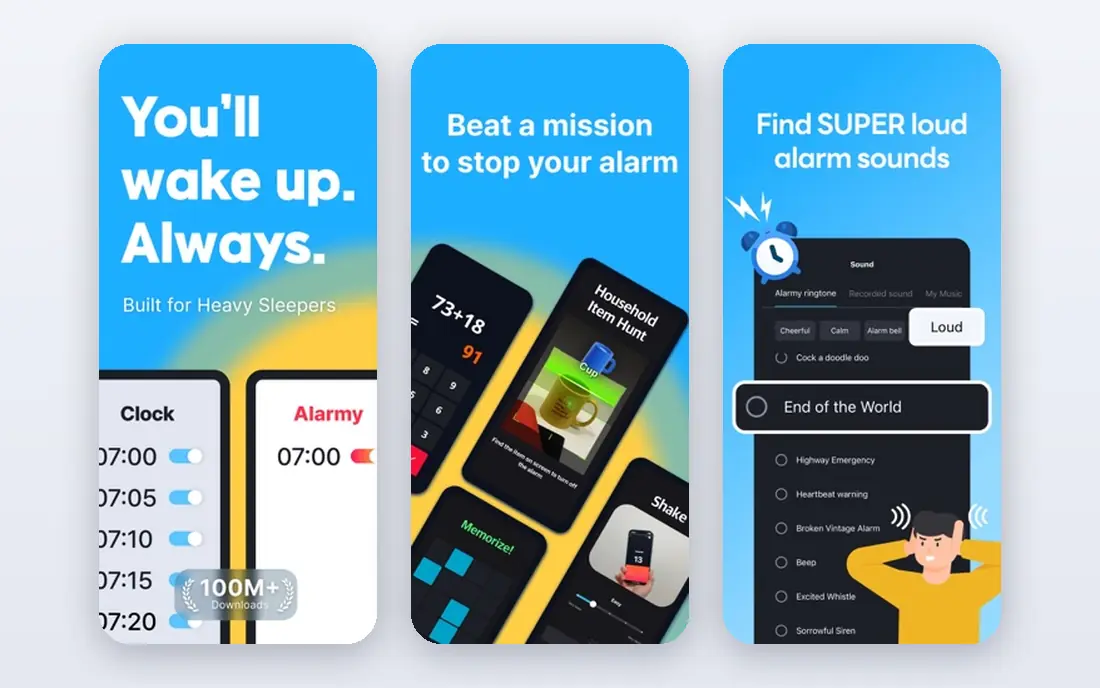
Alarmy is built for people who switch alarms off in their sleep. Instead of a tap to dismiss, you complete a mission first, such as photographing a set place in your home, solving math problems, shaking the phone a set number of times, or scanning a barcode. The alarm does not stop until the mission is done, which forces you out of bed and into a waking task. That design is why Alarmy leads most heavy sleeper lists.
The free tier covers one alarm with limited mission types and shows ads, while a premium subscription adds multiple alarms, all mission types and sleep tracking. In-app purchases are reported from $4.99, so check the store listing for current pricing. If you sleep through normal alarms, Alarmy is our pick. If you wake easily, its missions will feel like overkill.
- Photo, math, shake, barcode and step missions
- Anti-snooze options
- Sleep tracking on paid plans
- Free tier limits alarms and mission types
- Ads on the free version
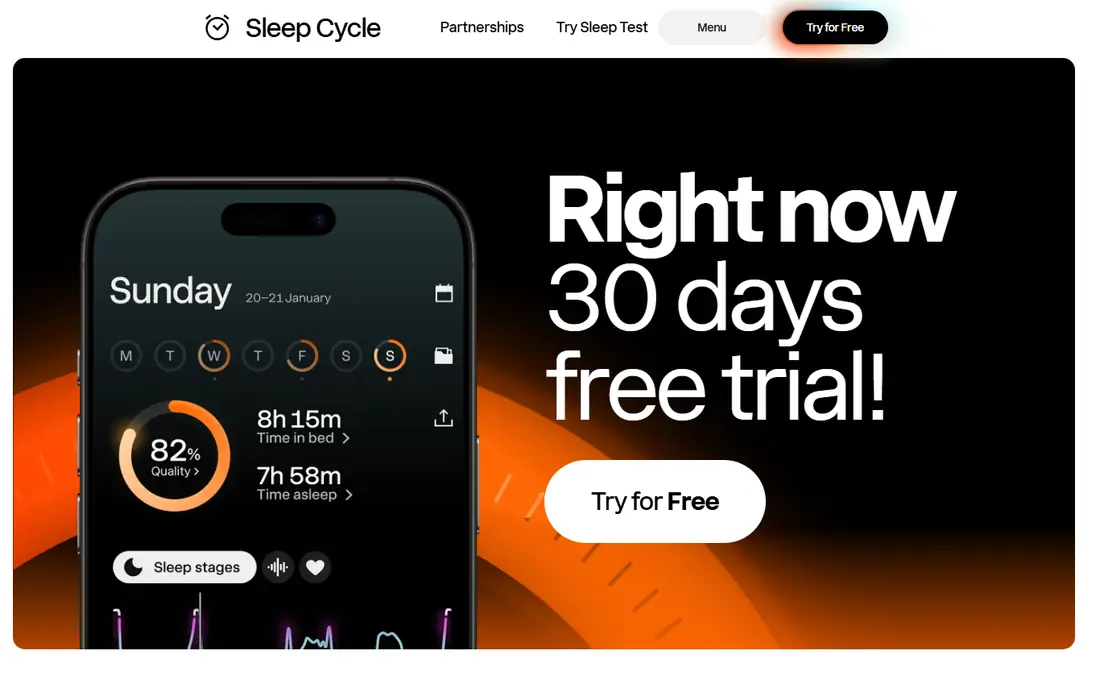
Sleep Cycle takes the opposite approach to Alarmy. It tracks sleep through the phone microphone and motion, then wakes you in a lighter sleep phase within a window you choose, often 30 minutes before your set time. The aim is to reduce grogginess rather than to force you upright, and it produces morning charts for sleep trends and snoring. For people who wake up feeling wrecked rather than not waking at all, that gentler method can help.
The basic alarm and tracking are free, with Premium adding deeper analysis, reported at $39.99 per year in 2026. Sleep Cycle will not drag a true heavy sleeper out of bed the way a mission alarm does, since dismiss is a standard tap. Pair it with Alarmy if you need both smart waking and a forced task, or pick Sleep Cycle alone if grogginess is your main problem.
- Smart wake window up to 30 minutes
- Sleep and snore tracking
- Clear morning sleep charts
- Standard dismiss is easy to silence
- Will not force a heavy sleeper out of bed
Sleep as Android is the best Android choice for combining tracking with a hard-to-dismiss alarm. It offers a smart wake window, sleep tracking, snore recording and alarms that can require a math problem, a captcha-style task or another challenge before they stop. That mix suits Android users who want Sleep Cycle-style tracking plus Alarmy-style friction in a single app. It also works with wearables for more accurate tracking.
The app is Android only, so iPhone users should look at Alarmy or Sleep Cycle instead. Its settings are extensive, which gives you control but takes time to learn. Pricing is listed as See website, with a free trial and a low yearly cost reported in app listings, so check the Play Store for your current price. For Android heavy sleepers, Sleep as Android is a strong all-round pick.
- Smart wake window
- Math and captcha dismiss options
- Sleep tracking and alarms in one app
- Android only
- Interface has many settings to learn
AMdroid is a flexible Android alarm app that lets you build alarms around your real schedule. You can set alarms that require a math problem, shaking the phone or a photo to dismiss, and you can add location-based rules, such as skipping an alarm on a holiday or changing it by calendar event. That logic helps people whose wake time changes by day, and it stops a single fixed alarm from becoming easy to ignore.
The free version covers core alarms, with a paid upgrade for extra features. AMdroid's design is functional rather than polished, and it is Android focused, so iPhone users will not find the same version. If you want an alarm that adapts to your calendar and forces a task, AMdroid is a good alternative to Alarmy. If you want a polished tracker as well, Sleep as Android covers more ground.
- Math, shake and photo dismiss options
- Location and calendar-aware alarms
- Flexible scheduling
- Android focused
- Design is functional rather than polished
WakeUpBroo is a newer iPhone alarm app built around one idea, which is that you should not be able to dismiss an alarm on the same phone while half asleep. It can require a code shown on another device, or a barcode scan, before the alarm stops, which forces you to get up and engage with something outside the bed. That approach suits heavy sleepers who have learned every trick for silencing a phone alarm with one hand.
The app is iPhone focused, with an Android version reported as in development, so Android users should pick another option here. A free download plus a trial leads to a Pro subscription for full use, so check the App Store for current pricing. WakeUpBroo is a good pick if code-based dismiss appeals to you and you use an iPhone. If you want many mission types, Alarmy offers more variety.
- Dismiss code on another device or barcode scan
- Built to stop sleepy dismissals
- IPhone focused
- Android version is in development
- Paid Pro needed after a trial for full use
WalkUp Alarm uses movement as the wake-up test. The alarm keeps sounding until you walk a set number of steps, which forces you out of bed and into motion. That physical requirement is effective for people who can solve a math problem while still half asleep but who wake up once they are standing and moving. The concept is simple, which makes setup quick and the morning routine easy to understand.
The main limit is practical. You need safe space to walk in the morning, and the app offers fewer sleep tracking and smart wake features than Sleep Cycle or Sleep as Android. It is best as a dedicated waking tool rather than a full sleep app. If steps are the task that finally wakes you, WalkUp Alarm is a focused, free starting point.
- Requires a set number of steps to stop
- Simple concept
- Forces physical movement
- Needs safe walking space in the morning
- Fewer tracking features than rivals
Alarm Clock Xtreme is a long-running alarm app known for loud, configurable alarms and a math puzzle dismiss option. You can set alarm sounds, snooze limits, auto-dismiss rules and a puzzle that must be solved before the alarm stops. That combination suits heavy sleepers who want a strong sound plus a mental task, without the full mission system of Alarmy. Timers and a stopwatch add everyday usefulness beyond waking.
The free version shows ads, with a paid upgrade removing them and adding features. Design and feature availability vary by platform and store listing, so check the version for your phone before you rely on a specific puzzle type. For a loud, flexible alarm with a puzzle gate, Alarm Clock Xtreme is a solid, well-tested choice.
- Loud, configurable alarms
- Math puzzle dismiss
- Snooze controls and timers
- Free version shows ads
- Design and features vary by platform
I Can't Wake Up is an alarm app built around puzzle variety. You can require a math problem, a sequence, shaking the phone or retyping a phrase before the alarm stops, which gives you several ways to force alertness. That variety helps if one puzzle type stops working for you, since you can switch to a task that demands more attention. Snooze controls let you limit how often the alarm can be delayed.
The app's last major updates are older than Alarmy's, and the interface feels dated by comparison. A one-time purchase is reported in store listings, but pricing should be checked in your store before you buy. If you want puzzle variety at a low cost and you use Android, I Can't Wake Up is worth testing. If you want active development and sleep tracking, Alarmy or Sleep as Android are safer picks.
- Many puzzle types including math, sequence, shake and retype
- One-time purchase reported
- Snooze controls
- Last major updates are older
- Interface feels dated compared with Alarmy
Alarm Clock for Me is a simple alarm app for people who want a loud, reliable alarm without a complex mission system. You set alarms, choose sounds, and use extras such as a sleep timer in some versions. That simplicity suits users who wake with a strong sound but want a better alarm than the built-in clock, or who want a second alarm as a backup to a mission app.
The standard dismiss is the limit for true heavy sleepers. A tap can silence the alarm, so it will not stop a sleepy dismissal the way Alarmy or WalkUp Alarm will. Use Alarm Clock for Me as a backup alarm, or as a main alarm if loud sound alone usually wakes you. If you regularly sleep through taps, pick a mission or step alarm from higher in this list.
- Simple setup
- Loud alarms and custom sounds
- Sleep timer and weather options in some versions
- Standard dismiss is easier to silence
- Fewer mission options than Alarmy
How we picked these
We compared official product pages, app store listings and October 2026 alarm guides for apps that are available on iPhone, Android or both and that address heavy sleeping directly. We kept apps with a dismiss method harder than a single tap, a smart wake feature, or a loud configurable alarm, and we left out hardware clocks and apps that only offer a standard dismiss with no extra waking help.
We weighed the dismiss method above all else, since loudness alone stops working for many heavy sleepers. A mission, puzzle, barcode scan or step count forces engagement, while a smart wake window helps only if you wake in lighter sleep. That is why Alarmy leads, Sleep Cycle ranks highly for grogginess rather than deep sleep, and simple loud alarms sit lower despite their ease of use.
How to choose the right alarm for a heavy sleeper
Start with how you fail to wake up. If you switch the alarm off in your sleep, you need a mission, puzzle or step alarm that cannot be dismissed with a tap. If you wake up but feel groggy and fall back asleep, a smart wake window plus a mission alarm as a backup may work better. If loud sound alone usually wakes you, a simple loud alarm with a second backup alarm may be enough.
Next, test the app before you depend on it. Set a test alarm for two minutes ahead, lock your phone, and check that it sounds through Do Not Disturb, survives battery saving settings, and uses a puzzle hard enough to wake you without making you give up. On Android, check battery optimization settings, since system power saving is a common reason an alarm fails to ring. On iPhone, check that the app has notification and sound permissions.
Finally, pair the app with a habit change. Put the phone across the room, set a consistent wake time, and use a mission that forces you to leave the bed, such as a photo of your bathroom or a step count. No app can fix a sleep schedule on its own, and if you regularly cannot wake up despite alarms, consider speaking to a clinician, since persistent oversleeping can signal a sleep disorder.
Frequently asked questions
What is the best free alarm app for heavy sleepers?
Alarmy is the best free starting point for most heavy sleepers, with a free tier that includes mission-based dismiss options. Sleep Cycle is also free to start, but it suits groggy waking more than deep sleep. For phones, Alarmy remains the strongest free pick.
What are the best alarm apps for heavy sleepers on iPhone?
Alarmy, Sleep Cycle and WakeUpBroo are the strongest iPhone options here. Alarmy offers the most mission variety, Sleep Cycle offers smart waking and tracking, and WakeUpBroo offers code-based dismiss on another device. Test Alarmy first, since it covers the most heavy sleeper needs in one app.
What is the best alarm clock for heavy sleepers app on Android?
Sleep as Android and Alarmy are the best Android choices. Sleep as Android combines tracking, smart wake and puzzle dismiss in one app, while Alarmy offers the widest mission range. AMdroid is a good third option if you want flexible, calendar-aware alarm logic. Check battery optimization settings on Android, since they can stop an alarm from ringing.
Do mission alarms really work for heavy sleepers?
For many people, yes, because they replace a single tap with a task that requires attention and movement. A photo mission forces you out of bed, a math problem forces focus, and a step count forces motion. No app works for everyone, so test the mission type that wakes you best, and use a backup alarm for important mornings.
Can a smart alarm wake a heavy sleeper?
A smart alarm can help if your main problem is grogginess, since it aims to wake you in lighter sleep within a window before your set time. It is less reliable for a true heavy sleeper who sleeps through sounds, since its dismiss is usually a standard tap. In that case, pair a smart alarm with a mission alarm, or use the mission alarm alone.
Sources
See where you really rank - block by block
ProMapRanker scans Google Maps across a grid of your service area. Simple monthly plans from $19, white-label on every plan.
Start freeKeep reading
 zscaler alternatives
Best Zscaler Alternatives in 2026
Looking for zscaler alternatives? We compare 9 SASE and zero trust platforms on architecture, data protection, pricing, and fit for your network and team.
Read → zapier alternatives free
Best Zapier Alternatives Free in 2026
Nine automation tools for zapier alternatives free in 2026, all with genuinely free tiers, plus free plan limits, starting prices and upgrade paths explained.
Read → which platform is best for online reputation
Which Platform Is Best for Online Reputation in 2026
Wondering which platform is best for online reputation? We compare 8 review, listing, and response tools for small and multi-location businesses and agencies.
Read →