 ProMapRanker
AI UI Generator Tools in 2026: Top 6 Compared

Teams building marketing sites with AI structure · Pricing starts at: $12 per site/month (billed yearly)
Direct answer
For teams building marketing sites with AI structure, Relume is where this list starts. Listed starting prices: Relume from $12 per site/month, Anima from $20 per month and Framer from $10 a month. Anima is better for Figma users turning designs into code, and Framer is better for designers shipping a live marketing site. The remaining 3 options are covered below with prices and limits.
Choosing AI UI generator tools usually comes down to price, fit and limits. This ProMapRanker guide sets 6 tools side by side on those three points, with the facts kept short and checkable.
Key takeaways
- Relume takes the first slot, best suited to teams building marketing sites with AI structure.
- What to know about TeleportHQ first: no free plan, only a 7-day free trial.
- Relume, Anima, Framer, Visily, v0 by Vercel: these are the 5 tools out of 6 that offer a free plan.
- The lowest published monthly entry price here is $10 per month, from Framer.
Quick comparison
| Pick | Great for | Pricing starts at | Free tier | |
|---|---|---|---|---|
| Relume | Teams building marketing sites with AI structure | $12 per site/month (billed yearly) | Yes | Visit |
 Anima | Figma users turning designs into code | $20 per month | Yes | Visit |
 Framer | Designers shipping a live marketing site | $10 a month (billed annually) | Yes | Visit |
 TeleportHQ | Teams exporting code to multiple frameworks | $19.99 per month | Free trial (7 days) | Visit |
 Visily | Non-designers making wireframes and mockups | $11 per editor/month (billed yearly) | Yes | Visit |
 v0 by Vercel | Developers building React interfaces from prompts | $30 per user/month | Yes | Visit |
Every option for AI UI generator tools explained
Relume is built with teams building marketing sites with AI structure in mind. Relume builds marketing sites from a brief, with AI agents for strategy, copy, design, and analytics that propose a sitemap, wireframes, and a style guide. Worth adding: Pro AI usage costs $14 a month billed annually, or $24 billed monthly, and brings premium models and priority access.
The trade-off: Relume has two price lists, and upgrading one does not change the other. From a buyer's view, hosting is per website, whereas the Pro AI workspace plan is per account and includes AI usage across all projects. The Free plan costs $0 and contains enough monthly AI usage to build one full website, hosting on a relumesite.ai address with the Relume badge, 1,500 page views a month, 20 form submissions a month, and 7 days of analytics. Relume cost at the entry level: $12 per site/month. Free access exists with Relume.
The main drawbacks: on top of hosting. What users get: Launch hosting comes with a custom domain, SSL.
- AI produces a brief, sitemap, wireframe
- Free plan can build one full website
- Pro AI usage opens at $24 a month billed monthly
In short, Anima is for Figma users turning designs into code. The trade-off: every level caps chat messages and code generations a month, so heavy daily use can hit the ceiling even on Pro.
Anima pricing: $20 per month. Anima offers a free plan.
Drawbacks to consider: Free plan lets only 5 chat messages.
- Turns Figma designs
- Or prompts into code
- Pro costs $40 a month and still caps chat messages at 1,000 a month
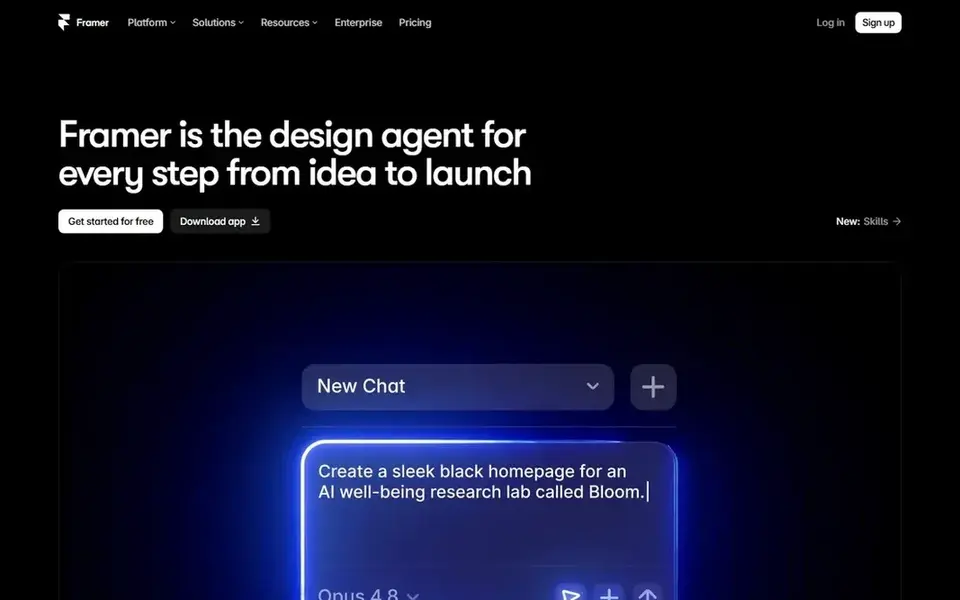
Think of Framer for designers shipping a live marketing site. The Free plan costs $0 and includes 500 AI credits to try, a Framer domain, 1 GB of bandwidth, 10 CMS collections, and 1,000 pages.
Choose Framer for a live marketing site in one place. Price to start with Framer: $10 per month. Free access exists with Framer.
Downsides: Pricing is per site, so each additional site needs its own plan.
- Entry-level comes with a custom domain and 1,000 AI credits a month
- Pro contains 3,000 AI credits a month and staging
- Free plan provides 500 AI credits to try and no custom domain
TeleportHQ is a good fit for teams exporting code to multiple frameworks. An extra project costs $19.99 a month, or $179.99 a year, after the 7-day trial.
The trade-off: TeleportHQ prices by project and by tokens. So a team with multiple live projects and heavy AI use must count both numbers. Starting cost for TeleportHQ: $19.99 per month. As for free access: Free trial (7 days).
Drawbacks to consider: No free plan; only a 7-day free trial.
- AI website builder and AI web app builder in one workspace
- 100,000 AI tokens a month on the middle level
- Code export is restricted to static projects on the lower level
Visily is designed for non-designers making wireframes and mockups. The Starter plan costs $0 and bundles 2 editable boards per workspace, up to 2,500 elements per board, and 300 AI credits a month, with 600 credits in the first month.
As for the details, choose Visily for quick wireframes at the lowest entry price among the design-first tools here. Visily cost at the entry level: $11 per editor/month. Visily offers a free plan.
Watch-outs: Free Starter plan permits only 2 editable boards per workspace.
- Templates into editable wireframes
- Turns prompts, screenshots
- Business costs $29 per editor a month billed yearly and holds SSO and audit controls behind that level
v0 by Vercel is a good fit for developers building React interfaces from prompts. The Free plan costs $0, includes $5 in one-time credits for new users, and permits 7 messages per day, with GitHub sync and deploy to Vercel included.
The main drawbacks: Business costs $100 per user per month with the same $30 monthly credit allowance as Plus.
Price to start with v0 by Vercel: $30 per user/month. v0 by Vercel offers a free plan.
- Produces React and Tailwind code from text prompts
- Deploys to Vercel and syncs with GitHub
- Free plan lets only 7 messages per day
How we compared the tools
We compared the tools on published pricing, free plan or trial availability, feature coverage for AI UI generator tools, and the limits each vendor documents. Plan names, prices and limits change often. Treat the figures here as a starting point and verify them with the vendor. Tools are placed by general fit for AI UI generator tools, with price clarity and free access as tie-breakers. A different team can reasonably rank them differently.
A buyer's checklist
- Check the vendor page for the current price: Framer starts at $10 per month here, and seats or billing terms can move it.
- Look at free plan limits closely: Relume, Anima, Framer and others have one, and the caps decide whether it is usable for real work.
- Take the trial from TeleportHQ and push a live task through it before you pay.
- Before choosing Relume, weigh its main limit: hosting and AI usage are charged on two separate lists.
- Before you load data into Relume, check what an export looks like and who can run it.
- Check the integration list for v0 by Vercel against the tools you run today, and note which ones need a higher plan.
Frequently asked questions
Can I try these options before paying?
Often, yes. Relume, Anima, Framer and others have a free plan and TeleportHQ offers a free trial. Use your own data and a real task during the test, and check what the free tier or trial limits before you rely on it.
What is the cheapest option for AI UI generator tools in this list?
On published monthly entry prices, Framer is the lowest here at $10 per month. Entry price is only part of the cost, because seats, add-ons and billing terms can change the total. Prices, free plan details and limits for all 6 tools in this AI UI generator tools roundup sit on the individual cards above.
Do these tools publish their prices?
Yes. Every tool from Relume to v0 by Vercel shows a starting price, though seats, add-ons and billing terms still change the final cost.
Which options for AI UI generator tools have a free plan?
On this list, Relume, Anima, Framer, Visily and v0 by Vercel include a free plan. Caps on seats, usage or features are common, so test the free plan against your real workload. One other tool offers a trial instead.
Sources
See where you really rank - block by block
ProMapRanker scans Google Maps across a grid of your service area. Simple monthly plans from $19, white-label on every plan.
Start freeBrowse all guides
← 6 Best AI SQL Generators for 20265 Best Enterprise Software for Agentic Reasoning in 2026 →
 best ai search engines
Best AI Search Engines: 2026 Prices and Picks
Shortlisting the best AI search engines? 6 products compared on cost, free access and ideal buyer. Every profile names its biggest catch. Straight answers.
Read → best ai procurement software
7 Best AI Procurement Software for 2026
Shortlisting the best AI procurement software? 7 products compared on cost, free access and ideal buyer. Every entry states what it lacks. See which fits.
Read → best ai platforms for incident response
AI Platforms for Incident Response in 2026: Top 6 Compared
Best AI platforms for incident response: 6 contenders ranked by fit, with entry costs and free tiers. Short, factual notes on every option. Decide faster.
Read → sora ai alternatives
Sora AI Alternatives in 2026
Sora AI alternatives for text-to-video creation range from Runway to Veo and Kling. We compare nine legitimate tools for creators, marketers and teams.
Read → windsor.ai alternatives
Windsor.ai Alternatives in 2026
Windsor.ai alternatives compared for 2026: 9 marketing attribution and reporting tools for ad data, dashboards, and warehouse reporting needs for your team.
Read → peec ai alternatives
Peec AI Alternatives in 2026
Compare the best peec ai alternatives for tracking brand visibility in AI answers, from Profound and Otterly to Scrunch, AthenaHQ, Goodie and more in 2026.
Read →More in AI Tools · All guides A to Z by date · Latest guides