 ProMapRanker
Best AI Room Design Apps in 2026

Key takeaways
- Planner 5D and Homestyler are the best all round picks, because they combine editable floor plans with 3D renders.
- RoomGPT and Interior AI are best for fast AI restyles of a room photo, when you want style ideas rather than a measured plan.
- IKEA Kreativ is best for previewing real IKEA furniture in your own room, at no design subscription cost.
- Free tiers are often trials, not unlimited use. Check how many AI credits or renders are included before you start a project.
- AI renders can show furniture and finishes that do not exist, so measure your room and check real product sizes before you buy.
Quick comparison
| Pick | Great for | Pricing starts at | Free tier | |
|---|---|---|---|---|
 Planner 5D Planner 5D | Editable 2D and 3D plans | Free | Yes | Visit |
 Homestyler Homestyler | Free 3D renders | Free | Yes | Visit |
 RoomGPT RoomGPT | Fast photo restyles | See website | Yes | Visit |
 Interior AI Interior AI | Style variety and staging | See website | No | Visit |
 IKEA Kreativ IKEA Kreativ | Real IKEA furniture preview | Free | Yes | Visit |
 REimagineHome REimagineHome | Staging and product ideas | See website | Yes | Visit |
 Spacely AI Spacely AI | Photo restyle and staging | See website | Yes | Visit |
 Houzz Houzz | Inspiration and shopping | Free | Yes | Visit |
The best AI room design apps
We compared the best AI room design apps on photo restyling, floor plans, 3D renders, furniture catalogs, free tiers and shopping links. The eight below cover quick AI ideas, measured plans and real furniture previews.
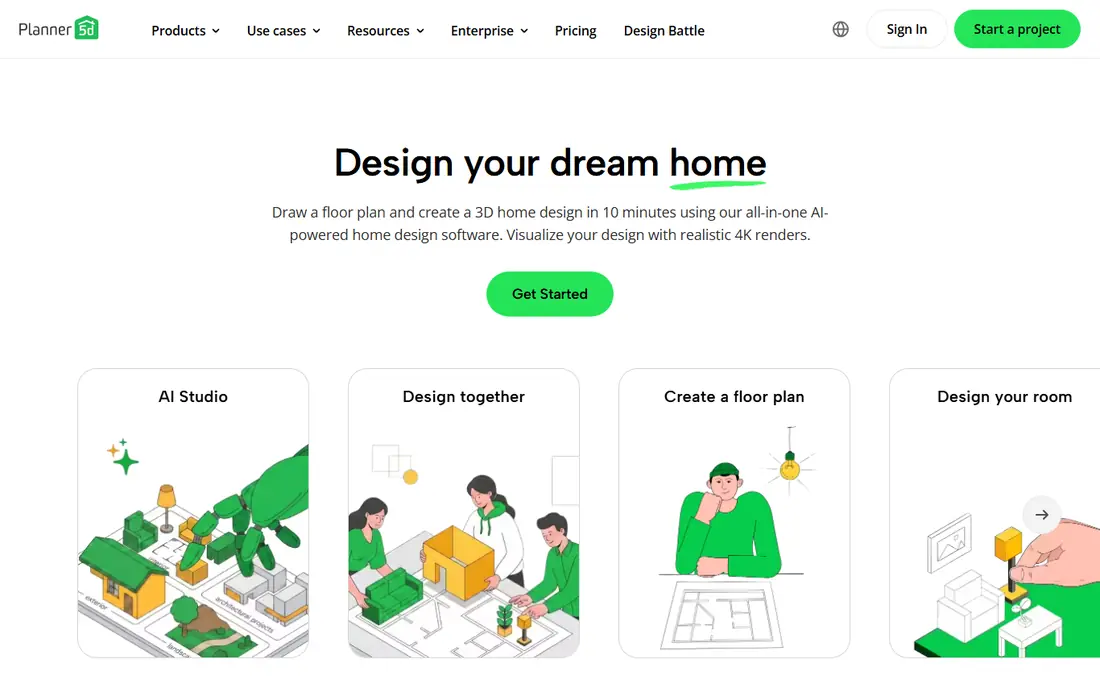
Planner 5D is the best all round room design app for people who want a measured plan, not just a pretty image. You draw a floor plan, add walls, doors and windows, furnish it from a catalog, and view the result in 2D and 3D. That editable plan is useful for renovation, furniture layout and talking to a contractor, because sizes and positions are real.
The free plan covers unlimited projects but only part of the furniture catalog, with full access and advanced rendering on Premium. AI design generation is also more limited on the free tier. Planner 5D suits DIY planners who want control over layout, and who will use a photo restyler alongside it for style ideas.
- Unlimited projects on free plan
- 2D floor plans plus 3D views
- Large furniture catalog on paid plans
- Full catalog and advanced rendering need Premium
- AI design features are limited on free plan
- Not a photo restyler
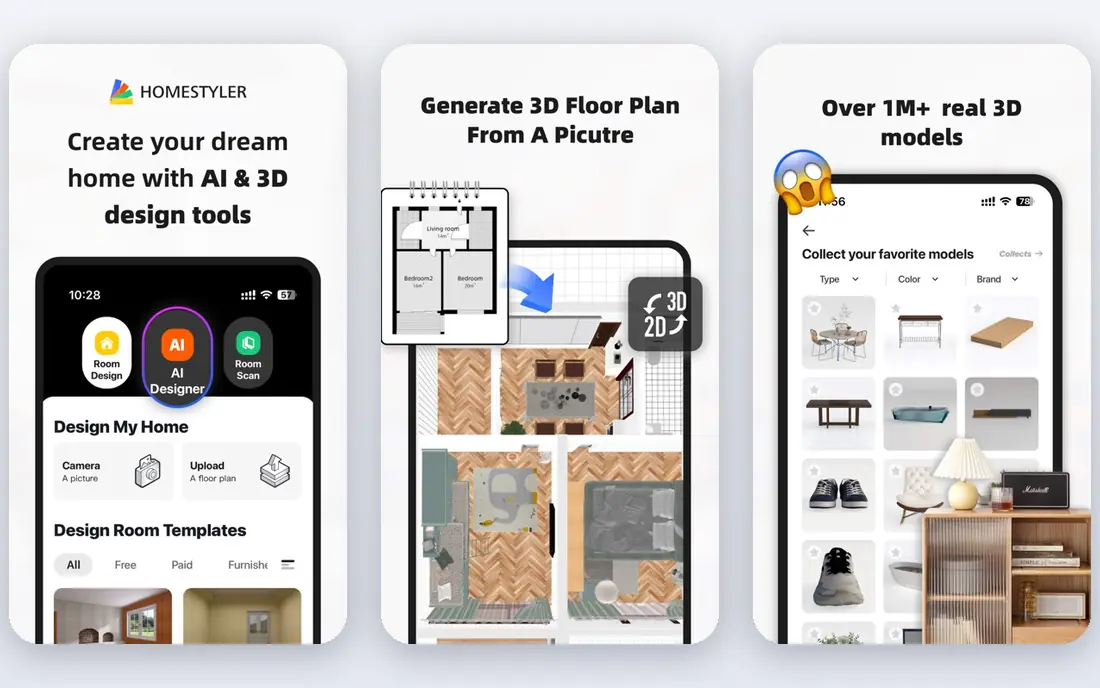
Homestyler combines a 3D room planner with AI tools, and its free Basic plan is unusually generous for renders. You can build a room in 2D or 3D, furnish it from a large model library, and produce unlimited renders at 1K resolution. That makes it easy to test several layouts without paying for each render.
AI credits on the free plan are limited, and a high quality AI staging image can cost more credits than the free allowance. Higher resolution renders also need a paid plan. Homestyler suits users who want a free, editable 3D planner with good renders, and who will pay only when they need high resolution or more AI images.
- Free Basic plan with unlimited 1K renders
- Large 3D model library
- Editable 2D and 3D layouts
- Free AI credits are limited
- Higher resolution renders need a paid plan
- Catalog models are not always buyable

RoomGPT is the fastest way to see a room in a new style. Upload a photo, pick a style, and get a restyled image in seconds. That speed makes it ideal for brainstorming, because you can try ten styles in the time it takes to build one 3D plan. The workflow is simple enough for anyone, with no floor plan or furniture catalog to learn.
The limits are clear. The free allowance is small, often one design, and there is no editable plan to take to a contractor or furniture store. Prices and free terms are shown after login in some cases, so check them before you rely on RoomGPT for a full project. Use RoomGPT for style exploration, and Planner 5D or Homestyler for a plan you can build from.
- Very fast room photo restyles
- Many style choices
- Simple three step workflow
- Free allowance is small
- No editable floor plan
- Prices and free terms are shown after login in some cases
Interior AI offers a wide range of styles for photo restyling and virtual staging. You can restyle a furnished room, stage an empty room for a listing, or try a style you have not considered, all from a photo. That variety helps real estate agents and homeowners who need a staged look quickly, without hiring a photographer and stager.
There is no ongoing free plan in many reports, so regular use needs a subscription. Renders are images, not editable floor plans, so you cannot measure furniture or change a wall position from the result. Interior AI suits users who need many style options and staging images, and who will pay for volume rather than using a free trial.
- Many interior styles
- Virtual staging for empty rooms
- Fast photo restyles
- No free plan in many reports
- Subscription needed for regular use
- Renders are images, not editable plans
IKEA Kreativ is the most practical free tool when you plan to buy IKEA furniture. You can scan a room, remove existing furniture in the view, and place real IKEA pieces to scale, which removes much of the guesswork about size and fit. Because the furniture is real and buyable, the design can turn directly into a shopping list.
The catalog limit is obvious: only IKEA products are included, so a room with mixed brands cannot be previewed fully. A full 3D scan also needs supported hardware, though simpler room views work more widely. IKEA Kreativ suits IKEA shoppers who want a realistic preview, and it pairs well with a general AI restyler for style ideas beyond IKEA.
- Free to use
- Places real IKEA furniture in your room
- Scan and design tools in the IKEA app
- Limited to the IKEA catalog
- Full 3D scan needs supported hardware
- Not a general AI restyler
REimagineHome lets you edit a room photo by describing changes in plain language, which feels more natural than picking from a fixed style list. You can change a wall color, swap a sofa style or stage an empty room, and the tool updates the image. Interior, exterior and staging options cover both homeowners and real estate listings.
The free trial covers only a few designs, and conversational edits with real product links need higher plans. Like other photo tools, results are images rather than measured plans. REimagineHome suits users who want to describe a change and see it, rather than building a room from scratch in 3D.
- Conversational edits to a room photo
- Interior, exterior and staging options
- Product linked ideas on higher plans
- Free trial is limited to a few designs
- Chat and real product features need paid plans
- Renders are not editable plans
Spacely AI focuses on fast photo restyles and virtual staging. You upload a room photo, choose a style or staging option, and get a render quickly, with trial credits that in some offers carry no watermark. That makes it useful for real estate agents and homeowners who need a clean listing image without a long setup.
Credit costs vary by render type, and paid prices vary by plan, so check the current pricing page before you commit to a volume project. Spacely AI does not offer an editable floor plan, so it is best for images and staging rather than renovation planning. Use it when a fast, clean restyle is the goal, and a 3D planner when measurements matter.
- Trial credits with no watermark in some offers
- Photo restyle plus staging
- Fast renders
- Paid price varies by plan
- Credit cost varies by render type
- No editable floor plan
Houzz is the inspiration and shopping companion to an AI design app. Its photo library covers almost every room type and style, and many photos link to real products you can buy. You can also find local designers, contractors and stores, which helps when an AI render needs a professional to make it real.
Houzz is not primarily an AI photo restyler, and its design tools are lighter than Planner 5D or Homestyler. Use Houzz to gather ideas, save photos you like, and shop real products, then use an AI restyler or 3D planner to apply those ideas to your own room. That pairing gives you both inspiration and a plan you can act on.
- Huge photo library for inspiration
- Shop real products from photos
- Find local professionals
- Not an AI restyler in the same way as RoomGPT
- Design tools are lighter than Planner 5D
- Shopping prices vary
How we picked these
We compared official feature pages, free tier and credit terms, and app store listings for AI room design apps in October 2026, plus public comparisons of free credits and render limits. We kept only apps that work in the United States, that offer AI restyling, 3D planning or real furniture preview, and that have a usable free tier or trial. We did not claim hands on testing that did not happen, and we used See website where pricing is shown after login or varies by plan.
How to get a design you can actually build
Start with measurements, not a render. Measure room length, width, ceiling height, door and window positions, and the size of furniture you already own. An AI image that ignores those numbers can look good and still be impossible to build, because a sofa, table or bed may not fit the real space.
Next, use two tools together. Use a photo restyler such as RoomGPT or Interior AI to explore styles, then rebuild the favorite style in Planner 5D or Homestyler as a measured plan. Check real product sizes on retailer sites before you buy, and keep a list of paint colors, finishes and furniture dimensions from the plan, not just from the image.
Finally, test light and scale in the real room. View the render at different times of day, compare paint samples on the actual wall, and tape out furniture footprints on the floor with painter tape. That low cost check catches scale and color mistakes before you spend on furniture or renovation. An AI design is a starting point, not a final specification.
Frequently asked questions
What is the best AI room design app overall?
Planner 5D and Homestyler are the best overall AI room design apps, because they combine editable floor plans with 3D renders and free tiers. RoomGPT is better for fast style ideas from a photo, while IKEA Kreativ is better for previewing real IKEA furniture. The best app depends on the plan, photo restyle or shopping preview you need.
What is the best free AI interior design app?
Homestyler offers a strong free Basic plan with unlimited 1K renders, while Planner 5D offers unlimited projects on its free plan. IKEA Kreativ is free for IKEA furniture previews. RoomGPT, REimagineHome and Spacely AI offer limited free trials, not unlimited free use, so check credit limits before you start.
What is the best AI app for room design from a photo?
RoomGPT is the simplest and fastest photo restyler, while Interior AI offers more styles and staging options. REimagineHome adds conversational edits, and Spacely AI offers fast restyles plus staging. Photo tools give images, not editable plans, so pair them with Planner 5D or Homestyler for a measured layout.
Can AI design my room for free?
Yes, for a limited number of designs. Free tiers and trials on RoomGPT, REimagineHome, Spacely AI and Homestyler cover a few AI images or basic renders, while Planner 5D and IKEA Kreativ offer ongoing free planning. For a full project with many renders, expect to pay for credits or a subscription.
Is AI room design accurate?
AI renders are useful for style and layout ideas, but they are not always accurate on size, scale, light and real product availability. Furniture in a render may not exist, or may differ in size from the real product. Always measure your room, check real product dimensions, and use a measured plan before you buy or renovate.
What is the best AI decorating app for beginners?
Planner 5D is a good beginner pick for measured planning, because the free plan is generous and the interface is visual. RoomGPT is the easiest beginner pick for photo restyles, because you upload a photo and pick a style. Start with one tool, learn its limits, and add a second tool only when you need a different job done.
Sources
See where you really rank - block by block
ProMapRanker scans Google Maps across a grid of your service area. Simple monthly plans from $19, white-label on every plan.
Start freeKeep reading
 zendesk alternatives
Best Zendesk Alternatives in 2026
Compare the best Zendesk alternatives in 2026, from budget help desks to AI-first support tools, with current pricing, free plans, and honest trade-offs.
Read → wordpress alternatives
Best WordPress Alternatives in 2026
Looking for the best WordPress alternatives? We compare 8 free and paid options for blogs, business sites, stores, and developer-led projects in 2026.
Read → which real estate company has the best training
Best Real Estate Company Training in 2026
Compare which real estate company has the best training, from Keller Williams and eXp to Compass and Coldwell Banker, by program, mentor, and fit in 2026.
Read →