 ProMapRanker
Best AI Photo to Video Animation Tools (2026)
Direct answer
HeyGen leads the list, best for avatar and talking videos. Listed starting prices: HeyGen from $29 per month and Pika from $10 per month. Adobe Firefly Video is better for creative suite users, and Luma Dream Machine is better for Iterative creative workflows. The remaining 2 options are covered below with prices and limits.
If you are comparing AI photo to video animation tools, this page covers 5 tools in one place: what each is best for, what it costs to start, whether it has a free plan, and the main limit to know about.
Key takeaways
- The list opens with HeyGen, aimed at avatar and talking videos.
- The main caution on Luma Dream Machine: less model variety than aggregators.
- Pika is the lowest-priced starter here at $10 per month.
- Kling AI is the one to check for Multimodal image to video.
- HeyGen, Pika: these are the 2 tools out of 5 that offer a free plan.
Quick comparison
| Pick | Great for | Pricing starts at | Free tier | |
|---|---|---|---|---|
 HeyGen | Avatar and talking videos | $29 per month | Yes | Visit |
 Adobe Firefly Video | Creative suite users | See website | Not stated | Visit |
 Luma Dream Machine | Iterative creative workflows | See website | Not stated | Visit |
 Pika | Multi-model photo animation | $10 per month | Yes | Visit |
 Kling AI | Multimodal image to video | See website | Not stated | Visit |
Our 5 AI photo to video animation tools

Think of HeyGen for avatar and talking videos. HeyGen is specialized for avatar-led videos, so it is not the tool for animating landscapes, products, or abstract photos.
In practice, HeyGen produces AI videos with a personal avatar, using your own face and voice so you can produce presenter-style videos without filming each one. As for the details, photo animation here means bringing a person to life as a speaker instead of adding motion to any image. On cost, HeyGen starts like this: $29 per month. Free access exists with HeyGen.
Limits to weigh: Narrower creative scope.
What HeyGen does well: Avoids filming every video.
- Confident presenter videos
- Personal avatar from your face and voice
- Not a general photo animator
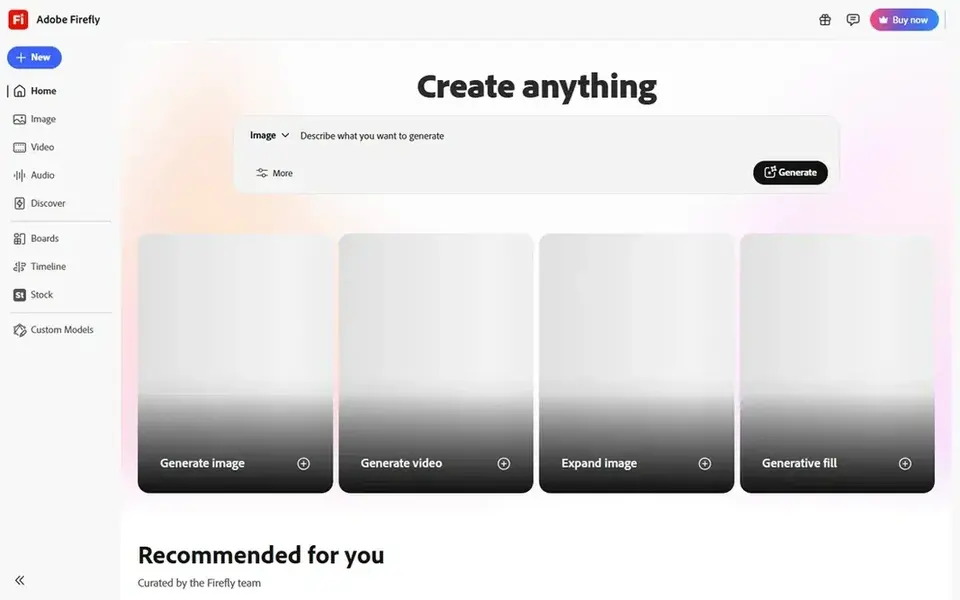
Adobe Firefly Video makes the most sense for creative suite users. For photo to video animation, that means you can create and edit within a familiar creative environment.
Watch-outs: Feature set spans numerous tools.
Worth adding: the breadth of the offering means it is not a single-purpose animation tool. The experience is most coherent for those inside the Adobe ecosystem. Check the vendor site for Adobe Firefly Video pricing; none is listed in this comparison. As for free access: Not stated.
Highlights: Access to top external models.
- Video generation
- Image, audio
- Best value inside Adobe ecosystem

Luma Dream Machine serves Iterative creative workflows. Luma Dream Machine is positioned as a creative agent for professionals, built to plan, create, iterate, and refine whereas keeping context across every stage of creative work.
Honest limits: Less model variety than aggregators.
That makes it a reasonable fit for people animating photos as part of a longer project, where continuity and repeated refinement matter more than one-off clips. Luma Dream Machine shows no starting price here, so confirm the cost on the vendor site. Free access: Not stated.
- Keeps context across stages
- Aimed at creative professionals
- Workflow focus may suit pros over casual users

Pika makes the most sense for multi-model photo animation. Pika is an AI creative system for video, images, and audio that brings several video models, including Seedance, Kling, Veo, and Wan, into a single workspace.
For everyday use, since multiple models sit under one roof, results and behavior can differ based on which you select, so expect some experimentation to find a consistent look. The starting price for Pika: $10 per month. A free plan is available with Pika.
The main drawbacks: Output quality varies by model.
- Wide creative toolkit in one place
- Also deals with images and audio
- Model choices may feel overwhelming

For Multimodal image to video, Kling AI is a natural candidate. Kling AI is a next-generation AI video and image generator that turns text, images, and references into multimodal creative content inside one studio.
Where Kling AI stands out: reference inputs.
Beyond that, for photo animation, its image and reference inputs are the relevant path. Check the vendor site for Kling AI pricing; none is listed in this comparison. Free access: Not stated.
Downsides: Studio interface takes learning.
- Video and image in one studio
- Text, image
- Quality can rely on input photo
A buyer's checklist
- Confirm the entry price on the vendor page. For Adobe Firefly Video, Luma Dream Machine and Kling AI that means a quote rather than a fixed price.
- Look at free plan limits closely: HeyGen and Pika have one, and the caps decide whether it is usable for real work.
- Before choosing HeyGen, weigh its main limit: not a general photo animator.
- Run a one or two week pilot of HeyGen with the people who will use it every day.
- Look at the renewal terms for Adobe Firefly Video: auto-renewal, notice periods and price changes can matter more than the first-year price.
Frequently asked questions
Can I animate any photo with these tools?
Most tools accept a photo as an input and produce motion from it, but results rely on the image and the model used.
Do these tools publish their prices?
Not all of them. Adobe Firefly Video, Luma Dream Machine and Kling AI publish no starting price, so expect a quote request for those. The rest, HeyGen included, show a starting price, though seats and billing terms still change the final cost.
Which options for AI photo to video animation tools have a free plan?
On this list, HeyGen and Pika include a free plan. Caps on seats, usage or features are common, so test the free plan against your real workload.
Can I try these options before paying?
Often, yes. HeyGen and Pika have a free plan. Use your own data and a real task during the test, and check what the free tier or trial limits before you rely on it.
What is the cheapest option for AI photo to video animation tools in this list?
On published monthly entry prices, Pika is the lowest here at $10 per month. Entry price is only part of the cost, because seats, add-ons and billing terms can change the total. All 5 picks in this AI photo to video Animation tools comparison list a starting price, free plan details and the main limits on their cards above.
Sources
See where you really rank - block by block
ProMapRanker scans Google Maps across a grid of your service area. Simple monthly plans from $19, white-label on every plan.
Start freeBrowse all guides
← Best AI for Text to Voice in 2026Best AI Voice Agent Platform for Customer Support (2026) →
 best ai dubbing service comparison
2026 Guide to the Best AI Dubbing Service Comparison
Best AI dubbing service comparison: 5 contenders ranked by fit, with entry costs and free tiers. Each profile ends with a plain caveat. Clear verdicts.
Read → best video translation software for enterprise
6 Best Video Translation Software for Enterprise in 2026
Need the best video translation software for enterprise? We compare 6 tools on cost, free access and who each suits. Each pick lists its main limit. Facts only.
Read → best software for voiceovers
Top 5 Software for Voiceovers, Compared on Price (2026)
Best software for voiceovers: 5 tools compared on price, free plans and fit. TwistedWave comes first for quick editing and batch processing. Decide faster.
Read → best video marketing platforms
Top 8 Video Marketing Platforms for 2026, Compared
Compare 8 best video marketing platforms, with prices, free plans and who each fits. Notes on cost and gaps for each tool. Last reviewed November 2026.
Read → best ai upscale video software
AI Upscale Video Software
Best AI upscale video software in 2026: 7 contenders with entry costs and free tiers. Each profile ends with a plain caveat. Built for quick decisions.
Read → alternatives to css animations
Alternatives to CSS Animations in 2026
We explore alternatives to CSS animations, from GSAP and Motion to Lottie and Rive, for richer, more interactive, and scroll-driven web motion in 2026.
Read →More in Video, Audio & Podcasts · All guides A to Z by date · Latest guides