 ProMapRanker
Best AI Generated Art App in 2026

Key takeaways
- Midjourney still leads on artistic polish, while ChatGPT image generation leads on prompt following and text inside images.
- Adobe Firefly is the safest pick for commercial client work, because it is built around licensed training data and clear commercial terms.
- Free tiers are useful for testing, but daily credits, queues and public galleries limit serious use.
- Only generate art from your own prompts and images, never a real person without consent, and check each tool's current terms before commercial use.
Quick comparison
| Pick | Great for | Pricing starts at | Free tier | |
|---|---|---|---|---|
 Midjourney | Artistic polish | $10 per month | No | Visit |
 ChatGPT | Prompt following and text | $20 per month | Yes | Visit |
 Adobe Firefly | Commercial safe work | $9.99 per month | Yes | Visit |
 Leonardo AI | Game and design assets | $12 per month | Yes | Visit |
 Ideogram | Text, logos and posters | $8 per month | Yes | Visit |
 NightCafe | Multi model experiments | $5.99 per month | Yes | Visit |
 starryai | Mobile first creation | $12 per month | Yes | Visit |
 WOMBO Dream | Quick mobile art | Free | Yes | Visit |
 Canva | Social and marketing visuals | $12.99 per month | Yes | Visit |
The best ai generated art app
We compared AI art tools on image quality, prompt control, text handling, mobile access, free tiers and commercial terms. All tools on this list are legitimate creative tools for original art, illustration and design work.

Midjourney remains the pick when the image itself is the priority. Its outputs often look art directed straight from the prompt, with strong lighting, composition and mood. Style references and variation tools help a creator keep a series coherent, which matters for a book cover set, a poster series or a brand illustration style.
The main cost is entry. There is no free tier, so a new user starts at $10 per month for the Basic plan in third party pricing summaries. Prompt following has improved, but precise text and literal scene details are still stronger elsewhere. For pure visual quality, Midjourney is our first recommendation.
- Distinctive artistic quality
- Style references and character consistency tools
- Full web app alongside Discord access
- No free tier
- Text inside images can still be less accurate than ChatGPT
ChatGPT image generation, built on the GPT image series, replaced the standalone DALL-E brand in late 2025 according to third party comparisons. It is the easiest tool for a user who already chats with ChatGPT, because an image can be requested, revised and refined in plain language. Text on posters, labels and signs is handled more reliably here than in most rivals.
Free access exists, but limits and queues apply, and Plus at $20 per month gives higher access. Artists who want a gallery, community challenges or deep style controls may prefer Midjourney or Leonardo. For accurate, editable images from a written brief, ChatGPT is the most practical pick.
- Strong prompt accuracy and text rendering
- Conversational editing by describing changes
- Included with ChatGPT Plus
- Image limits apply on some plans
- Less of a dedicated art community than Midjourney
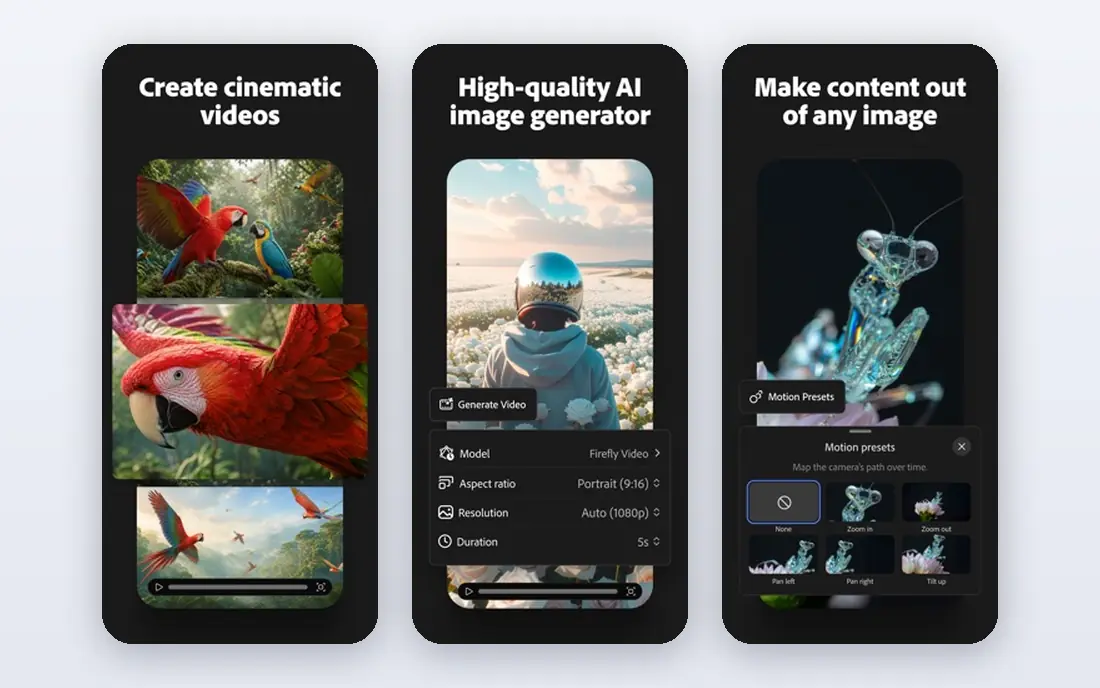
Adobe Firefly is built for designers who need to show a client where an image came from and whether it can be used commercially. Adobe trains Firefly on licensed content and offers commercial protections for eligible workflows, which reduces legal uncertainty for marketing work. Integration with Photoshop means generated images can be edited, extended and composited without leaving the Adobe workflow.
The trade off is style. Firefly can feel more controlled and less surprising than Midjourney, which some artists will see as a limit and others as a benefit for brand work. A free tier with monthly credits lets a user test it, while paid plans from $9.99 per month in third party summaries add more credits and features.
- Trained on licensed content for commercial use
- Deep Photoshop and Express integration
- Clear commercial protections for eligible work
- Artistic range can feel more restrained than Midjourney
- Credit limits apply on lower plans
Leonardo AI suits creators making many related images, such as game characters, items, environments and marketing assets. Fine tuning, consistent styles and image guidance help keep a set coherent, which is harder when each image is generated in isolation. The interface is built around production, not just one off experiments.
The free tier gives daily tokens, but serious volume needs a paid plan from $12 per month in third party summaries. New users should test token costs on a small set before committing to a large project. For game and design asset work, Leonardo is a strong specialist pick.
- Strong asset workflows for games and design
- Fine tuning and consistent character tools
- Daily free tokens
- Token system needs learning
- Higher volume work moves to paid tiers quickly
Ideogram stands out where text must be correct. Posters, book titles, logos, social graphics and product labels all depend on spelling and layout, and Ideogram handles those tasks better than most art tools. Its editing models also help refine an image without starting again.
For pure painterly illustration, Midjourney still leads. For a creator who makes posters, thumbnails and branded graphics every week, Ideogram saves time that would otherwise go to fixing text in an editor. Paid plans from $8 per month in third party summaries add priority generations and higher limits.
- Excellent text rendering for posters and logos
- Layout aware generation
- Free tier for testing
- Less artistic range than Midjourney for pure illustration
- Paid plans needed for priority speed
NightCafe lets a creator compare models without managing separate subscriptions. A single prompt can be tried across different engines, and daily free credits cover casual experiments. Community challenges and galleries also help new users learn prompt styles by seeing what others made.
Credit math is the catch. Different models cost different amounts, so a free tier can run out fast on premium models. Paid plans from $5.99 per month in older pricing summaries, with higher tiers in newer summaries, add credits and faster access. Check the current NightCafe pricing page before budgeting a project.
- Many models in one studio
- Daily free credits
- Community challenges and galleries
- Credit costs vary by model, so budgeting takes care
- Premium models sit behind paid tiers
starryai is built for phone first creators. A user can start free, type a prompt, choose a style and get an image without a desktop setup. Paid plans add Lumens, fast generations and upscaling, with Starter listed at $12 per month in third party summaries. That structure suits social creators who make art on the move.
Desktop professionals may want more control, batch tools and plugin depth. For a mobile creator, though, the simple flow is the point. Check the current plan page, because starryai has changed plan names and prices across 2026 summaries.
- Mobile apps for iOS and Android
- Free creation to start
- Upscaling and fast generation options on paid plans
- Mobile focus limits desktop workflow depth
- Canvas options vary by plan
WOMBO Dream turns a prompt or a photo into stylized art in seconds, with styles from watercolor and anime to cyberpunk and oil painting. It also offers photo to art and short video features, which suit social posts and quick experiments. The free start makes it easy to test without a subscription.
The free experience is casual by design. Serious creators who need consistent characters, precise text or commercial terms should use Midjourney, Firefly or Ideogram for client work. WOMBO Dream is best for fast ideas, gifts and social visuals, with paid options checked in app before use.
- Free to start
- Many art styles for photos and prompts
- Video and photo to art features
- In app purchases vary widely
- Free experience is more casual than a professional tool
Canva is the pick when the generated image is only part of the job. A creator can generate an image, add text, adjust layout and export a social post, flyer or presentation in one place. That workflow saves time for small businesses and social teams who do not want to move files between tools.
Specialist art quality still leads elsewhere, and Canva credits limit free generation. For marketing visuals where layout, branding and speed matter as much as the image itself, Canva is the most practical all in one choice, with Pro listed at $12.99 per month in third party summaries.
- AI generation inside a full design suite
- Templates for social, print and presentations
- Easy text and layout editing
- Generation is one feature among many, not a specialist art engine
- Credit limits apply
How we picked these
We compared official product pages, pricing pages and app store listings, plus third party pricing summaries for October 2026 where plans changed during the year. We kept only tools that are live now, that generate original art from prompts or user supplied images, and that publish clear terms for personal or commercial use. Where pricing differed across summaries, we used See website logic in the text and the most widely reported starting figure in the table, and we advise checking the vendor page before purchase.
How to choose and use AI art safely
Start with the end use. For a poster with text, pick Ideogram or ChatGPT. For a painterly illustration, pick Midjourney. For client marketing, pick Firefly or Canva. For many related assets, pick Leonardo. Test each tool with the same three prompts: a portrait, a poster with text, and a scene in your preferred style. That small test reveals more than a feature list.
Use AI art responsibly. Only generate art from your own prompts and images, never a real person without consent, and do not use a tool to imitate a living artist's work for commercial gain. Check the license for your plan, keep prompts and outputs for client records, and be honest with clients and audiences when an image is AI generated and that matters to them.
Frequently asked questions
What is the best ai generated art app?
Midjourney is best for artistic quality, ChatGPT is best for prompt accuracy and text, and Adobe Firefly is best for commercial client work. The right pick depends on whether you need beauty, accuracy or legal clarity most.
What is the best free ai generated art app?
NightCafe, starryai, WOMBO Dream, Ideogram and Canva all offer free tiers, but credits and queues limit them. For regular free use, NightCafe daily credits and Canva free credits are practical starting points, with paid plans for steady work.
What are the best ai generated art tools for beginners?
WOMBO Dream and Canva are the easiest to start with, because prompts and styles are simple and results are fast. ChatGPT is also beginner friendly for users who already use it for writing or questions.
Can I sell AI generated art?
Often yes on paid plans, but terms vary by tool and plan, and free tiers may restrict commercial use or keep images public. Check the current terms for your plan, and use Firefly for the clearest commercial position on client work.
Which AI art app is best for text in images?
Ideogram and ChatGPT image generation handle text most reliably in our comparison. Midjourney has improved, but posters and logos still need checking, and a design tool like Canva helps fix layout after generation.
Do AI art apps work on phones?
Yes, starryai and WOMBO Dream are mobile first, and Midjourney, NightCafe, Leonardo and Canva all work on mobile browsers or apps. For long production sessions, a desktop browser is usually more comfortable.
Sources
See where you really rank - block by block
ProMapRanker scans Google Maps across a grid of your service area. Simple monthly plans from $19, white-label on every plan.
Start freeKeep reading
 zscaler alternatives
Best Zscaler Alternatives in 2026
Looking for zscaler alternatives? We compare 9 SASE and zero trust platforms on architecture, data protection, pricing, and fit for your network and team.
Read → zapier alternatives free
Best Zapier Alternatives Free in 2026
Nine automation tools for zapier alternatives free in 2026, all with genuinely free tiers, plus free plan limits, starting prices and upgrade paths explained.
Read → which platform is best for online reputation
Which Platform Is Best for Online Reputation in 2026
Wondering which platform is best for online reputation? We compare 8 review, listing, and response tools for small and multi-location businesses and agencies.
Read →