 ProMapRanker
Adobe Premiere Pro Alternatives in 2026


Professional editing and colour on a budget · Pricing starts at: Free
Key takeaways
- DaVinci Resolve is the strongest free starting point, and its $295 Studio licence is a one-time purchase, not a subscription.
- Final Cut Pro at $299.99 one-time is the best value for Mac owners who want a fast, professional editor without monthly payments.
- CapCut and Filmora suit short social videos, while VEGAS Pro, PowerDirector, and Lightworks suit longer desktop projects.
- Shotcut and Kdenlive cost nothing and export without a watermark, which makes them ideal for learning before you pay for anything.
Quick comparison
| Pick | Great for | Pricing starts at | Free tier | |
|---|---|---|---|---|
| DaVinci Resolve | Professional editing and colour on a budget | Free | Yes | Visit |
 Final Cut Pro | Mac editors who buy once | $299.99 one-time | Free trial (90 days) | Visit |
 CapCut | Short-form social video | Free | Yes | Visit |
 Filmora | Template-driven creators | $49.99 per year | Yes | Visit |
 VEGAS Pro | Windows editors wanting a perpetual licence | $219.95 one-time | Free trial | Visit |
 PowerDirector | Fast, feature-packed editing | $59.99 per year | Yes | Visit |
 Lightworks | A pro editor with a free tier | Free | Yes | Visit |
 Shotcut | Zero-budget open-source editing | Free | Yes | Visit |
 Kdenlive | Free editing on Windows, Mac, and Linux | Free | Yes | Visit |
The best Adobe Premiere Pro alternatives
Premiere Pro itself is not listed here, since this is an alternatives guide. Each editor below replaces it for a different kind of project, from phone-first social clips to full professional timelines.
DaVinci Resolve is the first alternative most editors should try. The free version includes editing, node-based colour grading, Fusion visual effects, and Fairlight audio, with exports up to 3840 by 2160 at 60 frames per second. Studio costs $295 as a one-time licence and adds higher resolutions, advanced noise reduction, multi-GPU support, and a wider set of AI tools.
The honest catch is hardware and time. Resolve asks more of your graphics card than CapCut or Filmora, and its colour page rewards study. If you have a capable computer and you edit regularly, the free version alone beats many paid editors. If you edit only short clips on a modest laptop, a lighter tool will feel faster.
- Full editor, colour tools, Fusion effects, and Fairlight audio in the free version
- Exports up to 4K UHD without a watermark
- Demanding on hardware
- Learning curve is steeper than simpler editors
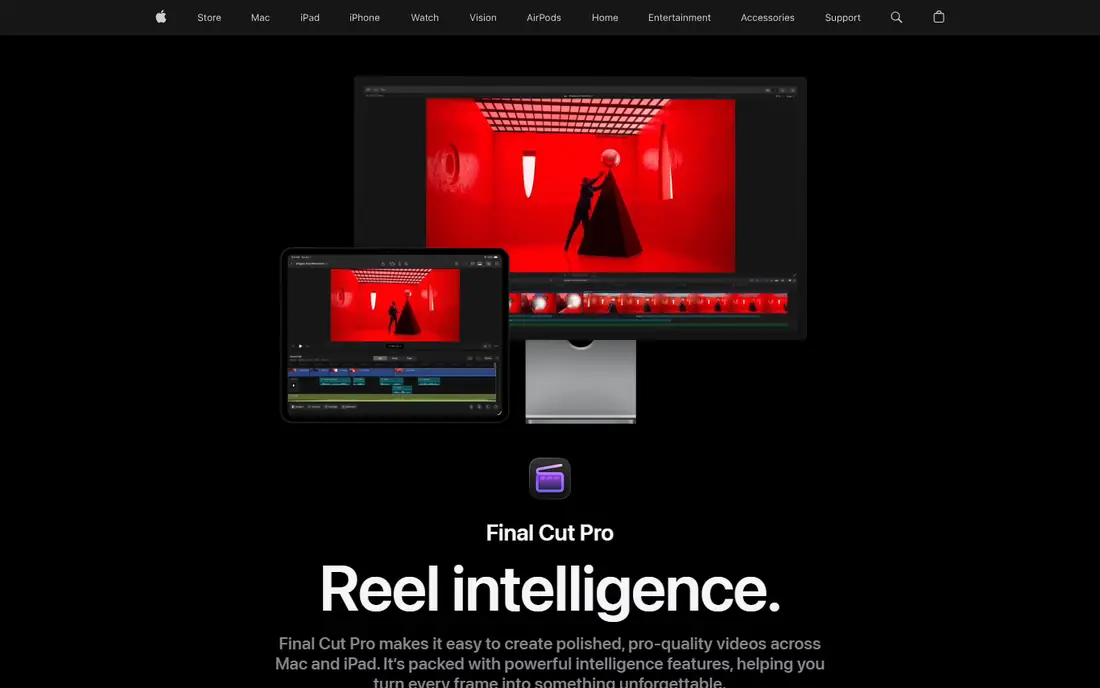
Final Cut Pro costs $299.99 as a one-time purchase on the Mac App Store, with a 90-day free trial. It is built for Apple hardware, so playback and export on recent Macs are often faster than on comparable Windows editors. The magnetic timeline keeps clips connected as you trim, which suits editors who assemble interviews, documentaries, and YouTube videos quickly.
Windows users cannot use it, and that is the whole decision for many readers. Apple also sells Final Cut Pro through the Apple Creator Studio subscription at $12.99 per month, and some premium content is subscription-only. The standalone purchase still suits Mac owners who dislike subscriptions and want a professional editor they own outright.
- Very fast on Apple silicon
- Magnetic timeline speeds assembly
- One-time purchase with free updates for owners
- Mac only
- Some premium content is reserved for Apple Creator Studio subscribers

CapCut is built for short video. The free desktop and mobile editors cover trimming, captions, effects, and templates, with most exports free of watermarks at up to 1080p. CapCut Pro costs $19.99 per month or $179.99 per year and adds 4K export, a larger AI toolkit, and more effects and cloud storage.
For TikTok, Reels, and Shorts, few editors are faster. For long documentaries or client work with strict licensing needs, a desktop editor such as Resolve, Final Cut Pro, or VEGAS Pro is a safer base. Read the current terms for any asset you plan to use commercially before building a client workflow around CapCut.
- Fast phone-to-post workflow
- Strong templates, captions, and effects
- Free version covers most social edits
- Pro costs $19.99 per month
- Commercial licensing terms need a careful read for client work
Filmora sits between CapCut and a full professional editor. The Basic plan starts at $49.99 per year, with higher tiers adding more AI credits and storage, and a perpetual licence for the current major version is listed at $79.99. Templates, titles, transitions, and stock-style effects help a creator finish a polished video without learning colour nodes or compositing.
The limit is depth. Filmora will not match Resolve for colour control or Final Cut Pro for large-project speed, and its AI credits can run out on heavy months. For YouTube creators, small businesses, and teachers who publish weekly, that trade is usually worth it, because finished videos matter more than fine control.
- Easy timeline and large template library
- Helpful AI tools
- Perpetual licence option for the current version
- Free exports carry a watermark
- AI features use a credit system on paid plans
VEGAS Pro has a long history on Windows, and its timeline still appeals to editors who learned on earlier versions. Current listings show a perpetual licence at about $219.95, with subscription and yearly options also offered, and a free trial for testing. Audio handling is a genuine strength, which helps podcast-style edits and music-led projects.
Newer editors look fresher, and VEGAS Pro does not have the same template and AI ecosystem as Filmora or CapCut. It earns its place here for Windows editors who want to own their editor, work on longer projects, and avoid a monthly bill for the core tool.
- Familiar timeline for long-time Windows editors
- Perpetual licence option
- Strong audio tools
- Windows only
- Interface feels older than newer rivals
PowerDirector 365 starts at $59.99 per year in current listings, with a perpetual Ultimate edition listed at $139.99. It offers several editing modes, from a quick guided mode to a full timeline, plus AI tools for background removal, object detection, and audio cleanup. That range makes it a good bridge from beginner to confident editor.
The Windows version is the fuller product, so Mac buyers should check the current Mac feature list before purchasing. PowerDirector also pushes its subscription harder than its perpetual edition, so confirm which version you are buying if you want to avoid yearly renewal.
- Guided modes for beginners
- Fast rendering on many Windows PCs
- Large effect and title library
- Best value sits in the yearly plan
- Mac version is more limited than the Windows version
Lightworks has been used on professional productions for decades, and its trimming and timeline controls still feel precise. The free version lets you learn those controls without paying, but exports are capped at 720p, which limits it for publishing. The Create plan starts at $9.99 per month, with a Pro plan at higher cost for full export options.
This is a good pick for an editor who wants professional habits and is willing to learn a distinct interface. It is a poor pick for someone who wants quick templates or social effects, since Lightworks focuses on the cut itself rather than on ready-made looks.
- Professional editing heritage
- Precise trimming tools
- Free version for learning the craft
- Free exports are limited to 720p
- Paid plans start at $9.99 per month
Shotcut is a free, open-source editor built on FFmpeg, which gives it wide format support without licence fees. It offers a multi-track timeline, filters, transitions, and 4K export, all without a watermark or a subscription. For students, volunteers, and small organisations, it removes cost as a barrier to learning video editing.
The interface is plain, and you will build more effects by hand than in Filmora or CapCut. Performance also depends heavily on your computer and on using proxy files for large footage. If you accept those limits, Shotcut is one of the most honest free editors available.
- Free and open source
- No watermark
- Wide format support
- Runs on Windows, Mac, and Linux
- Plain interface
- Fewer templates and AI helpers than paid editors
Kdenlive is another free, open-source editor, with a multi-track timeline, keyframe effects, titling, and proxy editing for smoother playback. It runs on Windows, Mac, and Linux, which makes it useful for mixed-device households and classrooms. The project is maintained by its community, and new versions arrive regularly.
Stability and polish can vary between platforms, so test it with your own footage before committing a large project to it. For editors who want a free tool with more timeline flexibility than the simplest free apps, Kdenlive is a strong second free option beside Shotcut.
- Free and open source
- Multi-track timeline with effects and titles
- Active community and regular updates
- Interface and stability vary by platform
- Fewer built-in templates than commercial editors
How we picked these
We compared official product pages, pricing pages, and app store listings checked in October 2026, and we kept only editors that are still sold or maintained and that can replace Premiere Pro for real projects. We included free, one-time, and subscription options across Mac, Windows, Linux, and mobile, and we left Premiere Pro itself out, as an alternatives list should. Where prices vary by region or promotion, we used the standard US list price and wrote See website only where no reliable standard price was available.
How to choose between free, one-time, and subscription editors
Start with how often you edit. If you edit a few times a year, a free editor such as Resolve, Shotcut, or Kdenlive is enough, and paying monthly for a tool you rarely open is wasteful. If you edit weekly, a one-time purchase such as Resolve Studio or Final Cut Pro usually costs less over two years than a subscription, and you keep the tool even if you pause for a month.
Check your computer before you check the feature list. Resolve and Final Cut Pro reward strong hardware, while CapCut, Filmora, and Shotcut with proxies are kinder to modest machines. Download the trial or free version, import your own footage, and export a finished clip. That single test tells you more than any feature table about speed, stability, and whether the interface suits you.
Match the editor to the video, not the other way round
Short social clips favour templates, captions, and fast export, so CapCut and Filmora win there. Interviews, documentaries, and client work favour precise trimming, colour control, and audio handling, so Resolve, Final Cut Pro, VEGAS Pro, and Lightworks win there. A creator who makes both kinds of video may reasonably keep two editors, one for speed and one for depth, rather than forcing one tool to do both jobs badly.
Frequently asked questions
What is the best alternative to Adobe Premiere Pro?
DaVinci Resolve is the best general alternative, because its free version is already professional grade and Studio is a one-time purchase. Final Cut Pro is the best alternative for Mac owners, and CapCut is the best alternative for short social video.
Are there free Premiere Pro alternatives?
Yes. DaVinci Resolve, Shotcut, and Kdenlive are free, and CapCut and Filmora offer free versions, although Filmora free exports carry a watermark. Lightworks also offers a free version, but its free exports are limited to 720p.
Is DaVinci Resolve better than Premiere Pro?
For colour grading and for editors who dislike subscriptions, Resolve is often the better choice. For teams already built around Adobe tools, shared projects, and After Effects workflows, Premiere Pro still has practical advantages, which is why many professionals keep both in mind.
What is the cheapest Premiere Pro alternative that still feels professional?
Shotcut and Kdenlive cost nothing, while DaVinci Resolve Studio at $295 one-time is the cheapest professional-grade paid option in this list. Final Cut Pro at $299.99 one-time is close in price for Mac owners.
Can I edit 4K video in a free alternative?
Yes. DaVinci Resolve free exports up to 4K UHD, and Shotcut and Kdenlive support 4K projects, subject to your computer hardware. CapCut free is capped lower for most exports, and Lightworks free is capped at 720p, so check export limits before you start a 4K project.
Sources
- https://www.blackmagicdesign.com/products/davinciresolve
- https://www.apple.com/final-cut-pro/
- https://www.capcut.com
- https://filmora.wondershare.com
- https://www.vegascreativesoftware.com
- https://www.cyberlink.com/products/powerdirector-video-editing-software
- https://lwks.com
- https://shotcut.org
- https://kdenlive.org
See where you really rank - block by block
ProMapRanker scans Google Maps across a grid of your service area. Simple monthly plans from $19, white-label on every plan.
Start freeKeep reading
 zscaler alternatives
Best Zscaler Alternatives in 2026
Looking for zscaler alternatives? We compare 9 SASE and zero trust platforms on architecture, data protection, pricing, and fit for your network and team.
Read → zapier alternatives free
Best Zapier Alternatives Free in 2026
Nine automation tools for zapier alternatives free in 2026, all with genuinely free tiers, plus free plan limits, starting prices and upgrade paths explained.
Read → which platform is best for online reputation
Which Platform Is Best for Online Reputation in 2026
Wondering which platform is best for online reputation? We compare 8 review, listing, and response tools for small and multi-location businesses and agencies.
Read →