 ProMapRanker
Best Timely Alternatives in 2026

Key takeaways
- Timely is known for automatic activity capture and AI-drafted timesheets, so the closest alternatives either automate capture or make manual timers painless.
- Free tiers differ a lot: Clockify covers unlimited users free, while Toggl Track and Harvest limit free plans to small teams or single users.
- If you bill clients, shortlist tools with invoicing and budget alerts built in rather than adding a separate billing tool later.
- Teams that need proof of work should weigh screenshot and activity features against staff trust, since monitoring tools change the team dynamic.
Quick comparison
| Pick | Great for | Pricing starts at | Free tier | |
|---|---|---|---|---|
 Toggl Track | Simple timers and reports | $9 per user per month | Yes | Visit |
 Clockify | Free tracking for large teams | Free | Yes | Visit |
 Harvest | Time tracking with invoicing | $11 per seat per month | Yes | Visit |
 RescueTime | Automatic productivity insight | See website | Free trial | Visit |
 Hubstaff | Tracked time with verification | $4.99 per seat per month | Free trial | Visit |
 TimeCamp | Low-cost automatic tracking | $3.99 per user per month | Yes | Visit |
 Everhour | Tracking inside project tools | $10 per user per month | Free trial | Visit |
 TrackingTime | Simple team timesheets | See website | Yes | Visit |
 My Hours | Straightforward freelance billing | $8 per user per month | Yes | Visit |
The best timely alternatives
Timely records app and document activity in the background, then drafts timesheets from that activity for the user to approve. It suits people who forget to start timers and teams that want timesheets without nagging. The apps below take different routes to the same result: one-click timers, automatic capture, or tracking built into project work. We compared official feature pages, pricing pages, app store listings and public reviews to build this list.

Toggl Track is the easiest timer in this list to adopt. One click starts tracking, browser extensions put the timer inside tools such as Asana, Trello and GitHub, and reports break time down by project and client without fuss. Teams that failed with heavier tools often succeed here because the daily habit is so light.
The limits show up when billing gets serious. Toggl Track has no built-in invoicing, so freelancers must export time to another tool to bill. The free plan covers up to 5 users, which suits small teams but not larger ones. It is our pick for teams that want accurate time data first and will handle billing elsewhere.
- One-click timer that people actually use
- Browser extensions for many tools
- Clear project reports
- Free plan limited to 5 users
- No built-in invoicing
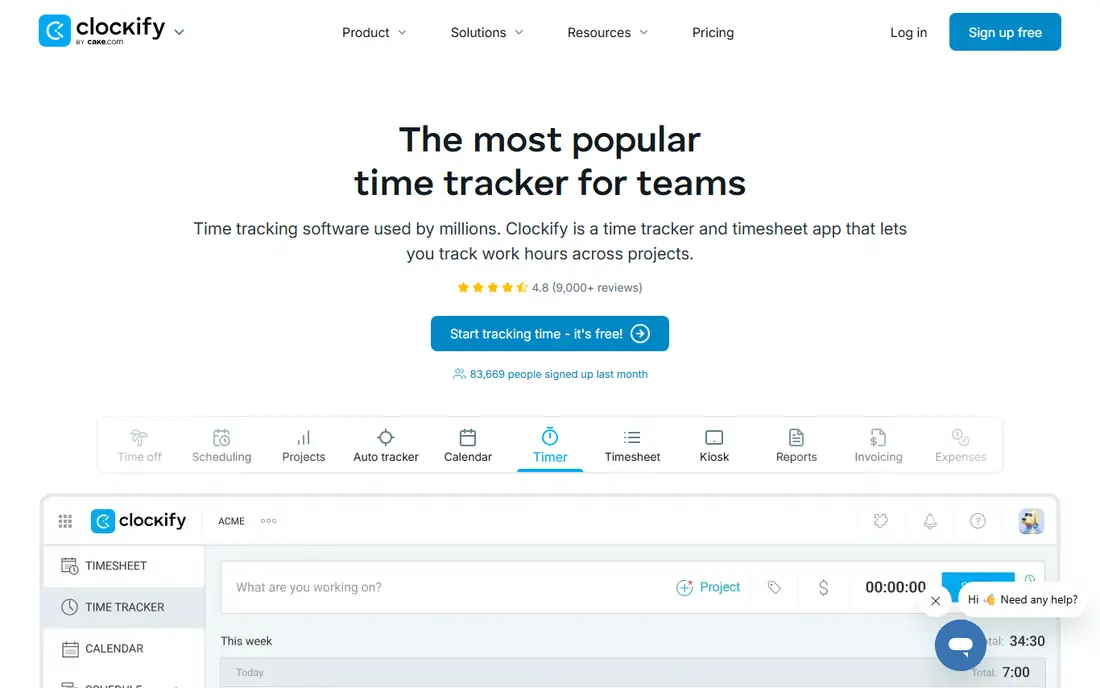
Clockify wins on value. Its free plan covers unlimited users, unlimited projects and unlimited tracking, which no other tool here matches. A team of twenty can track time properly without paying anything, and paid tiers from around $3.99 per seat per month add approvals, scheduling and advanced reporting.
The trade-off is polish. Clockify's interface feels plainer than Toggl Track, and its automatic tracking features are less central than Timely's. If budget is the deciding factor, or your team is larger than five people, Clockify is the obvious starting point. Upgrade only when you need approvals or scheduling.
- Free plan covers unlimited users and projects
- Timers, timesheets and calendar views
- Affordable paid tiers
- Interface is less polished than Toggl
- Automatic tracking is limited on the free plan

Harvest is built for people who bill by the hour. Track time, add expenses, then turn tracked time into a professional invoice that clients can pay through Stripe or PayPal. Budget alerts warn you when a project approaches its hours or cost limit, which helps agencies avoid unpaid overwork.
The free plan is narrow, with one seat and two projects, so most working freelancers need the paid plan. Harvest also lacks automatic capture, so it suits people willing to run a timer. If invoicing is half the job, Harvest saves a tool and a monthly export routine.
- Timers plus invoicing and expenses in one tool
- Budget alerts
- QuickBooks and Xero sync
- Free plan limited to 1 seat and 2 projects
- Paid plan costs more than Clockify
RescueTime takes the automatic route further than most tools here. It runs in the background, categorises app and website activity, and shows where the day actually went. Focus sessions and distraction blocking help individuals protect deep work time, and weekly summaries make patterns visible without manual logging.
RescueTime is weaker for client billing, since it tracks activity rather than project timesheets with billable rates. It fits individuals and knowledge workers who want to understand their own habits, including Timely users who liked automatic capture but do not need team timesheets. Try it solo before rolling it out to a team.
- Fully automatic activity capture
- Weekly summaries and focus tools
- No timer habit needed
- Aimed at personal productivity, not client billing
- Paid plans cost more than simple timers
Hubstaff suits teams where verification is an operational requirement, such as remote contractors, field teams and outsourced services. Screenshots, app and URL tracking, GPS and payroll automation give managers proof of work alongside timesheets. Scheduling and shift tools extend it into workforce management.
Those same features are the risk. Screenshot monitoring changes how a team feels about tracking, so agree the policy with staff before switching it on, and use the lightest verification that meets the need. Hubstaff is a strong tool for its niche, but it is the wrong pick for a team that only wants simple timesheets.
- Screenshots, GPS and activity levels for verification
- Payroll and scheduling included
- Many report types
- Monitoring features can harm trust if handled poorly
- Minimum seat counts apply on some plans
TimeCamp is the budget automatic option. Its desktop app tracks activity by keyword and project, so much of the timesheet fills itself in, and the free plan covers unlimited users and projects. Paid plans from around $3.99 per user per month add billing rates, invoicing and attendance features at a price well below Timely.
TimeCamp's mobile experience lags its desktop app, which matters for field teams. It also lacks the AI-drafted timesheet polish that makes Timely feel effortless. For desk-based teams that want automatic capture without a premium price, TimeCamp is a sensible compromise.
- Automatic keyword-based tracking
- Free plan for unlimited users and projects
- Basic invoicing included
- Mobile app is weaker than desktop
- Interface feels dated in places
Everhour puts the timer where the work already happens. Its browser extension adds time tracking, estimates and budgets inside Asana, Trello, ClickUp, Monday and similar tools, so teams do not need to switch apps to log time. Budgets, billable rates and cost reports turn tracked hours into project profitability data.
Everhour makes little sense as a standalone tracker, since its value depends on a supported project tool. It also has no permanent free plan, only a trial. If your team already lives in Asana or Trello and wants time data without a second system, Everhour is the tidiest fit in this list.
- Timer inside Asana, Trello, ClickUp and more
- Budgets and cost tracking
- Clean reports
- No permanent free plan
- Best value only if you already use a supported project tool
TrackingTime keeps team time tracking simple. Staff run timers or enter time against projects and tasks, managers review timesheets, and integrations connect it to tools such as Asana, Trello and Slack. The free plan suits small teams testing whether structured tracking helps at all.
Larger teams may outgrow its reporting, which is simpler than Toggl Track or Harvest at comparable prices. TrackingTime fits small teams that found other tools too busy and want a calm, straightforward timesheet tool. Confirm the paid price for your team size, since plans vary by seats and features.
- Simple timers and timesheets for teams
- Project and task organisation
- Integrations with common tools
- Smaller feature set than larger rivals
- Reporting is basic on lower plans
My Hours is a quiet favourite among freelancers. It combines timers, timesheets and invoicing with support for different billing rates per client or project, which matters when one client pays hourly and another pays a flat project rate. The free plan covers small teams, and the paid plan stays affordable.
My Hours has fewer integrations than Toggl Track or Harvest, so teams with complex tool stacks should check connectors first. It also leans on manual timers rather than automatic capture. For a solo freelancer or small studio that bills from tracked time, it covers the essentials without clutter.
- Simple timers with multi-rate billing
- Invoicing included
- Free plan for small teams
- Fewer integrations than larger tools
- Automatic tracking is limited
How we picked these
We compared official feature pages, pricing pages, app store listings and public reviews for time tracking tools that replace Timely's core jobs: capturing time, building timesheets and reporting on projects. We kept only tools that are live and actively sold in October 2026, and we included both automatic and manual options because teams differ on how much automation they trust. Where pricing varies by billing period, we used annual billing figures from vendor pages.
What to check before you switch
Decide first whether you need automatic capture or will accept a timer habit. Automatic tools suit people who forget timers, while manual timers give cleaner project data for billing. Next, check how time flows into invoices and payroll: a tool that exports cleanly to your accounting system saves hours every month.
Also agree the monitoring policy before choosing a tool with screenshots or activity tracking. Staff trust is hard to rebuild once a monitoring rollout goes badly. Finally, run a two-week trial with your real projects and clients, and check whether timesheets at week two are more accurate than week one. That trend tells you more than any feature list.
Frequently asked questions
Is there a free alternative to Timely?
Yes. Clockify offers a free plan with unlimited users and projects, and TimeCamp and My Hours also offer free plans. Timely itself is trial-only on most plans, so free alternatives can save a meaningful amount for small teams.
Which Timely alternative has automatic time tracking?
RescueTime and TimeCamp offer automatic activity capture, with TimeCamp adding project-based timesheets. Toggl Track and Clockify focus on manual timers, though both offer some background features on paid plans.
What is the best Timely alternative for freelancers?
Harvest suits freelancers who bill clients directly, since invoicing and expenses are built in. Toggl Track suits freelancers who invoice separately, and My Hours suits those who need different billing rates per client.
Do these tools work for remote teams?
Yes, with different emphases. Clockify and Toggl Track suit remote teams that want simple tracking, while Hubstaff adds verification features such as screenshots and GPS for teams that need proof of work.
Can I import my Timely data into another tool?
Most tools here support CSV import for projects, clients and time entries, though the exact mapping varies. Export a sample from Timely first and test the import before moving your full history.
Sources
See where you really rank - block by block
ProMapRanker scans Google Maps across a grid of your service area. Simple monthly plans from $19, white-label on every plan.
Start freeKeep reading
 zoho books alternatives
Best Zoho Books Alternatives in 2026
Compare the best zoho books alternatives for small business accounting, from QuickBooks Online and Xero to FreshBooks, Wave, and Sage in 2026, with pricing.
Read → zluri alternatives
Best Zluri Alternatives in 2026
Compare zluri alternatives for 2026, with SaaS management platforms for app discovery, spend tracking, renewals, and automation for IT, finance and procurement.
Read → zerobounce alternatives
Best ZeroBounce Alternatives in 2026
Best zerobounce alternatives for list hygiene: compare 8 email verification tools for bulk cleaning, real-time checks and catch-all handling in 2026 today.
Read →