 ProMapRanker
Best Pedometer Apps in 2026

Key takeaways
- Pacer is our pick for most people because it counts steps well, adds walking groups and plans, and works without a wristband.
- StepsApp is the best simple option for Apple users who want a clean daily step view without a busy fitness dashboard.
- Google Fit and Samsung Health are the best free starting points, since they are already on many Android phones and need no extra purchase.
- Apple Health is the best built-in option for iPhone owners, because it collects steps quietly in the background.
- Fitbit is the best choice when you also want a wearable, sleep data, and a wider health picture in one app.
Quick comparison
| Pick | Great for | Pricing starts at | Free tier | |
|---|---|---|---|---|
 Pacer Pacer | Most walkers who want groups and plans | Free | Yes | Visit |
 StepsApp StepsApp | Simple daily step tracking on iPhone | Free | Yes | Visit |
 Accupedo Accupedo | A simple widget and history view | Free | Yes | Visit |
 Google Fit Google Fit | Free step tracking on Android | Free | Yes | Visit |
 Samsung Health Samsung Health | Samsung phone owners who want more health data | Free | Yes | Visit |
 Apple Health Apple Health | iPhone owners who want built-in tracking | Free | Yes | Visit |
 Fitbit Fitbit | Walkers who also use a Fitbit device | Free | Yes | Visit |
 Pedometer++ Pedometer++ | A clean iPhone step counter with no fuss | Free | Yes | Visit |
The best pedometer apps
A good step counter should do one job well: count your steps without draining your battery or asking you to open the app all day. The apps below all do that, but they differ in extras, design, and the devices they work with. Step counts are estimates for general activity tracking, not medical measurements, and accuracy varies by phone, pocket position, and walking style. We compared them on free features, ease of use, history views, and device support.

Pacer turns your phone into a step counter that works whether the phone is in your hand, pocket, or bag. It tracks steps, distance, calories, and active time, and it shows trends over days and weeks so you can see how your walking compares with last month. The free step counting is the core of the app, and you do not need a website login to start.
Groups and events are what set Pacer apart. You can walk with friends and family, join challenges, and follow daily exercise plans for different goals. That social layer helps when motivation fades, though the paid plans sit behind a subscription. For most walkers, Pacer is the best balance of free counting and useful extras.
- Free step counting with no wristband needed
- Groups and challenges for motivation
- Syncs with Fitbit and Garmin
- Some plans and guided workouts need a paid upgrade
- Ads and upsells appear in the free version
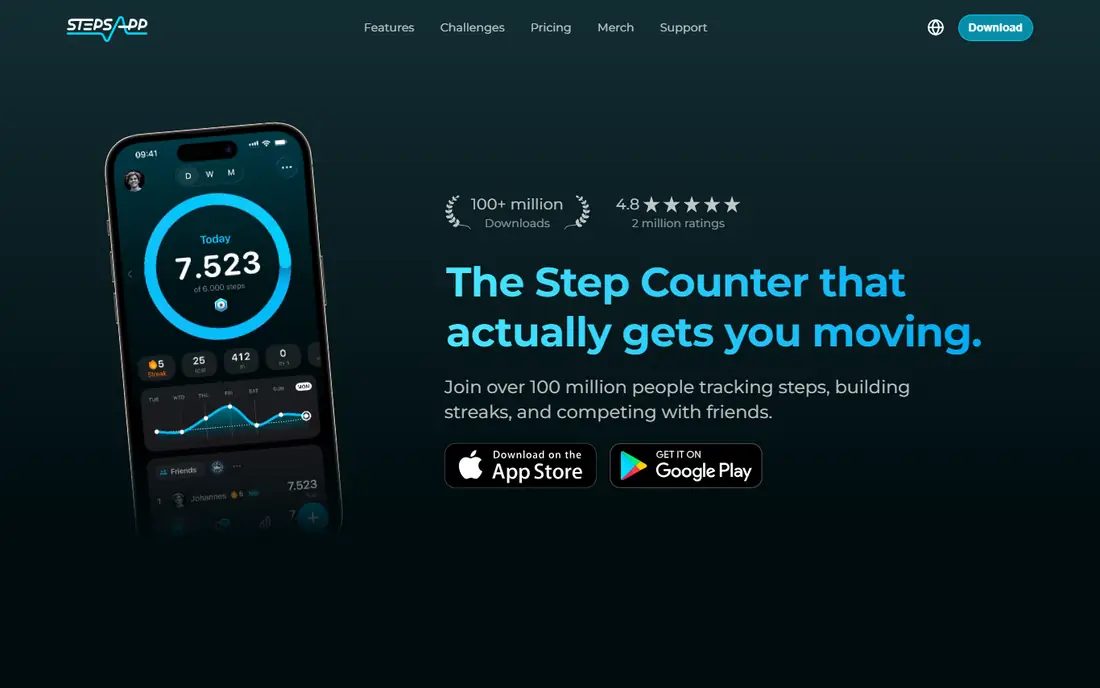
StepsApp keeps the focus on steps. Open it and you see your daily count, your progress toward a goal, and a simple history, without a crowded fitness dashboard. That simplicity is welcome when you only want to know whether you hit your target today. It reads steps from Apple Health, so it works quietly in the background on an iPhone.
The trade-off is scope. StepsApp does not offer the groups, challenges, or guided plans that Pacer does, and it is not the best pick for Android users. If you want a step counter that stays out of the way and looks good doing it, StepsApp is an excellent choice. If you want coaching and community, look at Pacer or Fitbit instead.
- Clean and simple design
- Daily, weekly, and monthly views
- Works with Apple Health
- Fewer social and training features than Pacer
- Best experience is on Apple devices
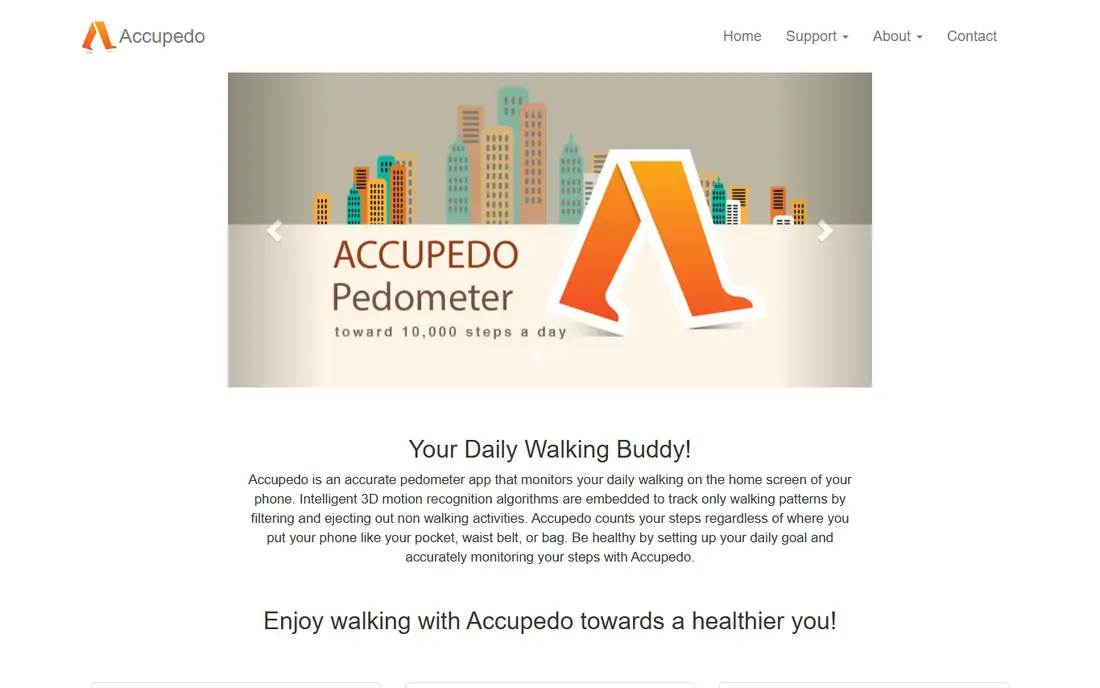
Accupedo is a straightforward pedometer that has been around for years, and it still does the basic job well. It counts steps, shows distance and calories, and offers a home-screen widget so you can check your count without opening the app. History views let you compare days and weeks at a glance.
Accupedo does not try to be a full fitness platform. There are no walking groups, no guided plans, and fewer device integrations than Pacer or Fitbit. For a user who wants a simple counter and a widget, that restraint is a plus. For a user who wants motivation and training, it will feel thin.
- Clear widget for the home screen
- Simple daily history and charts
- Light on battery for basic use
- Design feels older than newer apps
- Fewer social features and integrations
Google Fit is the default step counter for many Android owners, and its strength is simplicity. It tracks steps, distance, and active minutes, and it turns activity into two simple goals: Move Minutes and Heart Points. That framing helps when a step goal alone feels too narrow, because a brisk walk counts for more than a slow stroll.
Google Fit does not offer the groups, challenges, or detailed training plans of Pacer, and its future development has been quieter than in past years. Still, for an Android owner who wants free counting without a new app account or a paid plan, Google Fit is the easiest starting point. It also syncs with many third-party apps, so your steps can feed other tools you already use.
- Free and already on many Android phones
- Simple Heart Points and Move Minutes goals
- Syncs with many apps
- Fewer social features than Pacer
- Google has reduced its focus on Fit in recent years
Samsung Health is more than a pedometer, but step counting sits at its core. It records steps, distance, and active time, and it adds sleep, weight, food, and workout records in the same app. For a Samsung phone owner, that breadth means one app for daily health data instead of several separate counters.
The catch is device fit. Samsung Health works best on Samsung phones and watches, and some features depend on your model and region. If you own a Samsung device, it is the natural free pick. If you use another Android phone, Google Fit or Pacer will feel more at home.
- Free step tracking plus sleep, weight, and activity records
- Works well with Samsung watches
- Clean daily summary
- Best experience needs a Samsung phone or watch
- Some features vary by device and region
Apple Health is the quiet option in this list. It is already on every iPhone, it counts steps using the phone motion sensors, and it stores that data in one place where other apps can read it with your permission. You do not need to open it daily, and you do not need a subscription to see your step history.
Apple Health alone is not a walking community. It has no groups, challenges, or guided plans, so most users pair it with an app like StepsApp, Pacer, or Pedometer++ for a better daily view. As a built-in counter and a data hub, though, it is hard to beat, because it costs nothing and works without extra setup.
- Built into every iPhone at no cost
- Counts steps in the background
- Central place for health data from many apps
- No social challenges or guided plans on its own
- IPhone only
Fitbit started as a wearable company, and its app still shines brightest with a Fitbit tracker or watch on your wrist. With a device, you get steps, distance, sleep, heart rate, and active minutes in one dashboard, plus challenges with friends and long-term trends. Without a device, the app can still count steps from your phone, but that is not its main strength.
A paid Premium plan adds deeper insights, guided programs, and more detailed reports, while the free app covers the basics. If you already own a Fitbit, or you plan to buy a wearable, the Fitbit app is the obvious hub. If you only want phone counting, Pacer or StepsApp will feel simpler and cheaper.
- Step counting plus sleep, heart rate, and activity data with a device
- Strong community challenges
- Long history views
- Best features need a Fitbit device or a paid Premium plan
- Phone-only counting is less central than in Pacer
Pedometer++ is the minimalist pick for iPhone owners. It shows your steps, your daily goal, and a simple history, and it does little else. That focus is refreshing when other fitness apps push plans, challenges, and subscriptions on every screen. Basic counting needs no account, and the app stays light on your phone.
The limit is obvious: Pedometer++ does not offer groups, training plans, or wearable data. It is a counter, not a fitness platform. For an iPhone owner who wants the best free step counter app in the simplest form, it is a strong choice. For anyone who wants motivation or coaching, Pacer is the better pick.
- Very simple interface focused on steps
- Daily and weekly history
- No account needed for basic counting
- IPhone only
- Few extras beyond step counting and basic history
How we picked these
We compared official app listings, feature pages, and public reviews for step counter apps that exist and work today, and we kept only apps that truly count steps from a phone or a paired wearable. We favored free step counting, clear history views, and honest limits, and we included built-in options alongside standalone apps so both iPhone and Android owners have a good starting point. Prices quoted here are entry prices found in October 2026, and they can change, so check the app listing before you buy a paid plan. We did not claim hands-on testing we did not do; our comparison rests on vendor documentation, app listings, and public user feedback.
How to choose the right step counter
Start with your phone. iPhone owners can begin with Apple Health plus StepsApp or Pedometer++, while Android owners can begin with Google Fit or Samsung Health. That built-in start costs nothing and tells you whether phone counting is accurate enough for your daily routine. If the count feels low, check that the app has permission to run in the background and that battery-saving settings are not closing it.
Next, decide whether you need motivation or just a number. A simple counter is enough when walking is already a habit. Groups, challenges, and plans help when you need a reason to walk on a busy day. Try the free version for two weeks before paying for a premium plan, and judge it by whether you walk more, not by how many features it lists.
Improve accuracy without buying anything
Carry your phone in a pocket or bag rather than holding it loosely, and keep it with you during walks you want counted. Short indoor steps are the hardest for any phone to catch, so do not judge an app by a single trip to the kitchen. Compare a few days of counts, not a single hour, and pick the app whose trend matches how active you felt.
When a wearable makes sense
A wrist wearable counts steps when your phone stays on a desk, and it adds sleep and heart rate data that a phone cannot measure well. That matters for walkers who work at a desk, or who want a fuller health picture. If you walk mainly with your phone in your pocket, a wearable is a nice extra, not a need.
Frequently asked questions
What is the best free step counter app?
Pacer is the best free step counter app for most people, because its free tier covers step counting, distance, calories, and trends without a wristband. Google Fit and Apple Health are also free and built into many phones. Paid plans add plans and deeper insights, but basic counting should not require payment.
What is the best steps tracker app for iPhone?
StepsApp and Pedometer++ are the best simple iPhone step trackers, while Apple Health provides the built-in counting underneath them. Pacer is the best iPhone option when you also want groups and challenges. All three read steps from Apple Health, so you can switch between them without losing your history.
What is the best pedometer app for Android?
Google Fit is the best free starting point for Android, and Samsung Health is the best pick for Samsung phone owners. Pacer is the best standalone Android pedometer app when you want groups, plans, and Fitbit or Garmin sync. Accupedo is a good simple alternative with a handy home-screen widget.
Are free pedometer apps accurate?
Phone step counters are reasonably accurate for outdoor walks with the phone in a pocket, but they can miss short indoor steps and vary by phone model. Treat the count as a useful trend rather than an exact total. If accuracy matters for a health goal, compare a few days of data and consider a wrist wearable.
Do I need a Fitbit or smartwatch to count steps?
No. Every app in this list can count steps from your phone alone, and built-in options like Google Fit and Apple Health need no extra device. A wearable helps when your phone stays on a desk, and it adds sleep and heart rate data. Start with your phone, and add a device only if phone counting leaves gaps in your day.
What is the best pedometer app for walking challenges?
Pacer is the best choice for walking challenges, thanks to its groups, events, and shared progress. Fitbit also offers strong challenges, especially when friends already use Fitbit devices. A simple counter like StepsApp or Pedometer++ will not offer the same social motivation.
Sources
See where you really rank - block by block
ProMapRanker scans Google Maps across a grid of your service area. Simple monthly plans from $19, white-label on every plan.
Start freeKeep reading
 zeffy payment processor stripe alternatives
Zeffy and Stripe Alternatives for Nonprofits in 2026
Explore zeffy payment processor stripe alternatives for nonprofits. We compare 8 fundraising platforms on fees, donor tools, and nonprofit focus. Check fees.
Read → workday alternatives
Workday Alternatives in 2026
Workday alternatives compared: we review 8 HR and payroll platforms that replace Workday, with pricing, strengths and honest limits for each team size.
Read → what's the best weather app
What's the Best Weather App in 2026
Wondering what's the best weather app? We compare 10 free and paid apps for forecasts, radar, alerts, and Colorado mountain weather for everyday and storm use.
Read →