 ProMapRanker
Best Lawn Care Invoice Software


Lawn care crews that quote, schedule and invoice in one place · Pricing starts at: $29 per month (billed annually)
Key takeaways
- Yardbook, Wave, Square Invoices and Zoho Invoice all start at $0, so a solo operator can send invoices with no monthly subscription.
- Jobber, Yardbook and GorillaDesk are built for lawn care and field work, with scheduling, routes and recurring invoices in the same system.
- FreshBooks and QuickBooks Online suit owners who want invoicing joined to bookkeeping, expenses and reports in one place.
- Recurring invoices, automatic reminders and card payment fees matter more than the headline price, because they decide how fast cash arrives.
- Check the invoice limit, user limit and payment fee on each plan before you choose, because the cheapest plan can cost more once volume grows.
Quick comparison
| Pick | Great for | Pricing starts at | Free tier | |
|---|---|---|---|---|
| Jobber | Lawn care crews that quote, schedule and invoice in one place | $29 per month (billed annually) | Free trial (14 days) | Visit |
 Yardbook | Solo operators who want free lawn care invoicing | $0 per month | Yes | Visit |
 GorillaDesk | Route-based crews that bill by route and schedule | $49 per route/month | Free trial (14 days) | Visit |
 FreshBooks | Small teams that bill clients and track time | $23 per month | Free trial (30 days) | Visit |
 Wave | Solo owners who want free invoicing and bookkeeping | $0 per month | Yes | Visit |
 Square Invoices | Crews that take card payments in person and by invoice | $0 per month | Yes | Visit |
 Zoho Invoice | Small teams that want free invoicing with reminders | $0 per month | Yes | Visit |
 QuickBooks Online | Owners who want invoicing inside full accounting | $38 per month | Free trial (30 days) | Visit |
The best lawn care invoice software
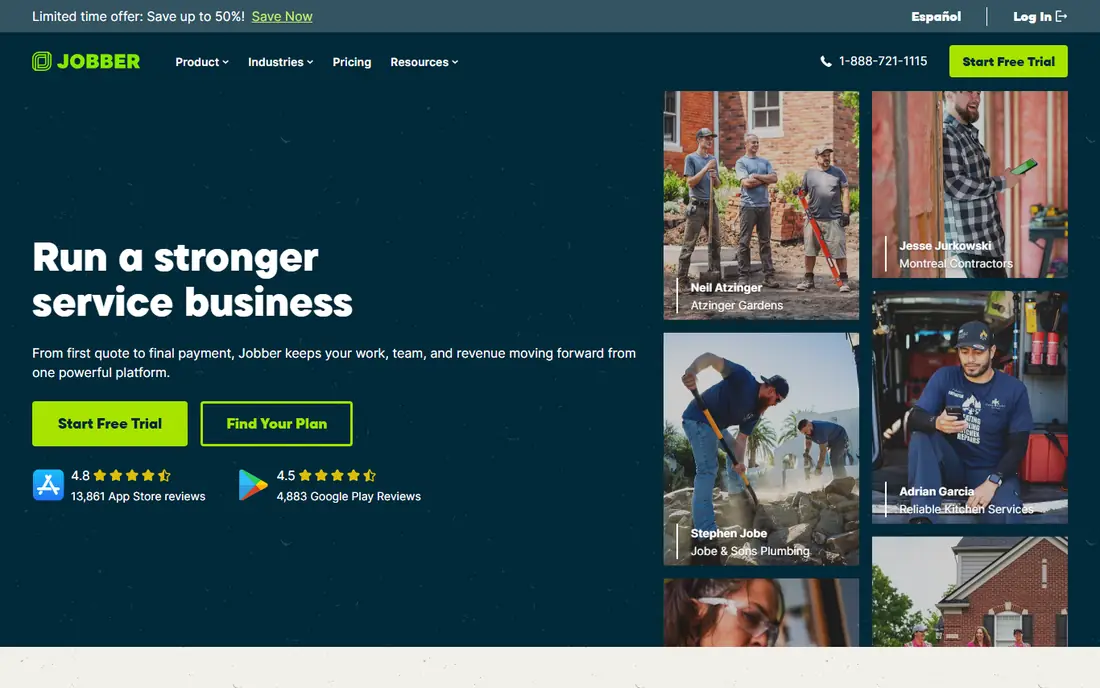
Jobber is a field service system that covers the full job cycle for a lawn care business, from quote to invoice to payment. A crew can create a quote, turn it into a scheduled job, then send an invoice from the same record, which keeps client details, job notes and billing history in one place. Recurring work fits this flow well, because weekly mowing and seasonal treatments can run on a repeat schedule with invoices that follow the same cycle. The mobile app lets a crew leader check the day, mark a job done and send the invoice from the yard.
The Core plan starts at $29 per month when billed annually, or $49 on monthly billing, for one user, and includes quoting, invoicing, scheduling, a client hub and online payments. Higher plans add reminders, QuickBooks Online sync, time tracking, two-way text and job costing. Card payments cost 2.9 percent plus 30 cents, and bank payments cost 1 percent.
- Built for field service work
- Recurring invoices and online payments included
- Core plan covers one user, so extra users add $29 per user each month
Yardbook is lawn care software with a free Starter plan that includes customer records, estimates, scheduling, invoices, routing and expense tracking. That mix makes it a strong first tool for a solo operator who mows a local route and wants to send tidy invoices with no monthly bill. The invoice flow is simple: create the invoice from the job, send it to the client, and take card payments online. Because the free plan has no time limit, a new business can use it for a full season before it spends on a monthly plan.
The Business plan costs $34.99 per month and adds automatic invoice reminders, bulk text and email, GPS tracking and a multi-step chemical program. Enterprise costs $49.99 per month and adds QuickBooks sync and a branded client portal. The free plan shows ads and adds a 1 percent Yardbook fee on online payments, on top of the card processor fee, and that fee disappears on the two monthly plans.
- Free Starter plan includes invoicing, scheduling and routing
- No per-user charge listed
- Free plan shows ads and adds a 1 percent Yardbook fee on online payments

GorillaDesk is field service software for route-based businesses such as lawn care, pest control and pool service. Its pricing follows routes, where one route is one technician schedule, rather than charging per user. That model fits a lawn care crew well, because office staff and extra mobile devices do not add to the bill, and the cost grows only when a new route is added. Invoices, estimates and work orders sit beside scheduling, basic routing, customer records and material tracking.
The Basic plan costs $49 per route each month, or $539 per route each year, and includes scheduling, invoices, estimates, basic routing for up to 25 stops per route, Square and Stripe payments, and automated email and SMS reminders. Pro costs $99 per route each month and adds the Drive Matrix optimizer, QuickBooks Online sync, a customer portal and review generation. Growth costs $149 per route each month. SMS needs a separate $5 monthly number rental plus advance credits.
- Prices by route, not by user
- Unlimited admin users and mobile devices
- SMS messaging costs extra on every plan
FreshBooks is invoicing and accounting software for service businesses, and it fits a lawn care owner who bills by client and wants clear records of who owes what. Every plan includes unlimited invoices, estimates, time tracking and expense tracking, so the invoice count never forces an upgrade. A lawn care business can send a recurring invoice for a weekly mowing client, add a one-off charge for leaf cleanup, and let the client view and pay the invoice through the client portal. Late payment reminders and online card payments help cash arrive sooner.
The Lite plan costs $23 per month and covers up to 5 billable clients, which is too few for most lawn care routes. Plus costs $43 per month and covers up to 50 billable clients, with proposals, retainers, bank reconciliation and double-entry reports. Premium costs $70 per month and removes the client cap. Extra team members cost $11 per month each, and card payments cost 2.9 percent plus 30 cents.
- Unlimited invoices on every plan
- Clean invoice templates and client portal
- Lite plan covers only 5 billable clients, so most lawn care businesses need Plus
Wave is free accounting and invoicing software for solo owners and very small teams. The Starter plan costs $0 and includes unlimited estimates, invoices, bills and bookkeeping records, with no time limit and no invoice cap. That makes it one of the lowest cost ways for a lawn care owner to send professional invoices and keep a clean record of income and expenses. Invoices can carry a logo, accept online card payments, and go out from the mobile app.
The Pro plan costs $19 per month, or $190 per year, and adds automatic bank import, automatic categorization, receipt capture, automated late payment reminders and live support. On Starter, card payments cost 2.9 percent plus 60 cents, and bank payments cost 1 percent. On Pro, the 60 cent fixed fee is waived on the first 10 card payments each month. Wave has no lawn scheduling or routing, so an owner who needs route planning must pair it with another tool.
- Starter plan is free with unlimited invoices
- Includes double-entry bookkeeping
- Automatic bank import and late payment reminders need the Pro plan
Square Invoices is the invoicing part of Square, and it fits a lawn care business that takes payments in person as well as by invoice. A crew can send an invoice from the job site, take a card payment with a reader at the gate, or let the client pay the invoice link online, and all of it lands in one Square account. The free plan includes unlimited invoices, estimates, contracts with e-signature, recurring invoices, deposits and automatic reminders.
The cost sits in the payment fees rather than the subscription. On the free plan, an online card payment costs 3.3 percent plus 30 cents, and an ACH bank payment costs 1 percent with a $1 minimum and no cap. Plus costs $49 per month per location and lowers the online card rate to 2.9 percent plus 30 cents, caps the ACH fee at $10, and adds milestone schedules, batch invoicing and custom templates. A business needs about $12,250 a month in card invoices before the lower rate alone covers the Plus fee.
- Free plan includes unlimited and recurring invoices
- One account for invoices and card readers
- Card fee on the free plan is 3.3 percent plus 30 cents per online invoice payment
Zoho Invoice is free invoicing software with a single free plan and no monthly fee. It includes quotes, recurring invoices, automated payment reminders, expense and time tracking, credit notes and a client portal. A lawn care business can set a weekly mowing client on a recurring invoice, send automatic reminders when a bill goes overdue, and let clients view their balance in the portal. The limits are volume and team size rather than features.
The limits are volume and team size rather than features. The free plan covers up to 500 invoices a year, which is about 41 a month, up to 2 users, and up to 3 projects, and invoices carry Zoho branding. There is no higher Zoho Invoice plan to move to, so a business that outgrows those caps must move to Zoho Billing, which starts at $25 per organization per month when billed annually, or to Zoho Books. Zoho does not process card payments itself, so the card fee depends on the payment gateway connected to the account.
- Free plan includes recurring invoices, reminders and a client portal
- No monthly fee
- Free plan caps use at 500 invoices a year and 2 users, with Zoho branding on invoices
QuickBooks Online
Great for: Owners who want invoicing inside full accounting
QuickBooks Online is cloud accounting software from Intuit, and it fits a lawn care owner who wants invoicing joined to the full books rather than kept in a separate app. Invoices, estimates, bills, bank feeds, income and expense tracking and reports all share one file, so an invoice sent for a mowing job updates the client balance and the income record at the same time. Recurring invoices and online payments are included, and an accountant can access the same books.
The Simple Start plan costs $38 per month for one user and covers invoicing, payments, bank feeds and basic reports. Essentials costs $85 per month for 3 users, Plus costs $140 per month for 5 users, and Advanced costs $340 per month for 25 users. New customers often see 50 percent off for the first three months, then the list price applies, so budget on the list price rather than the intro rate. QuickBooks also sells a free plan for one user with 2 invoices a month, which is too limited for a working lawn care route.
- Invoices, bills, bank feeds and reports share one set of books
- Widely used by accountants
- Simple Start covers one user only, and Essentials, Plus and Advanced rose in price in August 2026
How we chose
We compared vendor pricing pages, feature pages and plan documents for each tool, using prices checked in November 2026. We looked for recurring invoices, automatic reminders, online card and bank payments, estimates that turn into invoices, and a mobile app for billing from the job site. We also checked plan limits that change the real cost, such as client caps, invoice caps, user caps and per-route pricing, plus the card payment fee on each plan. We did not claim hands-on testing, and we did not use third-party ratings or review scores to rank the tools.
What to check before you buy
Start with your invoice volume. Count how many invoices you send in a month, including recurring mowing bills and one-off jobs, then check that number against the plan cap. Zoho Invoice allows 500 invoices a year, FreshBooks Lite allows 5 billable clients, and QuickBooks Online Simple Start covers one user, so a cap that looks fine on day one can block growth by mid-season. Next, check the payment fee on the plan you will actually use, because a free plan with a 3.3 percent card fee can cost more than a $23 monthly plan once card volume rises. Ask how reminders and recurring invoices work, and check the mobile app, because a crew that bills from the yard needs to send an invoice and record a payment from a phone. Finally, check how you export client and invoice records if you switch tools later, and confirm the price at checkout, because intro rates end and list prices apply after the first months.
| Business size | Monthly invoice volume | Best starting pick | Monthly subscription cost |
|---|---|---|---|
| Solo operator, under 40 invoices a month | Under 40 | Zoho Invoice or Yardbook Starter | $0 |
| Solo operator, over 40 invoices a month | Over 40 | Wave Starter or Square Invoices Free | $0 |
| Small crew, 1 to 3 people | 40 to 150 | FreshBooks Plus or Jobber Core | $43 or $29 per month |
| Route crew, 3 to 10 people | Over 150 | GorillaDesk Pro or Jobber Grow | $99 per route or $149 per month |
| Owner with an accountant | Any volume | QuickBooks Online Essentials | $85 per month |
Frequently asked questions
What is the best lawn care invoice software for a solo operator?
Yardbook Starter and Zoho Invoice are strong free starting points for a solo operator, because both cost $0 and include invoicing, estimates and client records. Yardbook adds scheduling and routing for lawn work, while Zoho Invoice adds recurring invoices and automatic reminders. Wave Starter is another free option with unlimited invoices and bookkeeping, so pick the tool whose extra features match your daily work.
How much does lawn care invoice software cost each month?
The tools in this guide start at $0 on free plans from Yardbook, Wave, Square Invoices and Zoho Invoice. The lowest monthly plans with a fee are Wave Pro at $19, FreshBooks Lite at $23, Jobber Core at $29 when billed annually, and QuickBooks Online Simple Start at $38. GorillaDesk starts at $49 per route each month. Add card payment fees to the subscription, because they often exceed the monthly plan cost.
Can I send recurring invoices for weekly mowing clients?
Yes, most tools in this guide support recurring invoices, including Jobber, Yardbook, FreshBooks, Square Invoices, Zoho Invoice and QuickBooks Online. Set the client on a weekly or monthly cycle, choose the service and price, and the invoice goes out on the same schedule. Check the plan first, because some features, such as automatic reminders, sit on higher plans in Yardbook and Wave.
Do free invoice tools really cost nothing?
The subscription can cost nothing, but card payments still carry a fee on every tool that takes online payments. Square Invoices Free charges 3.3 percent plus 30 cents per online card payment, Wave Starter charges 2.9 percent plus 60 cents, and Yardbook adds a 1 percent fee on free accounts. Zoho Invoice charges no fee itself, but the connected payment gateway sets its own rate, so read the fee table before you send your first invoice.
Which tool is best if my clients pay by card in person?
Square Invoices is the best fit when clients pay by card in person, because invoices and card readers share one Square account and the free plan includes unlimited invoices. A crew can send the invoice, take the card at the gate, and record the payment in the same place. Jobber and GorillaDesk also take card payments, but Square is built around in-person card sales first.
Should I pick a lawn care tool or a general invoice tool?
Pick a lawn care tool such as Jobber, Yardbook or GorillaDesk if scheduling, routes and recurring jobs drive your day, because invoicing then follows the job record. Pick a general tool such as FreshBooks, Wave, Zoho Invoice or QuickBooks Online if bookkeeping, expenses and reports matter more than routes. Many owners start with a free general tool, then move to a lawn care system once the route grows.
Sources
See where you really rank - block by block
ProMapRanker scans Google Maps across a grid of your service area. Simple monthly plans from $19, white-label on every plan.
Start freeKeep reading
 best local marketing software for franchises
Best Local Marketing Software for Franchises
Compare the best local marketing software for franchises, with real 2026 prices, so every location can run reviews, listings, and ads that stay on brand.
Read → best local competitor analysis software
9 Best Local Competitor Analysis Software for 2026
Compare the best local competitor analysis software for local SEO, with real prices, rival rank tracking, review and citation gaps, and map pack checks.
Read → best link management platform for sms at scale
Best Link Management Platform for SMS at Scale
Compare the best link management platform for sms at scale, with branded short links, click tracking, APIs and bulk tools for high-volume text campaigns.
Read →