 ProMapRanker
Best Data Preparation Software in 2026

Key takeaways
- Alteryx and Dataiku suit analysts and data teams that need repeatable, governed prep workflows at scale.
- Tableau Prep and Microsoft Power Query suit teams that already live in Tableau or Power BI and want prep close to reporting.
- KNIME and OpenRefine offer free starting points for analysts, students, and small teams with limited budgets.
- Most enterprise prep tools price by quote or annual license, so check desktop, server, and automation costs together.
- Choose based on data volume, coding comfort, and where cleaned data must land, not on the longest feature list.
Quick comparison
| Pick | Great for | Pricing starts at | Free tier | |
|---|---|---|---|---|
 Alteryx | Repeatable analyst workflows | See website | Free trial | Visit |
 Tableau Prep | Prep for Tableau dashboards | $75 per user per month | Free trial | Visit |
 KNIME | Free visual data workflows | Free | Yes | Visit |
 Dataiku | Prep that feeds data science | See website | Free trial | Visit |
 Domo | Prep plus business reporting | See website | Free trial | Visit |
 SAS Viya | Governed enterprise analytics | See website | Free trial | Visit |
 Microsoft Power Query | Prep inside Power BI and Excel | See website | Free trial | Visit |
 OpenRefine | Free cleaning for messy files | Free | Yes | Visit |
 Talend | Data integration and prep | See website | Free trial | Visit |
The best data preparation software
Data preparation software turns raw, messy data into clean, structured tables ready for analysis, reporting, or machine learning. The tools below cover visual workflow builders, BI-embedded prep, free open-source options, and enterprise platforms. They differ in coding needs, governance, and price, so the best choice depends on who prepares data and where it will be used.

Alteryx Designer lets analysts build repeatable workflows that clean, join, transform, and blend data without writing code for most tasks. That repeatability matters when a monthly report must be rebuilt from fresh data, since the same workflow can run again with new inputs. Predictive and spatial tools add depth for analysts who need more than basic cleaning.
Pricing is annual and varies by edition, with desktop and cloud options, so buyers should get a written quote for seats, server, and automation. The learning curve also grows with advanced features such as macros and geospatial work. For analysts who prepare data every week, Alteryx remains a benchmark tool.
- Visual drag-and-drop workflows
- Broad data blending
- Automation and scheduling options
- Pricing is annual and can be high
- Desktop heritage
- Learning curve for advanced workflows
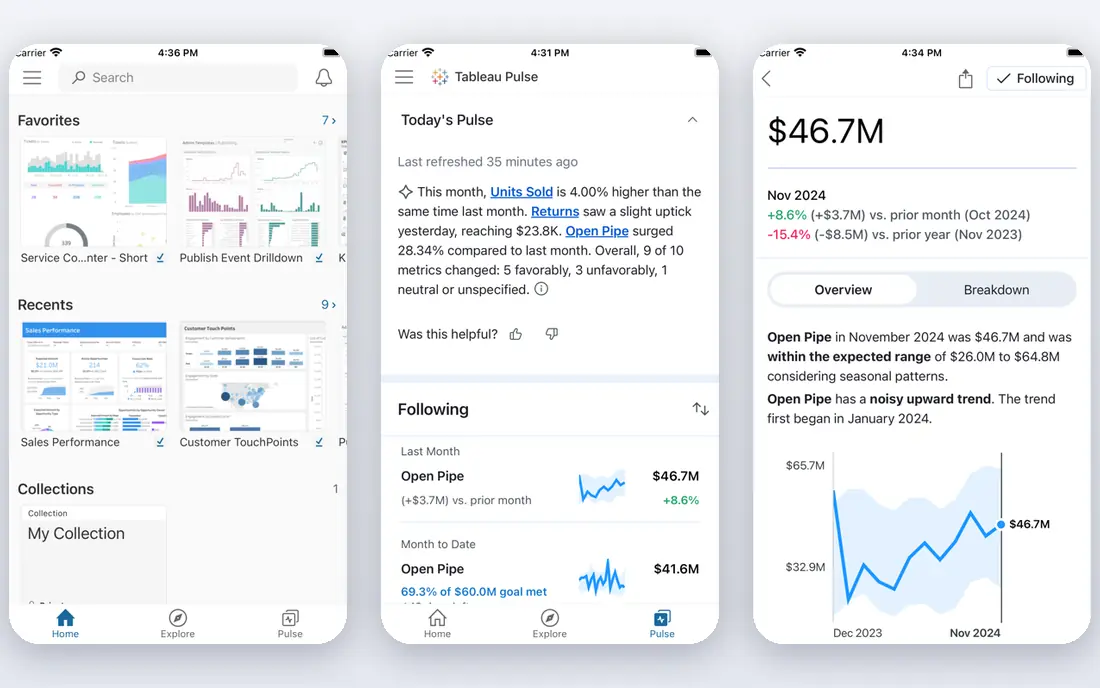
Tableau Prep gives Tableau users a visual way to clean, join, reshape, and profile data before it reaches a dashboard. Flow steps show how data changes at each stage, which helps analysts spot bad joins, missing values, and inconsistent categories early. Output can flow directly into Tableau for reporting, reducing manual export steps.
Tableau Prep comes with a Creator license, priced at $75 per user per month on Standard in recent comparisons, with higher Enterprise pricing. It is less suited to large-scale data warehousing or complex pipeline engineering than Alteryx or Dataiku. For teams that already report in Tableau, it is the most natural prep choice.
- Visual cleaning and profiling
- Close Tableau integration
- Easy flow sharing
- Best inside Tableau
- Limited for large-scale warehousing
- Needs a Creator license
KNIME Analytics Platform is a free, open-source visual tool for building data workflows from nodes that clean, join, transform, and model data. Analysts can start without a license fee, and extensions cover databases, cloud storage, text, images, and machine learning. That breadth makes KNIME a strong learning and prototyping tool as well as a production option for small teams.
The free platform suits individual analysts, while team collaboration, scheduling, and server deployment require paid KNIME Business Hub options. The interface can feel technical for non-analysts, and large workflows need a capable machine. For budget-conscious teams that want visual prep without a subscription, KNIME is hard to beat.
- Free Analytics Platform
- Visual node workflows
- Broad extensions for data and AI
- Interface can feel technical
- Server and collaboration cost extra
- Performance varies by setup
Dataiku brings data preparation, analytics, models, and AI work together in one governed system. Analysts can use visual Prepare recipes with many built-in transformers, while data scientists write Python, R, or SQL in the same project Flow. That shared workspace helps when cleaned data must become training data for a model without a handoff between tools.
Paid plans are quoted by sales, with a 14-day free trial and a self-hosted Free Edition for testing. Dataiku is a large platform if a team only needs basic prep, and adoption takes time. For data teams that move from prep to modeling in the same project, it is one of the strongest options.
- Visual recipes plus code
- Governed shared projects
- Strong machine learning links
- Quote-only pricing
- Large platform for prep alone
- Adoption takes weeks
Domo is an AI and data platform that connects, prepares, and transforms data from many sources, then presents it in dashboards and reports. Prep work sits close to reporting, so business users can clean and join data without waiting for a separate engineering handoff. Automation workflows help keep prepared datasets fresh as source data changes.
Pricing is by quote, and Domo is broader than a pure prep tool, so small teams may pay for reporting features they do not need. For companies that want prep and business dashboards from one vendor, Domo offers a practical combined path. Check data connector coverage for your key sources before signing.
- Connects and prepares many sources
- Built-in dashboards
- Automation workflows
- Pricing by quote
- Reporting focus may exceed prep needs
- Learning curve for advanced prep
SAS Viya is a cloud-native analytics platform with data management, preparation, governance, and lineage tracking built in. Teams can access many sources, profile and clean data, and move into statistical modeling and machine learning in the same environment. Governance and lineage features help regulated organizations prove where prepared data came from and how it changed.
Pricing is by quote, and the platform is built for enterprise scale, so small teams will find it heavy and expensive. Implementation and training also take time. For large organizations that need governed prep beside advanced analytics, SAS Viya is a credible enterprise choice.
- Strong data quality and governance
- Visual and code interfaces
- Broad analytics depth
- Quote-only pricing
- Enterprise complexity
- May be heavy for small teams
Microsoft Power Query is the data preparation engine inside Power BI and Excel, letting users connect, clean, transform, and combine data with visual steps. Office users already know the interface, and prepared queries can refresh when source files or databases update. That familiarity lowers training time for finance, operations, and analyst teams.
Power Query is strongest inside the Microsoft ecosystem, and advanced dataflow, sharing, and governance features depend on Power BI licensing. Teams that report outside Power BI may prefer a standalone prep tool. For Microsoft-centered reporting teams, Power Query is the lowest-friction prep option.
- Built into Power BI and Excel
- Familiar for Office users
- Strong transformation steps
- Best inside Microsoft tools
- Advanced dataflows need Power BI licensing
- Governance varies by plan
OpenRefine is a free, open-source tool for cleaning messy data, especially spreadsheets and CSV files with inconsistent spellings, formats, and duplicates. Clustering helps find variant spellings of the same value, and transformation history lets analysts undo steps and reuse cleaning recipes. It runs locally, so small datasets stay on the analyst's machine.
OpenRefine is a desktop tool for individual analysts, not a scheduled enterprise pipeline platform. It lacks built-in collaboration, scheduling, and governance features found in Alteryx or Dataiku. For journalists, researchers, librarians, and analysts cleaning files by hand, it remains one of the best free tools available.
- Free and open source
- Excellent for messy spreadsheets
- Clustering finds duplicate values
- Single-user desktop focus
- No built-in scheduling
- Limited enterprise governance
Talend, now part of Qlik, offers data integration and preparation tools that help teams connect sources, clean data, and move it into warehouses or analytics platforms. Visual jobs support transformation, quality checks, and pipeline automation, which suits data engineering teams that prepare data for many downstream uses. Cloud and on-premises deployment options give flexibility for regulated environments.
Pricing is by quote, and Talend is broader than a self-service analyst tool, so business users may need data engineering support. For organizations that already use Talend or Qlik for integration, adding prep in the same platform keeps governance and lineage simpler. For pure analyst prep, KNIME or Tableau Prep may be simpler.
- Strong data integration heritage
- Visual jobs for prep and pipelines
- Cloud and on-prem options
- Pricing by quote
- Platform breadth needs learning
- Smaller focus on self-service prep
How we picked these
We compared official product pages, feature documentation, and recent data preparation comparisons, and we favored tools with a live product, clear cleaning and joining workflows, and a realistic path to analysis or reporting. We excluded pure BI dashboards with no prep workflow and pure code libraries with no visual prep interface. Prices are stated where vendors publish them and marked as See website where pricing is by quote.
How to choose a prep tool without overbuying
Start with the data you actually prepare: file sizes, source systems, and how often the work repeats. A one-time spreadsheet cleanup needs OpenRefine or KNIME, while a weekly multi-source report needs a repeatable workflow tool such as Alteryx, Tableau Prep, or Power Query. Next, check who will do the work. Non-technical analysts need visual tools, while data engineers can use code-friendly platforms such as Dataiku or Talend.
Then test the full path: connect a real source, clean a messy sample, join two tables, handle missing values, and publish the result where it will be used. If any step needs manual export or rework, that gap will repeat every cycle. Finally, price the whole setup, including desktop seats, server or hub fees, and automation runs, not just the first license.
Frequently asked questions
What is the best data preparation software?
Alteryx suits repeatable analyst workflows, Tableau Prep suits Tableau reporting teams, and Dataiku suits data science teams. KNIME and OpenRefine suit budget-conscious analysts. The best tool depends on data volume, coding comfort, and where cleaned data must land.
What are the best tools for data preparation for beginners?
KNIME, Tableau Prep, and Microsoft Power Query offer visual interfaces that beginners can learn without heavy coding. OpenRefine is also beginner-friendly for spreadsheet cleaning. Alteryx and Dataiku offer more power but take longer to learn.
Is there free data preparation software?
Yes. KNIME Analytics Platform and OpenRefine are free, and Power BI Desktop includes Power Query at no license cost for desktop use. Free tools suit individual analysts and small teams, while paid server, collaboration, and governance features cost extra.
How is data preparation different from ETL?
Data preparation focuses on cleaning, profiling, joining, and shaping data for analysis, often by analysts. ETL, or extract, transform, load, focuses on moving data between systems, often by engineers. Many tools overlap, and platforms such as Talend and Dataiku cover both sides.
Does Tableau Prep require Tableau?
Tableau Prep is sold with a Tableau Creator license, so it is designed to work with Tableau dashboards. It can prepare data for other uses, but teams that do not use Tableau usually get better value from KNIME, Power Query, or Alteryx.
Sources
See where you really rank - block by block
ProMapRanker scans Google Maps across a grid of your service area. Simple monthly plans from $19, white-label on every plan.
Start freeKeep reading
 zoho books alternatives
Best Zoho Books Alternatives in 2026
Compare the best zoho books alternatives for small business accounting, from QuickBooks Online and Xero to FreshBooks, Wave, and Sage in 2026, with pricing.
Read → zluri alternatives
Best Zluri Alternatives in 2026
Compare zluri alternatives for 2026, with SaaS management platforms for app discovery, spend tracking, renewals, and automation for IT, finance and procurement.
Read → zerobounce alternatives
Best ZeroBounce Alternatives in 2026
Best zerobounce alternatives for list hygiene: compare 8 email verification tools for bulk cleaning, real-time checks and catch-all handling in 2026 today.
Read →