 ProMapRanker
Best Classroom Management Software in 2026

Key takeaways
- Classroom management covers three different jobs, behavior and communication, device control, and assignments, and no single tool leads on all three.
- ClassDojo and Google Classroom are free at the core, which makes them easy starting points for individual teachers.
- LanSchool, GoGuardian Teacher, and Dyknow suit device-heavy classrooms, where teachers need to see screens and limit distractions.
- Seesaw and Nearpod focus on student work and interactive lessons, rather than on monitoring alone.
- Schools should check student privacy rules and district approval before rolling any monitoring tool out to whole classes.
Quick comparison
| Pick | Great for | Pricing starts at | Free tier | |
|---|---|---|---|---|
 ClassDojo | Behavior and family communication | Free | Yes | Visit |
 Google Classroom | Assignments in Google schools | Free | Yes | Visit |
 LanSchool | Device monitoring and control | See website | Free trial | Visit |
 GoGuardian Teacher | Screen monitoring and filtering | See website | Free trial | Visit |
 Dyknow | Keeping students on task | See website | Free trial | Visit |
 Seesaw | Student portfolios and family sharing | Free | Yes | Visit |
 Nearpod | Interactive lessons and checks | $159 per year | Yes | Visit |
 Classcraft | Gamified behavior and teamwork | $120 per year | Yes | Visit |
The best classroom management software
Classroom management software helps teachers run the room, from behavior points and parent messages to screen monitoring and assignments. The eight tools below are all active in October 2026, and they split into behavior tools, device tools, and lesson tools, so the right pick depends on the problem you most need solved.
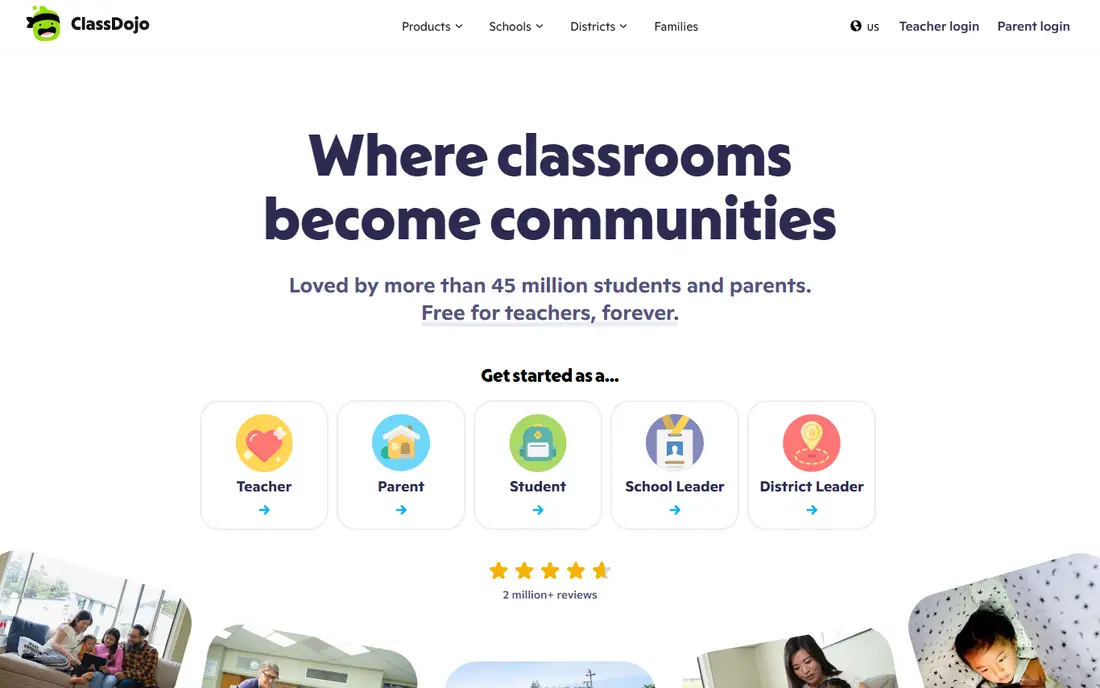
ClassDojo is a behavior and communication platform used widely in primary schools. Teachers award points for specific positive behaviors, share photos and messages with families, and keep a class story that parents can follow. The core product is free for teachers, students, and families, with an optional paid Plus tier for extra features.
Its strength is culture, not control. ClassDojo does not monitor student devices or block websites, so it pairs well with a device tool in a one-to-one classroom. Teachers who want a positive, visible system for recognition and family contact will find it easy to start, since setup takes minutes and families already know the name.
- Free core for teachers, students, and families
- Positive behavior points
- Photo and message sharing with families
- Limited customization in some areas
- Paid Plus tier adds features families may not need

Google Classroom is the assignment hub for schools that already use Google Workspace. Teachers create classes, post assignments, collect work in Drive, grade, and return feedback, with email summaries for guardians. It is free for schools using Google Workspace for Education, which makes it the default choice in many districts.
Classroom is not a behavior tool or a device monitor, so it solves the workflow side of management rather than the attention side. Teachers who need behavior points should pair it with ClassDojo, and teachers who need screen control should add LanSchool or GoGuardian. Inside a Google school, though, Classroom is the simplest base to build on.
- Free with Google Workspace for Education
- Simple assignment and grading flow
- Strong Google Docs and Drive integration
- Behavior and device monitoring tools are limited
- Best inside Google schools
LanSchool is a classic device management tool for classrooms with shared or one-to-one devices. Teachers can view student screens, push out websites, limit applications, and blank screens to regain attention. It works across Chromebook, Mac, and PC, which suits mixed-device classrooms.
Pricing is quote-based, with a free trial for evaluation, and some reviewers have raised concerns about value and yearly upgrade costs. Schools should price it per device and per year, and compare it with Dyknow and GoGuardian on the same device count. For direct, teacher-led device control during lessons, LanSchool remains a solid, well-known choice.
- Real-time screen viewing
- Website and application limits
- Works on Chromebook, Mac, and PC
- Pricing is quote-based
- Some reviewers cite annual upgrade costs
GoGuardian Teacher lets teachers view student screens, open and close tabs, and limit browsing during class, while the wider GoGuardian suite adds web filtering and student safety monitoring. That combination suits districts that want classroom control plus filtering and safety alerts from one vendor. Teachers can also message students without singling them out in front of the class.
The product is sold through schools and districts, with quote-based pricing, so individual teachers usually get it through their district rather than buying alone. If your district already uses GoGuardian filtering, Teacher is the natural classroom layer to add. If not, compare it with LanSchool and Dyknow on price and on filtering needs.
- Screen monitoring plus web filtering
- Student safety alerts
- Integrates with wider GoGuardian suite
- Pricing is quote-based
- Full suite features need district-level purchase
Dyknow Classroom focuses on one job, keeping students on task during lessons. Teachers see student screens, block distracting sites and apps, and send messages to redirect students. Reviewers rate it highly for value and for effectiveness in hybrid and remote settings, where a teacher cannot walk the room to check screens.
Like its device rivals, Dyknow is quote-based and usually bought by a school or district. The trial gives a school a chance to test it in real lessons before committing. For teachers whose main problem is distraction rather than behavior points or assignments, Dyknow is a strong, focused pick.
- Real-time monitoring with blocking
- Strong reviewer ratings for keeping students on task
- Works on Chromebook, Mac, and PC
- Pricing is quote-based
- District purchase is the usual route
Seesaw is a learning loop tool where students show their work with drawing, voice, photos, and video, teachers give feedback, and families see progress. It supports translation in more than 100 languages, which helps families take part even when school language differs from home language. The core product is free for students, teachers, and families.
Seesaw manages learning and communication, not device attention, so it is not a substitute for a monitoring tool in a device-heavy room. Its paid Plus tier adds skills tracking, multipage posts, and scheduling, while school plans add admin tools. For elementary classrooms that want portfolios and family connection, Seesaw is one of the best fits in this list.
- Free core for students, teachers, and families
- Multimodal student work with drawing, voice, and video
- Translation in many languages
- Paid extras need Seesaw Plus or a school plan
- Less device control than LanSchool or Dyknow
Nearpod turns a lesson into an interactive session, with slides, videos, polls, quizzes, and collaborative boards that students join from their devices. Teachers see responses in real time, which gives a live check on understanding that a plain slide deck cannot offer. A free tier covers basic use, with paid plans adding more storage, reports, and content.
Nearpod manages engagement during a lesson, not device behavior outside it, so it complements rather than replaces a monitoring tool. Teachers who want to check understanding as they teach, rather than only at the end of a unit, will get the most from it. The paid plan is worth it for teachers who run interactive lessons daily.
- Interactive lessons with polls, quizzes, and videos
- Formative checks during lessons
- Free tier for teachers
- Paid plan starts near 159 dollars per year in published comparisons
- Management features are lesson-based, not device-based
Classcraft adds game mechanics to classroom management, with student teams, character powers, rewards, and consequences tied to behavior and teamwork. Students earn points for positive actions, and teams work together toward goals, which can motivate classes that respond to game-style systems. It works in a browser and on mobile devices.
The game theme is also its limit, since older students or more formal classrooms may find it less fitting than a plain points system like ClassDojo. Pricing listings put paid plans from about 120 dollars per year, with a free tier for basic use. For teachers who want behavior management that feels like a game, Classcraft is a distinctive and well-supported choice.
- Gamified behavior system with teams and rewards
- Collaboration tools
- Free tier available
- Paid pricing starts near 120 dollars per year in published listings
- Game theme may not suit every age group
How we picked these
We compared classroom tools that help teachers manage behavior, devices, assignments, or lessons, and that are active in October 2026. We kept tools with a real teacher or school user base, a free tier or trial where listed, and a clear classroom role, and we left out general learning platforms with no management features. Prices come from vendor and listing pages checked in October 2026, and district pricing for device tools is quote-based, so schools should request a quote for their device count.
How to choose classroom management software for your room
Start with your biggest daily problem. If behavior and family contact take your time, start with ClassDojo or Seesaw. If devices distract students, start with LanSchool, GoGuardian Teacher, or Dyknow. If assignments and grading are the bottleneck, start with Google Classroom. Picking one tool for the main problem beats buying a bundle that does everything weakly.
Next, check privacy and district rules before you roll a tool out. Device monitoring tools collect screen and browsing data, so your district policy, parent consent rules, and student data agreements matter. Tell students and families what the tool does, when it is active, and what data it keeps, and use monitoring during class time only, not outside school hours.
Finally, test with one class before a school-wide purchase. Run the tool for two weeks, watch whether it saves time or adds setup work, and ask students how it feels to use. A tool that teachers enjoy and students accept will last longer than a powerful tool that feels like surveillance. Keep the focus on learning, and use management software to protect lesson time, not to replace teaching.
Frequently asked questions
What is the best classroom management software for elementary schools?
ClassDojo and Seesaw are strong picks for elementary schools, since they focus on positive behavior, portfolios, and family communication in a form young students understand. Google Classroom suits older elementary students who already use Google tools for assignments.
What are the best classroom management tools for device monitoring?
LanSchool, GoGuardian Teacher, and Dyknow are the main device monitoring tools in this list, with screen viewing, site blocking, and messaging for teachers. Compare them on device support, filtering needs, and quote-based pricing for your device count.
Is Google Classroom a classroom management tool?
Google Classroom manages assignments, grading, and class communication, but it does not offer behavior points or device monitoring. Schools often pair it with ClassDojo for behavior and a device tool for screen control.
Is ClassDojo free?
Yes, the core ClassDojo product is free for teachers, students, and families, with an optional paid Plus tier for extra features. Published listings put Plus near 4.99 dollars per month, though the core behavior and messaging tools remain free.
How do schools protect student privacy with monitoring tools?
Schools should follow district policy and student data rules, limit monitoring to class time, and tell students and families what data is collected and kept. Check the vendor privacy policy and data agreement before a district-wide rollout, and prefer tools with clear school data protections.
What is the difference between classroom management software and a learning management system?
Classroom management software runs the room day to day, covering behavior, attention, and communication, while a learning management system organizes courses, content, and grades over a term. Google Classroom sits between the two, handling assignments while leaving behavior and device control to other tools.
Sources
- https://www.cotocus.com/blog/top-10-classroom-management-software-tools-in-2025-features-pros-cons-comparison/
- https://www.g2.com/compare/classdojo-vs-lanschool
- https://www.g2.com/compare/dyknow-classroom-vs-lanschool
- https://www.saasworthy.com/product/classcraft
- https://www.saasworthy.com/product/web-seesaw
- https://www.classdojo.com
- https://classroom.google.com
- https://www.lanschool.com
- https://www.goguardian.com
- https://www.dyknow.com
- https://web.seesaw.me
- https://nearpod.com
- https://www.classcraft.com
See where you really rank - block by block
ProMapRanker scans Google Maps across a grid of your service area. Simple monthly plans from $19, white-label on every plan.
Start freeKeep reading
 zoho books alternatives
Best Zoho Books Alternatives in 2026
Compare the best zoho books alternatives for small business accounting, from QuickBooks Online and Xero to FreshBooks, Wave, and Sage in 2026, with pricing.
Read → zluri alternatives
Best Zluri Alternatives in 2026
Compare zluri alternatives for 2026, with SaaS management platforms for app discovery, spend tracking, renewals, and automation for IT, finance and procurement.
Read → zerobounce alternatives
Best ZeroBounce Alternatives in 2026
Best zerobounce alternatives for list hygiene: compare 8 email verification tools for bulk cleaning, real-time checks and catch-all handling in 2026 today.
Read →