 ProMapRanker
Best Attio Alternatives in 2026


Teams wanting marketing and sales together · Pricing starts at: Free
Key takeaways
- HubSpot and Zoho CRM give the most room to start free, while Pipedrive gives the clearest pipeline view for a sales-led team.
- Salesforce suits larger teams that need deep customization, but it costs more in setup time and training than the simpler options here.
- Close suits call-heavy teams, Folk suits relationship-led teams, and Capsule suits small teams that want a simple contact system.
- Price per seat is only part of the cost, since add-ons, seat minimums, and automation limits change the real monthly bill.
Quick comparison
| Pick | Great for | Pricing starts at | Free tier | |
|---|---|---|---|---|
| HubSpot CRM | Teams wanting marketing and sales together | Free | Yes | Visit |
 Pipedrive | Sales teams living in the pipeline | $14 per user per month | No | Visit |
 Salesforce | Larger teams needing deep customization | $25 per user per month | No | Visit |
 Zoho CRM | Budget teams wanting customization | Free | Yes | Visit |
 monday CRM | Teams already using monday work tools | $12 per seat per month | Yes | Visit |
 Close | Call-heavy inside sales teams | $9 per user per month | No | Visit |
 Capsule CRM | Small teams wanting simple contacts | Free | Yes | Visit |
 Folk | Relationship-led teams and founders | $24 per member per month | No | Visit |
 Freshsales | Small teams wanting low-cost AI help | Free | Yes | Visit |
The best Attio alternatives
Attio appeals to teams that want a flexible, modern CRM with custom objects and a clean interface. The options below cover the same ground from different angles, from a free all-in-one platform to a focused sales pipeline. Pick by selling motion first, then by price, since a cheap CRM that the team avoids using costs more than a pricier one they open daily.

HubSpot CRM is the easiest free starting point in this list, and that free tier covers contacts, deals, pipelines, and basic email tracking. Teams that also run marketing can keep forms, landing pages, and email in the same system, so a lead does not need to be copied between tools. The integration library is wide, which helps when a team already uses common email, calendar, and support tools.
The cost jump is the honest catch, since the features many growing teams want, such as full automation, custom reporting, and forecasting, sit on higher tiers. A two-person team can live on the free plan for a long time, but a ten-person team should price the Professional tier before assuming HubSpot stays cheap. For a startup that wants one platform for marketing and sales, HubSpot is still the safest default.
- Genuine free CRM
- Marketing, sales, and service hubs share one contact record
- Large integration library
- Paid Professional tiers jump sharply in price
- Setup can take days for a full sales hub
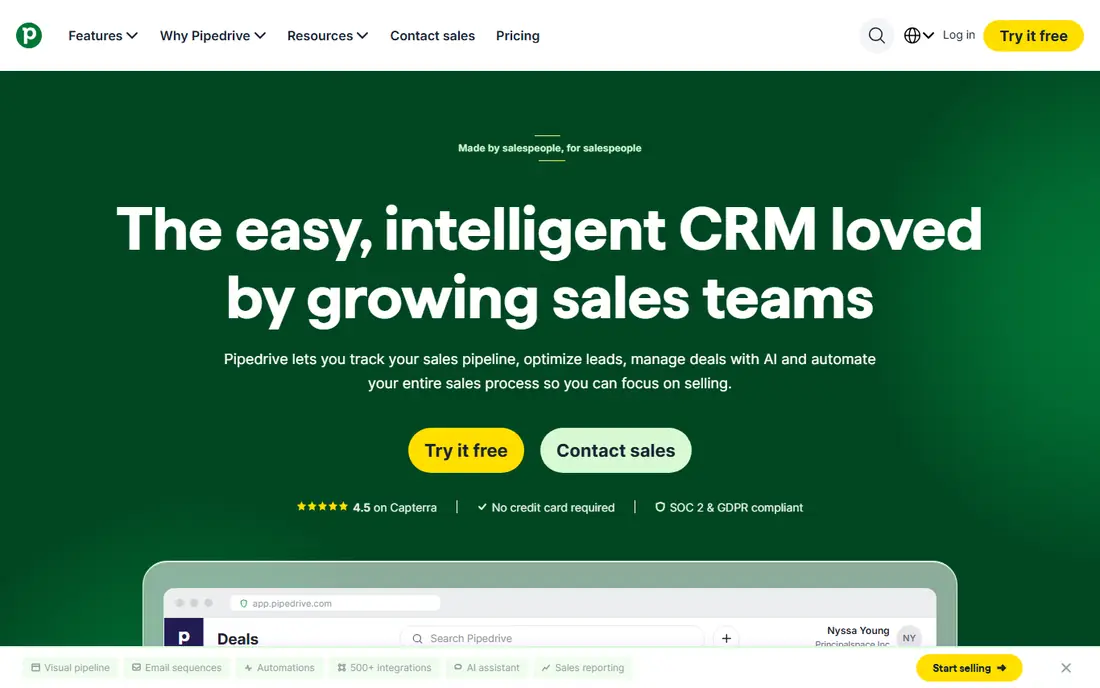
Pipedrive wins on clarity, because the pipeline is the product rather than one view among many. A sales rep can see every deal, its stage, its next activity, and its value at a glance, and a manager can spot stalled deals without running a report. Setup is fast compared with Salesforce or HubSpot, and per-seat pricing makes the monthly bill easy to forecast for a small team.
Marketing is the weak spot, since email campaigns, lead capture forms, and chatbot tools are add-ons rather than built-in features. Automation and email sequences also sit above the entry Lite plan, so a team that needs those should price the Growth plan from the start. For a team whose day is calls, meetings, and moving deals forward, Pipedrive is a strong, focused choice.
- Clear visual pipeline
- Fast setup
- Predictable per-seat pricing
- No free plan
- Marketing features need add-ons
- Automation starts on higher tiers

Salesforce is the option for teams that have outgrown a simple pipeline and need custom objects, approval flows, and reports that match a complex sales process. The Starter Suite gives small teams a lower-cost entry, while Sales Cloud scales to large organizations with territory management, forecasting, and a huge app marketplace. Security controls and permissions suit regulated or multi-team companies better than most rivals here.
That depth comes with a cost in time, since even a modest Salesforce setup benefits from an admin or a consultant, and training a new rep takes longer than on Pipedrive or Capsule. Add-ons for AI features, extra storage, or advanced support can lift the bill well above the entry price. Choose Salesforce when the sales process itself is complex, not just when the team is large.
- Deepest customization and app ecosystem
- Strong reporting
- Enterprise security controls
- Setup and training take real time
- Costs rise with add-ons and implementation help
Zoho CRM gives budget teams a path that few rivals match, with a free plan for up to 3 users and a Standard plan at $14 per user per month on annual billing. Custom fields, workflows, and blueprint process rules let a team shape the CRM around its own stages rather than forcing the team into a fixed pipeline. Teams already using Zoho Mail, Books, or other Zoho apps get extra value from shared contacts and single sign-on.
The interface can feel crowded, especially for new users who only need contacts and deals, and the learning curve is steeper than Capsule or Folk. Automation depth also improves on higher tiers, so a team that wants complex routing should check the Professional plan. For a cost-conscious team that still wants real customization, Zoho CRM is hard to beat.
- Free plan for up to 3 users
- Low paid entry price
- Wide Zoho app ecosystem
- Interface can feel busy
- Best automation sits on higher tiers
Monday CRM suits teams that already plan projects, track tasks, or manage work on monday.com, since sales boards sit next to delivery boards in one workspace. Deals, contacts, and activities can be viewed as boards, timelines, or calendars, which helps teams that think in projects rather than in pipeline stages alone. The free plan covers up to 2 seats, so a tiny team can test the core workflow before paying.
Dedicated CRM depth is lighter than HubSpot, Salesforce, or Zoho, especially for complex reporting, forecasting, and email automation at scale. Paid plans also carry a seat minimum, so a one-person team pays for more seats than it uses. For an operations-minded team that wants sales and delivery in one place, monday CRM is a practical pick.
- Board views suit visual teams
- Connects sales work to delivery work
- Free plan for up to 2 seats
- CRM depth is lighter than dedicated CRMs
- Minimum seat purchase applies on paid plans
Close is built around the phone, with a dialer, SMS, and email sequences inside the same CRM a rep already uses. An outbound rep can call, log, send a follow-up, and set the next task without switching to a separate dialer or inbox tool. That single workflow saves minutes on every call, and those minutes add up across a call-heavy day.
The Solo plan at $9 per user per month covers one user, so a team must move to Essentials at $35 per seat per month for shared work, which changes the budget picture. Marketing automation is not the focus, so teams that need landing pages or nurture campaigns will pair Close with another tool. For an inside sales team whose day is calls and follow-ups, Close is the most purpose-built option here.
- Built-in calling and SMS
- Email sequences in one inbox
- Fast for outbound teams
- Solo plan covers one user only
- No built-in marketing automation
- Team plans cost more
Capsule CRM appeals to small teams that want a CRM they will actually use, rather than a platform they need to learn. Contacts, tasks, pipelines, and project boards are laid out plainly, and the free plan for up to 2 users covers basic contact management without a trial clock. Setup takes hours rather than days, which suits owner-led teams with no dedicated admin.
Automation and advanced reporting are lighter than on HubSpot, Zoho, or Pipedrive, and the integration library is smaller, so teams with complex tool stacks should check compatibility first. Paid plans start at $18 per user per month on annual billing, which is fair for the simplicity but not the cheapest paid tier here. For a small business that needs contacts, deals, and tasks in one tidy place, Capsule is a calm choice.
- Free plan for up to 2 users
- Simple contact and pipeline views
- No setup overhead
- Limited automation on lower tiers
- Smaller integration library than HubSpot or Salesforce
Folk suits founders, agencies, and partnership teams that sell through relationships rather than through high-volume outbound. Contact capture from LinkedIn, email sync, and simple groups make it easy to build a network list and keep notes on each person. Sequences and reminders help a small team follow up without building a complex automation system.
Full sales operations depth is limited compared with Pipedrive or Salesforce, especially for forecasting, complex pipelines, and large team reporting. There is no permanent free plan, only a trial, and the Standard plan at $24 per member per month is priced for relationship work rather than for a large sales floor. For a team whose pipeline is a network, Folk feels more natural than a traditional sales CRM.
- Fast contact capture from LinkedIn and email
- Simple groups and sequences
- Clean interface
- Not built for full sales operations at scale
- No free plan, only a trial
Freshsales, from Freshworks, gives small teams a low-cost route to a modern CRM with AI help on the Growth plan. The free plan covers up to 3 users with contacts, deals, and basic views, while the Growth plan adds AI assistance, workflows, and more customization at a price below most rivals. Built-in phone and email tools keep a rep inside one window for common sales tasks.
The app ecosystem is smaller than HubSpot or Salesforce, so teams that rely on niche integrations should verify them before switching. Advanced AI and reporting features also sit on higher tiers, which means the entry price is not the full feature price. For a small team that wants a clean CRM with AI help and a low monthly bill, Freshsales is a sensible shortlist option.
- Free plan for up to 3 users
- Low-cost Growth plan
- Built-in phone and email tools
- Smaller app ecosystem than HubSpot or Salesforce
- Advanced AI features sit on higher tiers
How we picked these
We compared official feature pages, pricing pages, free plan limits, and public reviews for each CRM. We kept only CRMs that are actively sold in October 2026, that cover contacts, deals, and pipelines, and that suit small to mid-size teams. We left out niche tools built only for one channel, tools with no clear pricing, and tools that had stopped development, since those would not serve as a practical replacement for most teams.
What to check before you switch
Start with the selling motion, not the feature list, since a pipeline CRM, a relationship CRM, and an all-in-one platform solve different daily jobs. List the five tasks your team does every day, such as calling, emailing, logging meetings, sending quotes, and reporting, then test each shortlisted CRM against those tasks in a trial. Check seat minimums, contact limits, automation limits, and whether email or calling tools are included or sold as add-ons.
Data migration deserves a trial too, because a CRM that cannot import your contacts, deals, and notes cleanly will cost weeks of manual work. Export a sample from your current system, import it into the trial, and check that custom fields, tags, and deal stages survive the move. A CRM the team avoids is the most expensive option, so involve the people who will use it daily before signing a yearly plan.
Frequently asked questions
Is there a free alternative to Attio?
Yes, HubSpot CRM, Zoho CRM, Capsule CRM, and Freshsales all offer free plans with user or contact limits. HubSpot suits teams that want marketing tools alongside sales, while Zoho suits teams that want customization on a free start. Check the seat and contact limits, since free plans suit small teams better than large ones.
Which CRM is easiest to set up?
Capsule and Pipedrive are among the fastest to set up, since both focus on contacts and pipelines without a large admin layer. HubSpot and Salesforce take longer when the full marketing or enterprise features are switched on. If speed matters, start with a focused CRM and add complexity only when the team asks for it.
Which CRM is best for a small sales team?
Pipedrive suits a sales-led small team that lives in the pipeline, while HubSpot suits a small team that also runs marketing. Close suits a call-heavy team, and Freshsales suits a team that wants AI help at a low price. Match the CRM to the daily selling motion rather than to the lowest headline price.
Can I migrate data from Attio to another CRM?
Most CRMs here offer CSV import, and several offer direct import tools or migration help on paid plans. Export contacts, companies, deals, notes, and custom fields first, then test the import in a trial account. Check that deal stages and tags map correctly before moving the full database.
Do these CRMs work with Gmail and Outlook?
Yes, all of the CRMs in this list offer email sync or integration with Gmail, Outlook, or both, though the depth varies by plan. Pipedrive, Close, and Freshsales include email tools on paid tiers, while HubSpot and Zoho cover email tracking and templates on free or low tiers. Verify two-way sync on your chosen plan, since one-way logging is less useful for a busy inbox.
Which CRM should a larger team choose?
Salesforce suits larger teams that need custom objects, permissions, and reporting depth, while HubSpot suits larger teams that want marketing, sales, and service in one system. Both need more setup time and budget than the simpler options, so price the full seat count and any implementation help before deciding.
Sources
See where you really rank - block by block
ProMapRanker scans Google Maps across a grid of your service area. Simple monthly plans from $19, white-label on every plan.
Start freeKeep reading
 zoho books alternatives
Best Zoho Books Alternatives in 2026
Compare the best zoho books alternatives for small business accounting, from QuickBooks Online and Xero to FreshBooks, Wave, and Sage in 2026, with pricing.
Read → zluri alternatives
Best Zluri Alternatives in 2026
Compare zluri alternatives for 2026, with SaaS management platforms for app discovery, spend tracking, renewals, and automation for IT, finance and procurement.
Read → zerobounce alternatives
Best ZeroBounce Alternatives in 2026
Best zerobounce alternatives for list hygiene: compare 8 email verification tools for bulk cleaning, real-time checks and catch-all handling in 2026 today.
Read →